How To
Summary
Thin Provisioning is a technology employed by storage products for optimized resource utilization. Under a Thin provisioned scheme, a disk is created with the specified size by pre-allocating none or partial storage space for it. The underlying blocks are allocated as-and-when a write is issued by the host to the disk. This technology improves the utilization of the storage subsystem when space is pooled across multiple disks. To derive full value of thin provisioning, it is important for the host to release disk blocks that are not being used anymore.
Objective
Following figure shows the typical AIX input/output(IO) stack. Traditionally the stack did not support returning freed blocks to the storage subsystem because there was no support from the disk device driver(DD) to return this space.

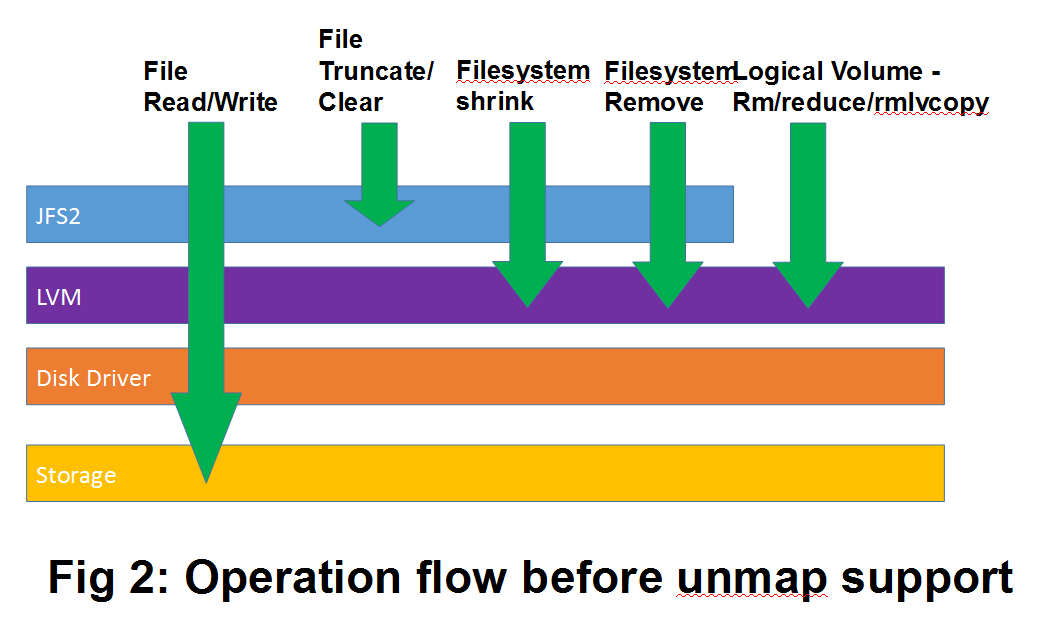
As shown in figure 2, information about free blocks did not flow beyond the file system layer and the information about free partitions did not flow beyond the logical volume manager (LVM) layer.
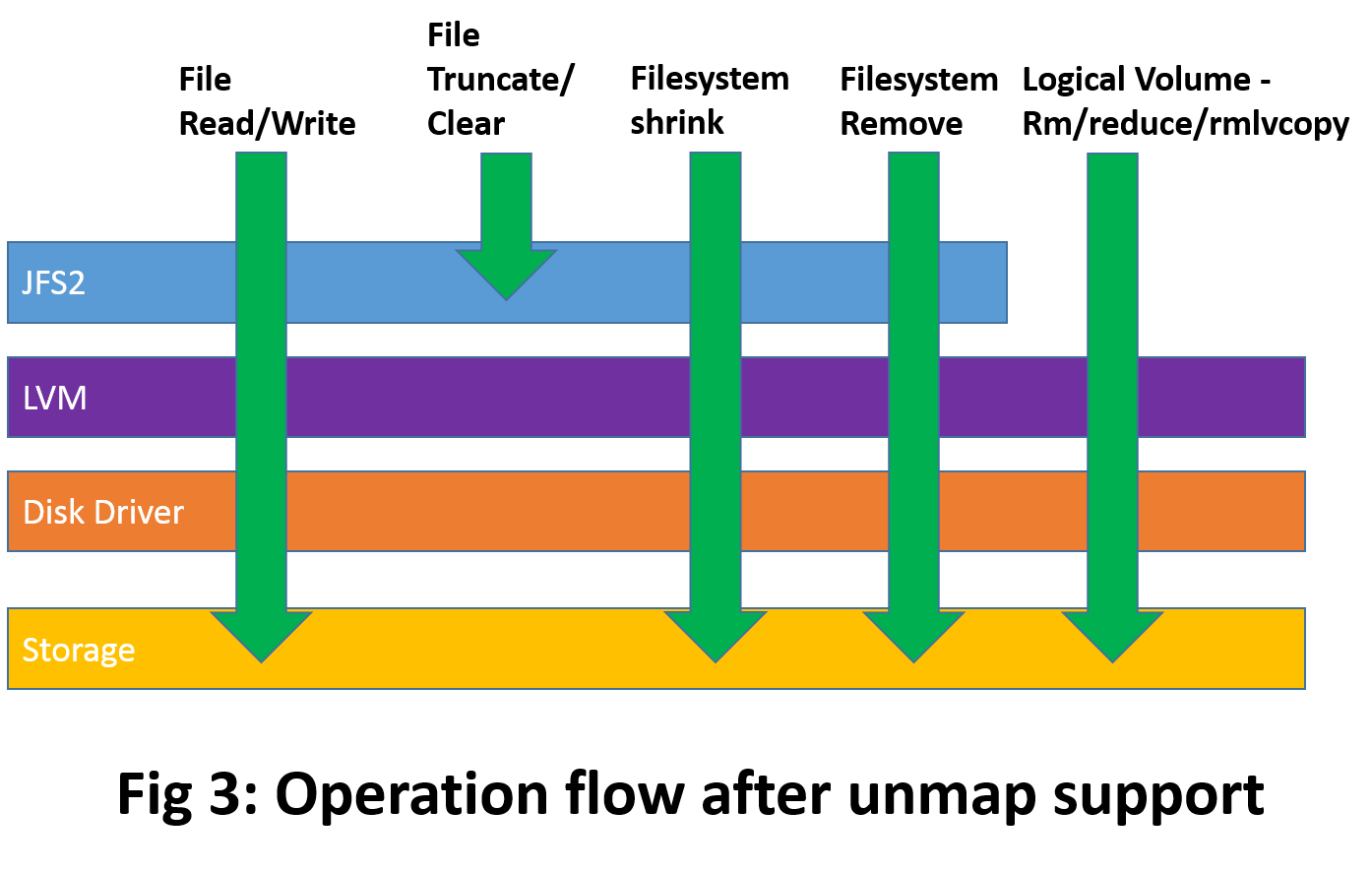
Starting at the AIX 7.2 Technology Level 1 and AIX 7.1 Technology Level 5, AIX starts returning freed blocks to storage subsystem by using the SCSI standard WRITE_SAME operation. Blocks are returned when one of the following operations is performed by the user.
- Removal of logical volume
- Removal of logical volume mirror copies
- Removal of JFS2 file system, which initiates removal of logical volume
- Reduction of JFS2 file system size through shrink operation, which reduces the size of the logical volume
- In AIX 7.2 TL3 and above, by running the chfs -a reclaim command.
As shown in the figure 3, upon LVM request, the disk device driver starts informing the storage subsystem that blocks are freed. It is also important to know that shrink file system or chfs -a reclaim are the only ways to unmap free block space from the file system.
Functional Overview:
The AIX storage space unmap functionality is implemented in the LVM and the disk device driver. One of the important goals was to provide the automatic operation without adding any new command or new command option. The unmap operation is performed asynchronously without blocking the initiating command.
- Logical Volume Manager (LVM):
LVM determines whether the device is thinly provisioned or not with the help of ioctl(IOCINFO) command provided by disk device driver. If the device is thinly provisioned, then LVM informs disk device driver whenever physical partitions on the device are freed. The physical partitions are freed by the following LVM and file system commands. Now as part of command execution LVM takes an extra step to inform disk device driver about the freed space.
- User can use following LVM commands to initiate storage space reclamation:
- # rmlv command: This command is used to remove the logical volume from the volume group. All the physical partitions allocated for logical volume are freed.
- # rmlvcopy command: This command is used to remove the mirror copy of logical volume. All the physical partitions allocated for the mirror copy will be freed.
- User can use following file system commands to initiate storage space reclamation with the help of LVM.
- # rmfs command: This command is used to remove the file system and logical volume. All physical partitions allocated for logical volume are freed.
- # chfs (shrink fs): The chfs command is used to extend or shrink a file system. For a JFS2 file system, shrink operation once the space is reduced the file system asks LVM to reduce the logical volume size, which frees up the associated physical partitions.
- # chfs -a reclaim=[normal|fast]: available in AIX 7.2 TL3 and above, initiates space reclamation in a JFS2 file system without shrinking it.
Space reclaim is supported on all types of volume groups like Big volume group, Concurrent volume group, root volume group, Scalable volume group (SVG), and Small volume group.
The lvmstat command is enhanced to provide space reclamation information for physical volumes in the volume group. The new option "-r" added to show the information about space reclamation. User can also use "-r -L" option to get more details about failures. Some of the important fields are as follows:
| Reclaim | Reclaim state "on" indicate that storage and AIX disk driver supports reclaiming space on this device. | |
|
Mb_freeed: |
Amount of physical partition space is freed from logical volume by commands like rmlv, rmfs, rmlvcopy, and chfs in megabytes |
|
|
Mb_pending: |
Space reclamation pending for the physical volume space in megabytes. |
|
|
Mb_success: |
Space reclamation requests succeeded at disk driver in megabytes. |
|
|
Mb_failed: |
Space reclamation requests failed by the disk driver in megabytes. |
|
|
Mb_reused: |
Free physical partition space reused for the logical volume without requesting the space reclamation in megabytes. |
Examples:
- Find out thin provisioned disks in the volume group by using lvmstat command. Reclaim state "on" means storage can reclaim the space if informed.


- Initiating space unmap by using file system shrink operation. Here file system size is reduced by 5GB. Check the reclaim information by using lvmstat command.


- Initiating space unmap by using file system removal. The file system removal operation removes the logical volume, which frees up the associated physical partitions. Space unmap is performed asynchronously hence you can see that there is a pending count on hdisk10.


- Initiate space reclamation by removing logical volume.


- Disk Device driver:
Disk Device driver interacts with storage subsystem by using standard SCSI commands. It uses the SCSI inquiry command to find out whether the device is thinly provisioned and upon getting unmap request from LVM, it sends a SCSI command to storage subsystem to reclaim the space.
Related Tunables
Some aspects of the space release function can be managed or tuned via the system tunable available via the ioo command (or corresponding SMIT panel). These tunables includes
- Enabling or disabling the function without requiring a reboot
- Controlling the amount of memory resource used for this functionality
To process requests to release blocks back to storage, a dedicated (system-wide) pool of buffers is used by the AIX Disk Driver. The number of buffers in this pool is one of the factors that (among some other things) dictate the maximum number of requests that can be processed in parallel by the AIX Disk Driver.
The following tunables can be changed
- dk_lbp_enabled
Setting this tunable to 0 (zero) disables this functionality on the AIX node. This tunable can be changed and made effective, without requiring a reboot. By default, this tunable is set to 1 (one), indicating that the feature is enabled on the AIX node.
To query the current setting, use the following command

To disable this function, use the following command

- dk_lbp_num_bufs
To process requests from LVM to release blocks back to storage, a dedicated (system-wide) pool of buffers is used by the AIX Disk Driver. The number of buffers in this pool limits the maximum number of requests that are processed in parallel by the AIX Disk Driver. To monitor if any requests were aborted due to the number of buffers being too low, the AIX administrator can view /proc/sys/disk/lbp/statistics file. If the Out-of-Memory counter is nonzero then it means that the pool size should perhaps be increased.
This tunable can accept any value between (1 - 1024) and can be changed without causing any disruption to ongoing request.
To query the current value for this tunable, use the following command

To check whether some space-release requests failed because of insufficient buffers, run the following command.

To set the number of buffers in the pool to be 128, use the following command

- dk_lbp_buf_size
Traditionally, most disks use a sector size of 512-bytes but some new storage products now also support a 4096-byte sector. For space release requests to work on a thin-provisioned disk that uses 4096-bytes sectors, the buffer size of the pool should be defined as 4096. Note that a buffer size of 4096 bytes can also work with thin-provisioned disks that use block size of 512-bytes.
To query the current buffer size used for the space-release pool, use the following command.

To set the buffer size for space-release pool to 4096-bytes, use the following command

Key points to note:
- Virtual storage support in PowerVM: Storage space reclamation functionality is supported through the NPIV (N_Port ID virtualization) for supported storage. But functionality is not supported for the storage attached through the virtual SCSI mode.
- Supported Storages: In the initial release, this feature is supported on following storage products for appropriate firmware levels that include thin-provisioned disk feature.
- IBM DS8000
- IBM XIV
- IBM FlashSystem A9000
- IBM SVC
- EMC Symmetrix Family
- Other storage is supported if the vendor enables the feature in their pre-defined ODM
- Space reclamation is best effort: According to SCSI specification, the space reclaim functionality is best effort. Hence different storage arrays implement it differently. They have different block sizes and the request must be aligned on the correct block size. Also, LVM physical partition size is decided at volume group creation and reclaim block size might not align with the partition size or partition start. Some storage subsystems support reclaim block size, which is much bigger than the LVM partition size, and these storage subsystems might not support partial block reclamation. In this scenario, LVM might not be able to accumulate enough contiguous free partitions to reclaim the whole block size. Therefore, it is possible that when user deletes multiple LVM partitions it might not end up reclaiming the equivalent amount of space in the storage subsystem.
- Performance considerations: To have minimal impact on the I/O performance, the disk driver shall treat space release operations as low priority in comparison to regular read/write operations and LVM tries to minimize number of requests submitted per device.
- Device thin provision capability detection: LVM and disk driver will attempt to detect the capability dynamically but if it is not able to, then it is recommended that the user should varyoff and varyon the volume group after turning on the capability at the storage.
- Unmapping free partition space from old VG or from interrupted request: Volume groups created before supported version might have free partition space on physical volumes. This free space is not eligible for automatic unmap after upgrading to the supported version. So to initiate unmap of this space, administrator has to create and delete dummy logical volume on those free partitions. But space will be automatically reclaimed for the partitions, which are freed after installation of supported version. Also, there are cases where asynchronous unmap operation get interrupted due to varyoffvg or system crash. In that case to initiate remaining unmap operation, administrator has to create and delete dummy logical volume on partitions, which are freed before interruption.
Additional Information
- Refer to the man pages of commands for more details.
Document Location
Worldwide
Was this topic helpful?
Document Information
Modified date:
15 September 2021
UID
ibm16324753