How To
Summary
In addition, of the nvidia-smi (NVIDIA® System Management Interface program) logs (nvidia-smi.log or nvidia-bug-report.log,). Which provides monitoring and management capabilities for each GPU installed into the POWERLC boxes; we can also use the DCGM interface for additional information when requested by your next level of support.
NVIDIA® Data Center GPU Manager (DCGM) is a suite of tools for managing and monitoring Tesla™ GPUs in cluster environments. It includes active health monitoring, comprehensive diagnostics, system alerts, governance policies including power and clock management.
Objective
In order to use the DCGMI with your system and run diagnostic commands, preliminary steps are needed in order to have all the installed GPU included into the diagnostic.
Environment
All the POWER8® and POWER9® based POWERLC systems that have NVIDIA Tesla™ (V100, K80, T4) GPU installed are concerned.
- 8335-GTC, 8335-GTG, 8335-GTH, 8335-GTX, 8335-GTW, 9006-12P, 9006-22P and 9006-22C
- 8001-12C, 8001-22C, 8335-GCA, 8335-GTA, and 8335-GTB and 9183-22X
Steps
- Download the NVIDIA® DCGM tool here
- rpm or dpkg the appropriate dcgm package for your OS found in the .zip file from Nvidia.
- To run DCGM the target system must include the following NVIDIA components, listed in dependency order: - Supported Tesla Recommended Driver
- - Supported CUDA Toolkit
- - DCGM Runtime and SDK
- Start DCGM using nv-hostengine
- Check devices installed and validate dcgm is working with the command:
dcgmi discovery -l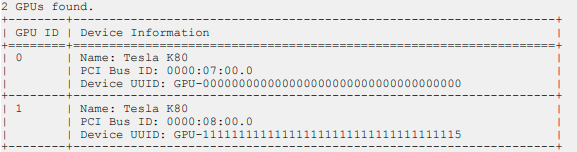
- Create a GPU Group:
dcgmi group -c GPU_Group -
Add GPUs to your GPU Group:
(for a system with 4 GPUs, 0,1,2,3,4,5 for a 6 GPU system). When the basic nv-hostengine up and running, and groups configured, you will be able to run the DCGM Diagnostics.dcgmi group -g 2 -a 0,1,2,3 - Once configured, run the following commands to screen your parts:
dcgmi diag -r 3
 It is a 15 minutes screening full test that will check power, temperature, clocks as well as look for excessive ECC errors, potential page retirements, etc.
 -
If you get any failures, and if only you get one, please run again with the following options and then send the output dcgm_console.log, dcgm_debug.log and .json files to IBM:
dcgmi diag -r 3 -j --statspath /tmp --debugLogFile /tmp/dcgm_debug.log -v -d 5 &>> dcgm_console.logFor the Volta GPU architecture, use the following command:dcgmi diag -r 3 -j -p "pcie.h2d_d2h_single_pinned.min_pci_width=2.0;pcie.h2d_d2h_single_unpinned.min_pci_width=2.0" --statspath /tmp --debugLogFile /tmp/dcgm_debug.log -v -d VERB &>> /tmp/dcgm_console.log
Additional Information
For more details, information, available diagnostics on the DCGM tools suite, find the DCGM User Guide here
If needed the dcgm source code can be find here
Document Location
Worldwide
[{"Business Unit":{"code":"BU058","label":"IBM Infrastructure w\/TPS"},"Product":{"code":"SSOJ0CI","label":"Power System LC921 Server (9006-12P)"},"ARM Category":[],"Platform":[{"code":"PF025","label":"Platform Independent"}],"Version":"All Version(s)","Line of Business":{"code":"LOB57","label":"Power"}},{"Business Unit":{"code":"BU058","label":"IBM Infrastructure w\/TPS"},"Product":{"code":"SGDMPF","label":"IBM Power System LC922 9006-22P"},"ARM Category":[],"Platform":[{"code":"PF025","label":"Platform Independent"}],"Version":"All Version(s)","Line of Business":{"code":"LOB57","label":"Power"}},{"Business Unit":{"code":"BU058","label":"IBM Infrastructure w\/TPS"},"Product":{"code":"SGDMMD","label":"IBM Power System AC922 8335-GTC"},"ARM Category":[],"Platform":[{"code":"PF025","label":"Platform Independent"}],"Version":"All Version(s)","Line of Business":{"code":"LOB57","label":"Power"}},{"Business Unit":{"code":"BU058","label":"IBM Infrastructure w\/TPS"},"Product":{"code":"SGDMK2","label":"Power System AC922 Server (8335-GTG)"},"ARM Category":[],"Platform":[{"code":"PF025","label":"Platform Independent"}],"Version":"All Version(s)","Line of Business":{"code":"LOB57","label":"Power"}},{"Business Unit":{"code":"BU058","label":"IBM Infrastructure w\/TPS"},"Product":{"code":"SGDMKK","label":"IBM Power System AC922 8335-GTH"},"ARM Category":[],"Platform":[{"code":"PF025","label":"Platform Independent"}],"Version":"All Version(s)","Line of Business":{"code":"LOB57","label":"Power"}},{"Business Unit":{"code":"BU058","label":"IBM Infrastructure w\/TPS"},"Product":{"code":"SGDML8","label":"IBM Power System AC922 8335-GTX"},"ARM Category":[],"Platform":[{"code":"PF025","label":"Platform Independent"}],"Version":"All Version(s)","Line of Business":{"code":"LOB57","label":"Power"}},{"Business Unit":{"code":"BU058","label":"IBM Infrastructure w\/TPS"},"Product":{"code":"SGDMND","label":"IBM Power System AC922 8335-GTW"},"ARM Category":[],"Platform":[{"code":"PF025","label":"Platform Independent"}],"Version":"All Version(s)","Line of Business":{"code":"LOB57","label":"Power"}}]
Was this topic helpful?
Document Information
Modified date:
25 January 2023
UID
ibm16252827