Troubleshooting
Problem
After installing i2 Analyst's Notebook, user gets error when trying to launch:

Text: "IBM i2 Analyst's Notebook 9
Accessing the feature...
Click OK to try again, or enter an alternate path to a folder containing the installation package 'IBM i2 Analyst's Notebook 9.msi' in the box below. User source: C:\Users\<username>\AppData\Local\Temp\Temp"
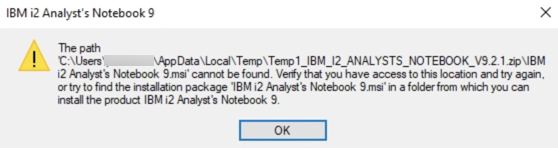
Text: "The path 'C:\Users\<username>\AppData\Local\Temp\Temp1_IBM_I2_ANALYSTS_NOTEBOOK_V9.2.1.zip\IBM is2 Analyst's Notebook 9.msi' cannot be found. Verify that you have access to this location and try again, or try to find the installation package 'IBM i2 Analyst's Notebook 9.msi' in a folder from which you can install the product IBM i2 Analyst's Notebook 9."
Cause
There is an issue with some component of i2 Analyst's Notebook, and the program is trying to repair itself. But it can't find the .msi to do the repair.
Resolving The Problem
To remedy this error, make sure you have access to this .msi file on your client machine, and then execute it (double-click). The file can be on the local drive or on a network drive.
The IBM i2 Analyst's Notebook 9.msi file can be found in the installation .zip file, for example IBM_I2_ANALYSTS_NOTEBOOK_V9.2.1.zip . The .zip file must be extracted.
When you run the .msi file, select "Repair" on the 2nd page of the installation, and then Next to finish. After that, you will be able to launch i2 Analyst's Notebook successfully, even if you lose access to the .msi file.
Document Location
Worldwide
[{"Business Unit":{"code":"BU059","label":"IBM Software w\/o TPS"},"Product":{"code":"SSXUXD","label":"i2 Analyst's Notebook"},"Component":"","Platform":[{"code":"PF025","label":"Platform Independent"}],"Version":"All Versions","Edition":"","Line of Business":{"code":"LOB24","label":"Security Software"}}]
Was this topic helpful?
Document Information
Modified date:
04 March 2020
UID
ibm15692394