Troubleshooting
Problem
User launches Excel. User clicks 'Controller - Log on'. User chooses database and enters username and password. If the user enters an incorrect password, then user receives error #1. User now closes the 'Login' screen (because they do not know the password). User then tries to close Excel (without logging onto Controller successfully first) by clicking on the 'X' button (top-right of Excel) - Now user receives error #2.
Symptom
Error #1
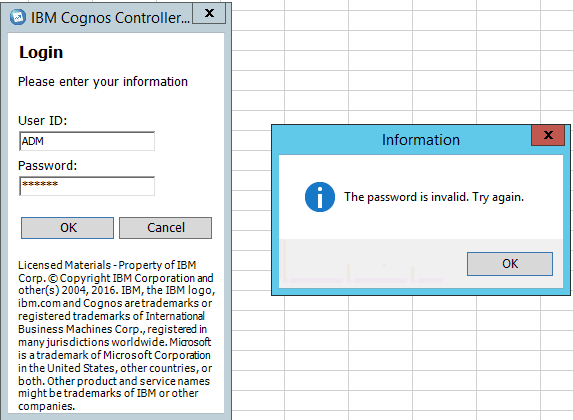
================================
User then clicks on the 'X' button (top-right corner) to attempt to close Excel.

================================

Standard Error
Number: 5
Source: System.Web.Services
Description: System.Web.Services.Protocols.SoapException: Server was unable to process request. ---> System.Exception: Security Error 1
at Cognos.Controller.Proxy.SoapExtension.ServerExtension.ValidateNativeUser(SoapMessage& message)
at Cognos.Controller.Proxy.SoapExtension.ServerExtension.ProcessMessage(SoapMessage message)
at System.Web.Services.Protocols.SoapMessage.RunExtensions(SoapExtension[] extensions, Boolean throwOnException)
at System.Web.Services.Protocols.SoapServerProtocol.CreateServerInstance()
at System.Web.Services.Protocols.WebServiceHandler.Invoke()
at System.Web.Services.Protocols.WebServiceHandler.CoreProcessRequest()
--- End of inner exception stack trace ---
at System.Web.Services.Protocols.SoapHttpClientProtocol.ReadResponse(SoapClientMessage message, WebResponse response, Stream responseStream, Boolean asyncCall)
at System.Web.Services.Protocols.SoapHttpClientProtocol.Invoke(String methodName, Object[] parameters)
at Cognos.Controller.ControllerSoapHttpClientProtocol.Invoke(String methodname, Object[] parameters)
at Cognos.Controller.Proxy.Light.WSLight.MenuSet_SelectAll(String sGuid, String sSelectCriterion, String sUser, Int32 lLLocale)
at Cognos.Controller.Cache.MenuSetCache.ISetCache_SelectAll()
at Cognos.Controller.Reports.xlDataHndlr.CanCreateReport()
- The password is invalid. Try again.
================================
User then clicks on the 'X' button (top-right corner) to attempt to close Excel.
================================
Error #2
Standard Error
Number: 5
Source: System.Web.Services
Description: System.Web.Services.Protocols.SoapException: Server was unable to process request. ---> System.Exception: Security Error 1
at Cognos.Controller.Proxy.SoapExtension.ServerExtension.ValidateNativeUser(SoapMessage& message)
at Cognos.Controller.Proxy.SoapExtension.ServerExtension.ProcessMessage(SoapMessage message)
at System.Web.Services.Protocols.SoapMessage.RunExtensions(SoapExtension[] extensions, Boolean throwOnException)
at System.Web.Services.Protocols.SoapServerProtocol.CreateServerInstance()
at System.Web.Services.Protocols.WebServiceHandler.Invoke()
at System.Web.Services.Protocols.WebServiceHandler.CoreProcessRequest()
--- End of inner exception stack trace ---
at System.Web.Services.Protocols.SoapHttpClientProtocol.ReadResponse(SoapClientMessage message, WebResponse response, Stream responseStream, Boolean asyncCall)
at System.Web.Services.Protocols.SoapHttpClientProtocol.Invoke(String methodName, Object[] parameters)
at Cognos.Controller.ControllerSoapHttpClientProtocol.Invoke(String methodname, Object[] parameters)
at Cognos.Controller.Proxy.Light.WSLight.MenuSet_SelectAll(String sGuid, String sSelectCriterion, String sUser, Int32 lLLocale)
at Cognos.Controller.Cache.MenuSetCache.ISetCache_SelectAll()
at Cognos.Controller.Reports.xlDataHndlr.CanCreateReport()
[{"Product":{"code":"SS9S6B","label":"IBM Cognos Controller"},"Business Unit":{"code":"BU048","label":"IBM Software"},"Component":"Controller","Platform":[{"code":"PF033","label":"Windows"}],"Version":"10.3","Edition":"","Line of Business":{"code":"LOB76","label":"Data Platform"}},{"Product":{"code":"SSMRTZ","label":"IBM Cognos Controller on Cloud"},"Business Unit":{"code":"BU048","label":"IBM Software"},"Component":" ","Platform":[{"code":"","label":""}],"Version":"","Edition":"","Line of Business":{"code":"LOB76","label":"Data Platform"}}]
Log InLog in to view more of this document
This document has the abstract of a technical article that is available to authorized users once you have logged on. Please use Log in button above to access the full document. After log in, if you do not have the right authorization for this document, there will be instructions on what to do next.
Was this topic helpful?
Document Information
Modified date:
09 May 2025
UID
swg22007506