Troubleshooting
Problem
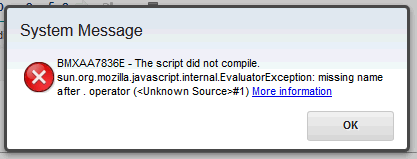
Any automation script written in javascript which uses mbo.delete() produces
System Message BMXAA7836E - The script did not compile.
sun.org.mozilla.javascript.internal.EvaluatorException: missing name after . operator (
Symptom
1. Navigate to System Configuration -> Platform Configuration -> Automation Scripts
2. Click on Create and then select any option. In the below example, I have selected Script
3. Give the script a name
4.. Select javascript or JavaScript for the Script Language
5. Type in the Source Code. in this example I am just using mbo.delete()
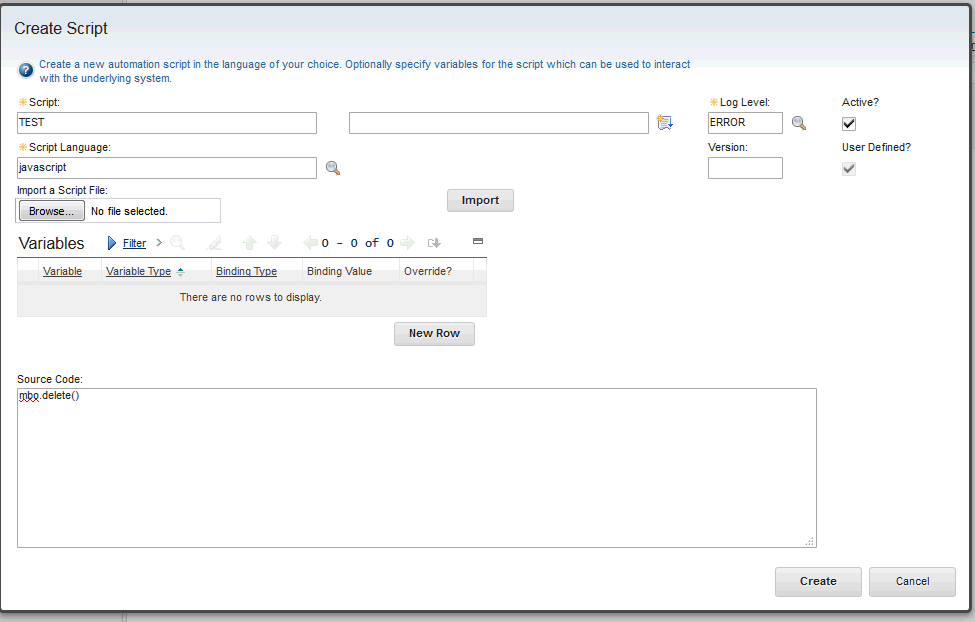
6. Click on Create
[{"Product":{"code":"SSLKT6","label":"IBM Maximo Asset Management"},"Business Unit":{"code":"BU048","label":"IBM Software"},"Component":"Not Applicable","Platform":[{"code":"PF025","label":"Platform Independent"}],"Version":"Version Independent","Edition":"","Line of Business":{"code":"LOB77","label":"Automation Platform"}},{"Product":{"code":"SSRHPA","label":"IBM Maximo Application Suite"},"Business Unit":{"code":"BU048","label":"IBM Software"},"Component":" ","Platform":[{"code":"","label":""}],"Version":"","Edition":"","Line of Business":{"code":"LOB77","label":"Automation Platform"}},{"Product":{"code":"SSWT9A","label":"IBM Control Desk"},"Business Unit":{"code":"BU048","label":"IBM Software"},"Component":" ","Platform":[{"code":"","label":""}],"Version":"","Edition":"","Line of Business":{"code":"LOB77","label":"Automation Platform"}}]
Log InLog in to view more of this document
This document has the abstract of a technical article that is available to authorized users once you have logged on. Please use Log in button above to access the full document. After log in, if you do not have the right authorization for this document, there will be instructions on what to do next.
Was this topic helpful?
Document Information
Modified date:
18 September 2025
UID
swg21989788