IBM Support

Creating your SPSS authorization code through the IBM SPSS License Key Center

Question & Answer


Question

How do I access the IBM SPSS License Key Center to view or generate SPSS Statistics authorization codes?

Answer

Create your SPSS authorization code through the IBM SPSS License Key Center
The IBM SPSS License Key Center is a self-service Authorization code and License key management service that provides you with easy access to and the ability to custom create your SPSS authorization and license codes.
 
 Video tutorials
Under Construction
 

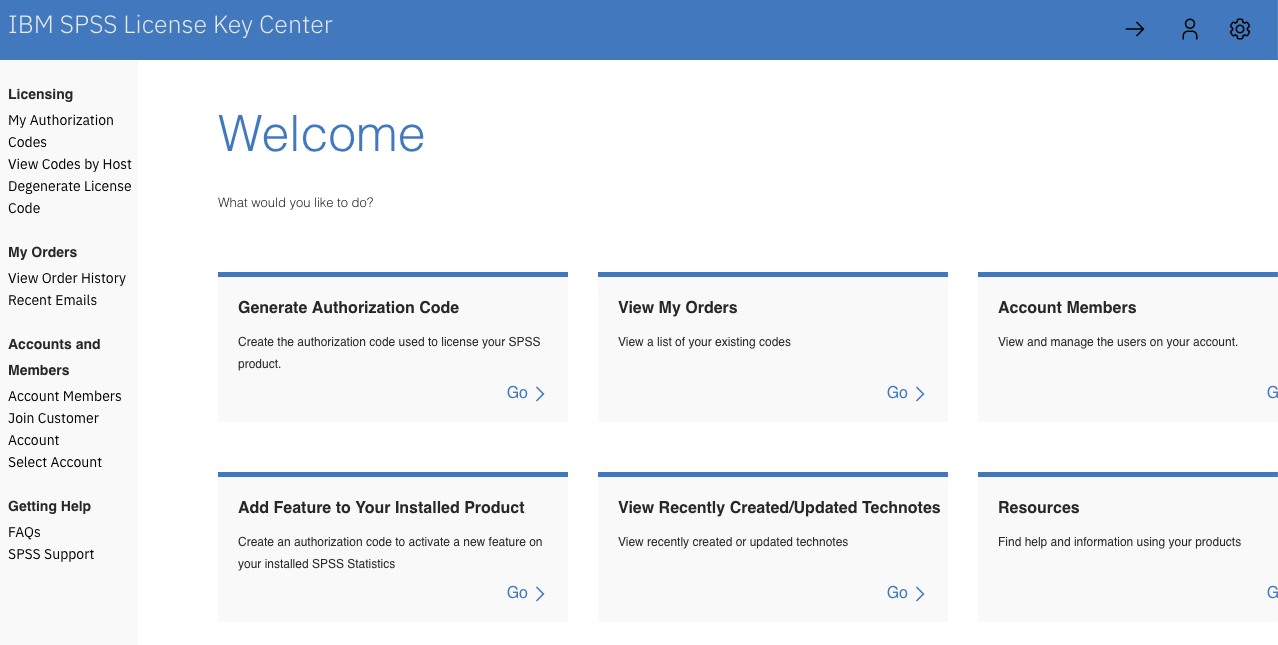
Access IBM SPSS License Key Center

image-20190724162615-1


Create authorization codes

1 - Select Go on the "Generate Authorization Code" tile. Select the product and version of the software - IBM SPSS Statistics Desktop 31, for example. 
Note: If you want to add a module to an existing installation, choose Go on the "Add feature to your installed product" tile instead.
2 - Quantity Purchased and Quantity Available are displayed for your Entitlement(s).
3 - Choose "Generate" to create a new code from the Quantity Available.  Choose "View" to display previously generated codes.
Note: If there is no Quantity Available, only "View" is displayed.
5 - From the Generate Options page, enter the "Requested Quantity" of codes.
6 - Choose to create One or Multiple Authorization codes. 
7 - If applicable, select add-on modules to be bundled with the base code (available quantity is displayed in brackets).
8 - An Expiration Date is not required for a Perpetual license. Enter an expiration date if you would like to limit license time frame. 
9 - Customer Name, Order #, Purchase Order Number and Comments are optional fields
10 - Choose the default "New License" option. 
11 - Choose "Review & Generate" to review the request.
12 - Choose Generate to confirm or Back to make updates.
13 - The authorization code has been created and is ready for use. 

What if you created an authorization code with wrong options and wish to delete?
Check this article to open a ticket for key deletion and submit an automatic (AUTO_DELETE) request to delete your authorization code.

How to gain access to the IBM SPSS License Key Center? 
The designated Primary and Site Technical Contact within your organization have permission to access the IBM SPSS License Key Center. They will manage access for others.

Forgotten login credentials or first visit?

Choose forgot your password to receive a password at first time access.
Or choose Request access to License Key Center to request access.


[{"Product":{"code":"SSLVMB","label":"IBM SPSS Statistics"},"Business Unit":{"code":"BU048","label":"IBM Software"},"Component":"Not Applicable","Platform":[{"code":"PF025","label":"Platform Independent"}],"Version":"Not Applicable","Edition":"","Line of Business":{"code":"LOB76","label":"Data Platform"}},{"Product":{"code":"SSLVC7","label":"IBM SPSS Amos"},"Business Unit":{"code":"BU048","label":"IBM Software"},"Component":" ","Platform":[{"code":"","label":""}],"Version":"","Edition":"","Line of Business":{"code":"LOB76","label":"Data Platform"}},{"Product":{"code":"SS3RA7","label":"IBM SPSS Modeler"},"Business Unit":{"code":"BU048","label":"IBM Software"},"Component":" ","Platform":[{"code":"","label":""}],"Version":"","Edition":"","Line of Business":{"code":"LOB76","label":"Data Platform"}},{"Product":{"code":"SS6A5A","label":"IBM SPSS SamplePower"},"Business Unit":{"code":"BU048","label":"IBM Software"},"Component":" ","Platform":[{"code":"","label":""}],"Version":"","Edition":"","Line of Business":{"code":"LOB76","label":"Data Platform"}},{"Product":{"code":"SSLVMB","label":"IBM SPSS Statistics"},"Business Unit":{"code":"BU048","label":"IBM Software"},"Component":" ","Platform":[{"code":"","label":""}],"Version":"","Edition":"","Line of Business":{"code":"LOB76","label":"Data Platform"}},{"Product":{"code":"SS7RUD","label":"SPSS Statistics for Linux on System z"},"Business Unit":{"code":"BU053","label":"Cloud \u0026 Data Platform"},"Component":" ","Platform":[{"code":"","label":""}],"Version":"","Edition":"","Line of Business":{"code":"","label":""}},{"Product":{"code":"SS6A7K","label":"IBM SPSS Text Analytics for Surveys"},"Business Unit":{"code":"BU059","label":"IBM Software w\/o TPS"},"Component":" ","Platform":[{"code":"","label":""}],"Version":"","Edition":"","Line of Business":{"code":"LOB10","label":"Data and AI"}},{"Product":{"code":"SUNSET","label":"PRODUCT REMOVED"},"Business Unit":{"code":"BU053","label":"Cloud \u0026 Data Platform"},"Component":" ","Platform":[{"code":"","label":""}],"Version":"","Edition":"","Line of Business":{"code":"","label":""}},{"Product":{"code":"SS6A8C","label":"IBM SPSS Visualization Designer"},"Business Unit":{"code":"BU048","label":"IBM Software"},"Component":" ","Platform":[{"code":"","label":""}],"Version":"","Edition":"","Line of Business":{"code":"LOB76","label":"Data Platform"}}]

Document Information

Modified date:
20 May 2025

UID

swg21980065