Troubleshooting
Problem
When installing Maximo Anywhere to a Windows 8.1 device the following error occurs and prevents downloading of the applications.
Symptom
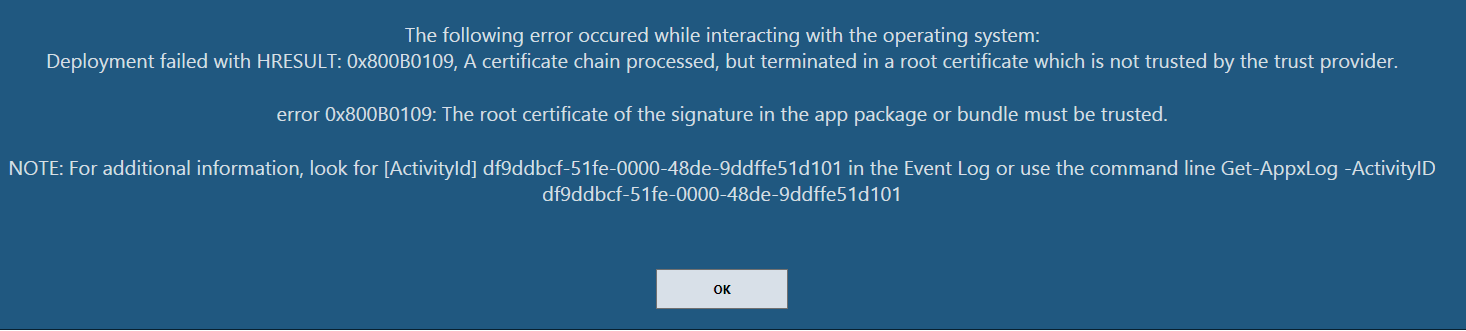
Unable to download applications to Windows 8.1 tablets, the application center will show the following error on the device.
The following error occurred while interacting with the operating system:
Deployment failed with HRESULT: 0x800B0109, A certificate chain processed, but terminated in a root certificate which is not trusted by the trust provider.
error 0x800B0109: The root certificate of the signature in the app package or bundle must be trusted.
NOTE: For additional information, look for [ActivityId] df9ddbcf-51fe-0000-48de-9ddffe51d101 in the Event Log or use the command line Get-AppxLog -ActivityID df9ddbcf-51fe-0000-48de-9ddffe51d101
[{"Product":{"code":"SSPJLC","label":"Maximo Anywhere"},"Business Unit":{"code":"BU048","label":"IBM Software"},"Component":"Not Applicable","Platform":[{"code":"PF033","label":"Windows"}],"Version":"7.5.2.1","Edition":"","Line of Business":{"code":"LOB77","label":"Automation Platform"}}]
Log InLog in to view more of this document
This document has the abstract of a technical article that is available to authorized users once you have logged on. Please use Log in button above to access the full document. After log in, if you do not have the right authorization for this document, there will be instructions on what to do next.
Was this topic helpful?
Document Information
Modified date:
17 June 2018
UID
swg21974975