Fix Readme
Abstract
This document explains the process of installing IBM Cognos Planning 10.1.1 FP2 in a shared architecture with IBM Cognos Business Intelligence 10.2.
Content
Installing IBM Cognos Planning 10.1.1 FP2 with IBM Cognos Business Intelligence 10.2 .x
1 Introduction
1.1 Purpose
This document explains the process of installing IBM Cognos Planning 10.1.1 FP2 in a shared architecture with IBM Cognos Business Intelligence 10.2.x. Historically IBM Cognos Planning required a matching IBM Cognos Business Intelligence rendition, however with the release of 10.1.1 FP2 Planning will now support a decoupled installation from IBM Cognos Business Intelligence versions. This enables IBM Cognos Planning to seamlessly integrate with either matching versions of IBM Cognos Business Intelligence (i.e. IBM Cognos Planning 10.1.1 and IBM Cognos Business Intelligence 10.1.1) or +1 versions of IBM Cognos Business Intelligence (i.e. IBM Cognos Planning 10.1.1 FP2 and IBM Cognos Business Intelligence 10.2).
1.2 Applicability
IBM Cognos Planning 10.1.1 FP2 and IBM Cognos Business Intelligence 10.2.x. For a complete list of supported BI 10.2.x versions please see the IBM Software Product Compatibility Reports.
1.3 Exclusions and Exceptions
Note: The 'IBM Cognos BI installation location' parameter should be left blank if no local install of IBM Cognos BI exists on the Planning server; Do NOT enter a UNC or network path in this field.
2 What you need to know
The classic approach to installing IBM Cognos Planning has changed with the introduction of new installation kits in IBM Cognos Planning version 10.1.1. The classic approach entailed the installation of both IBM Cognos Business Intelligence and IBM Cognos Planning components into the same directory location. This approach was challenging for users when newer versions of IBM Cognos Business Intelligence were released prior to the release of the matching IBM Cognos Planning version. In those cases where users wanted to install the latest release of IBM Cognos Business Intelligence and still utilize the integration capabilities with IBM Cognos Planning ahead of the release of the matching IBM Cognos Planning version, a work-around was required. The new installation kit was developed to enable the decoupling of product releases scheduled from IBM Cognos Business Intelligence.
Because two different versions are being installed (on a single machine in this example) they will need to be installed into separate directories. This also means there will be multiple versions of the dispatcher running, and at a minimum two versions of the IBM Cognos Service running. Also be aware that the default port number will need to be changed on at least one of the dispatchers so that there is no conflict in ports.
The new installation kits introduced in IBM Cognos Planning 10.1.1 are:
2.1 Planning Complete
Its intent is to be used in a stand-alone environment. This kit cannot be used when integrating with an IBM Cognos Business Intelligence 10.2 environment, however it can be used with an IBM Cognos Business Intelligence 10.1.1 environment. If your intent is to integrate IBM Cognos Planning with BI 10.2 then the Planning Complete kit should be ignored.
2.2 Planning Server
This installer contains all IBM Cognos Planning server-side requirements. It is required for an integrated IBM Cognos Business Intelligence 10.2 installation as it maintains all server-side functionality from running jobs, to hosting the Planning web service. When installing the Planning Server kit the best practice will be to install all Planning Service options and disable those services via Cognos Configuration that are not needed. This approach is recommended in case the server needs to be re-purposed in the future then without needing to install additional services the services can be enabled easily via Cognos Configuration.
2.3 Planning Admin
This installer contains the same components, and requires the same configuration setting as it has historically required. It contains the User Interface tools such as Analyst, Contributor or Analyst Manager, for example.
2.4 Planning Gateway
The Planning Gateway installer is intended to install into an existing IBM Cognos Business Intelligence gateway, the IBM Cognos Business Intelligence gateway can be version 10.1.1 or version 10.2. It does not contain all the gateway components, only those necessary to successfully run the IBM Cognos Planning applications.
2.5 Planning Client
This installer has not changed from prior releases and it is meant to install the Planning Rich Client on Contributor machines.
2.6 IBM Cognos Business Intelligence 10.2
A pre-existing IBM Cognos Business Intelligence 10.2 environment will need to exist in order to successfully integrate IBM Cognos Planning 10.1.1 FP2 with IBM Cognos Business Intelligence 10.2. The IBM Cognos Business Intelligence Server, or Runtime installer, will need to exist with a running Content Manager and Dispatcher. An IBM Cognos Business Intelligence 10.2 Gateway will also need to pre-exist.
3 The Environment
3.1 The IBM Cognos Planning 10.1.1 FP2 Server:
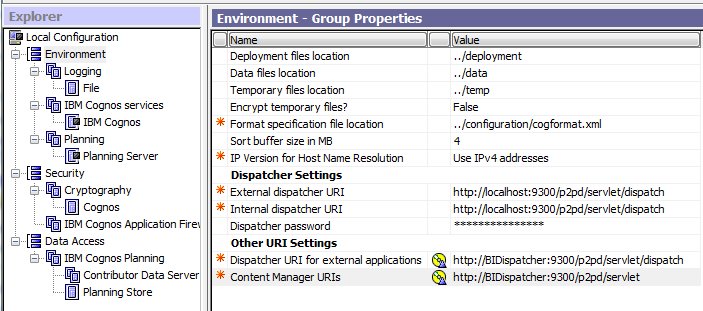
Upon installing the Planning Server package you will be presented in Cognos Configuration with the screen highlighted below. There are a few simple modifications that are required.
Dispatcher URI for external applications will need to be directed to the Primary IBM Cognos Business Intelligence dispatcher. This can actually point to any IBM Cognos Business Intelligence dispatcher, but the best practice is typically to point to the primary dispatcher.
The Content Manager URIs need to point to the IBM Cognos Business Intelligence content manager. There may be one or more content managers, just ensure that it is enabled and running.
Since the Platform is no longer present, there is no need to define the content manager data store, however the Planning Store still is required.
Note: If the Planning Server is installed on the same machine as the IBM Cognos Business Intelligence Server it will need to be installed into a separate directory and it will need to have the Dispatcher port set to a different number that the IBM Cognos Business Intelligence Dispatcher.
3.2 Admin Extensions
If you use the Generate Framework Manager extension or the Generate Transformer Model extension you will need to install either Framework Manager or Transformer on the same machine that you have installed the Planning Admin tools on.
Since Framework Manager and Transformer are now different renditions they need to be installed into separate directory paths. To accommodate for this in Cognos Configuration browse to the Planning entry in the Cognos Configuration tree and enter a path pointing to the directory that IBM Cognos Business Intelligence is installed in.
Note: A common mistake is browsing too deeply into the directory such as to the \bin location. Browse only to the parent directory such as \ibmcognos\c10 or in this example \ibm\c102_bi.

3.3 Planning Gateway
The Planning Gateway now will need to be installed into the IBM Cognos Business Intelligence 10.2 gateway location. Traditionally, in a truly distributed environment, the IBM Cognos Business Intelligence gateway may be a stand-alone server, otherwise it may be a shared location with an IBM Cognos Business Intelligence Server install. In either instance the Planning Gateway installer will need to be installed to the IBM Cognos Business Intelligence Gateway directory. This will place all necessary Planning files and components into the IBM Cognos Business Intelligence Gateway location. Nothing else will be needed post install.

3.4 The IBM Cognos Business Intelligence Server
The IBM Cognos Business Intelligence Server can be defined as it has traditionally been installed. There are no changes in this area of the installer.

4 What do I do if I already have Planning 10.1.1 installed?
There is little to be concerned with if you already have an IBM Cognos Planning 10.1.1 environment installed that is currently integrated with IBM Cognos Business Intelligence. When installing the IBM Cognos Business Intelligence upgrade to 10.2 you are required to uninstall/reinstall the software for IBM Cognos Business Intelligence. During this uninstall/re-install you can take advantage of the opportunity to separate the directories and port numbers if they are installed together.
If they are not installed together you simply make the minor modification mentioned above to point to the new IBM Cognos Business Intelligence Dispatcher and Content Manager, and to add the directory path to the Framework Manager or Transformer installation.
[{"Product":{"code":"SSPN2D","label":"Cognos Planning"},"Business Unit":{"code":"BU059","label":"IBM Software w\/o TPS"},"Component":"Extensions","Platform":[{"code":"PF033","label":"Windows"}],"Version":"10.1.1","Edition":"All Editions","Line of Business":{"code":"LOB10","label":"Data and AI"}}]
Was this topic helpful?
Document Information
Modified date:
15 June 2018
UID
swg21613469