Troubleshooting
Problem
User is troubleshooting problem in Controller. As part of this, the user manually drags and drops the file 'FrangoVFP.dll' into the Controller COM+ application (called 'IBM Cognos Controller Consolidation' from Controller 10.2.0 onwards). User receives error.
Symptom
The exact error will vary depending on the Controller version and installation location, but it will be similar to:
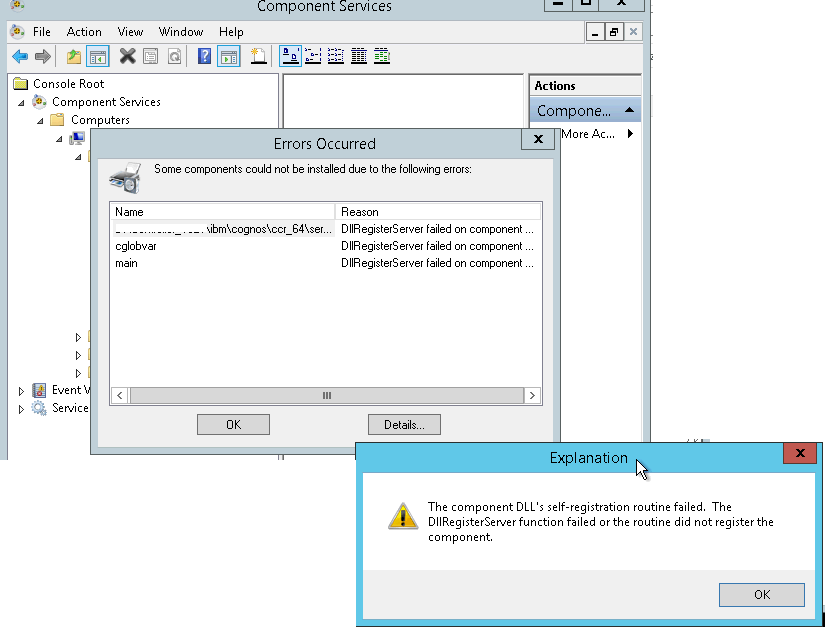
Errors Occurred
Some components could not be installed due to the following errors:
Name Reason
C:\Program Files\cognos\c8\server\... DllRegister failed on component...
cglobvar
main
Explanation
The component DLL's self-registration routine failed. The DllRegisterServer function failed or the routine did not register the component.
[OK]
Errors Occurred
Some components could not be installed due to the following errors:
Name Reason
C:\Program Files\cognos\c8\server\... DllRegister failed on component...
cglobvar
main
Explanation
The component DLL's self-registration routine failed. The DllRegisterServer function failed or the routine did not register the component.
[OK]
[{"Business Unit":{"code":"BU048","label":"IBM Software"},"Product":{"code":"SS9S6B","label":"IBM Cognos Controller"},"ARM Category":[{"code":"a8m0z000000brYKAAY","label":"Installation"}],"ARM Case Number":"","Platform":[{"code":"PF033","label":"Windows"}],"Version":"All Version(s)","Line of Business":{"code":"LOB76","label":"Data Platform"}},{"Product":{"code":"SSMRTZ","label":"IBM Cognos Controller on Cloud"},"Business Unit":{"code":"BU048","label":"IBM Software"},"Component":" ","Platform":[{"code":"","label":""}],"Version":"","Edition":"","Line of Business":{"code":"LOB76","label":"Data Platform"}}]
Log InLog in to view more of this document
This document has the abstract of a technical article that is available to authorized users once you have logged on. Please use Log in button above to access the full document. After log in, if you do not have the right authorization for this document, there will be instructions on what to do next.
Was this topic helpful?
Document Information
Modified date:
08 May 2025
UID
swg21459580