Question & Answer
Question
What value do you specify for port number when defining a System Z - FTP connection type in the IBM CICS Explorer for CICS Transaction Server for z/OS (CICS TS)?
Answer
Specify the port number through which you FTP into your LPAR. Typically this value will be 21, which is a well known port for FTP. If you use Secure FTP, the default value is 22.
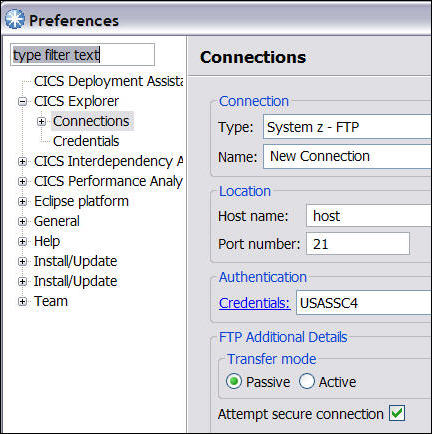
If you do not use the default values, then you will need to use the port number for FTP that has been setup for your environment.
You can enter a NETSTAT PORTLIST command to see the ports that are in use. Output from this command will look like this:
MVS TCP/IP NETSTAT CS V1R12 TCPIP Name: TCPIP 20:56:12
Port# Prot User Flags Range SAF Name
----- ---- ---- ----- ----- --------
7 TCP MISCSERV DA
9 TCP MISCSERV DA
19 TCP MISCSERV DA
20 TCP OMVS D
21 TCP FTPD1 DA
23 TCP TN3270 D
25 TCP SMTP DA
80 TCP OMVS DA
You can also check your SYS1.TCPPARMS(PROFxx) member for the PORT statement used for FTP and SSHD.
Related Information
Product Synonym
CICS/TS CICS TS CICS Transaction Server
Was this topic helpful?
Document Information
Modified date:
05 January 2026
UID
swg21448050