Troubleshooting
Problem
Firmware updates for QRadar hardware appliances on Lenovo System x® and ThinkSystem™ hardware fails if LAN Over USB (also called Ethernet Over USB) is disabled.
Symptom
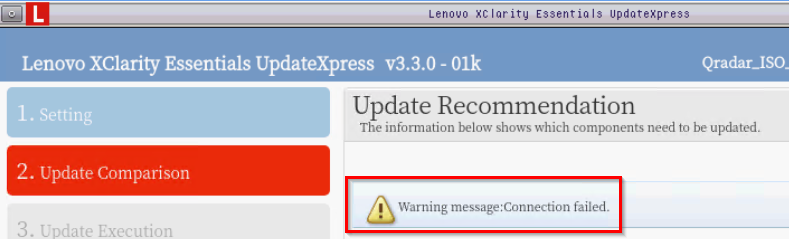
The failure typically occurs after the UpdateXpress ISO boots to the firmware update UI when the tool is attempting to compare the updates available in the ISO to the firmware installed in the QRadar hardware appliance. See the following example error message:
[{"Type":"MASTER","Line of Business":{"code":"LOB77","label":"Automation Platform"},"Business Unit":{"code":"BU048","label":"IBM Software"},"Product":{"code":"SSBQAC","label":"IBM Security QRadar SIEM"},"ARM Category":[{"code":"a8m0z000000cwtcAAA","label":"Hardware"}],"ARM Case Number":"","Platform":[{"code":"PF025","label":"Platform Independent"}],"Version":"7.3.0;7.3.1;7.3.2;7.3.3;7.4.0;7.5.0"}]
Log InLog in to view more of this document
This document has the abstract of a technical article that is available to authorized users once you have logged on. Please use Log in button above to access the full document. After log in, if you do not have the right authorization for this document, there will be instructions on what to do next.
Was this topic helpful?
Document Information
Modified date:
15 June 2026
UID
swg21982944