Question & Answer
Question
How can I use Chinese or Korean Microsoft Windows Domain usernames in IBM Telelogic DOORS?
Cause
Telelogic Directory Server (TDS) supports use in any locale using the UTF-8 character set (on UNIX) or CP 1252 (on Windows).
Use in locales using other character sets is unsupported. Telelogic Directory Server does not adapt messages, numeric formats or sorting orders according to the locale (other than English US locale).

Answer
The workaround detailed in this technote has been tested on following environments. This technote is based on Telelogic Directory Server 4.3 and Telelogic DOORS 9.1 on Microsoft Windows 2003. (4.3, 5.0, 5.1 has been tested)
- IBM Telelogic DOORS 9.1,
IBM Rational DOORS 9.2, IBM Rational DOORS 9.2.0.2 - IBM Telelogic Directory Server 4.3,
IBM Rational Directory Server 5.0, IBM Rational Directory Server 5.1 - Microsoft Windows 2003 R2 Korean, Microsoft Windows XP SP2 Korean
Preparation
- Identify what components of identity will be used to logon IBM Telelogic DOORS regardless double bytes characters issue.
For example, in Microsoft Windows Active Directory
(Last Name, First Name, Display Name and User Logon are all different.)
Last Name (L) : "LAST"
First Name (F) : "First"
Display Name (S) : "LAST First"
User Logon (U) : "LAST First Logon"


- Set up Telelogic Directory Server as Corporate Mode; refer to Page 29 in the attached document.

Then walk through either Step 1 or Step 2 below.
How to setup
Choose either workaround 1 or workaround 2 depends on your requirements
Workaround 1: Display Name (Common Name: CN)
Workaround 2: User Logon (Windows Username: sAMAccountName)
WORKAROUND 1:
- If you want to logon using Display Name (Common Name: LAST First). In Telelogic Directory Server, set User Logon Attribute as "CN" (Refer to Page 34)

- Then, TDS will use Display Name (from Microsoft Windows Domain) to logon TDS (in User Logon Name).
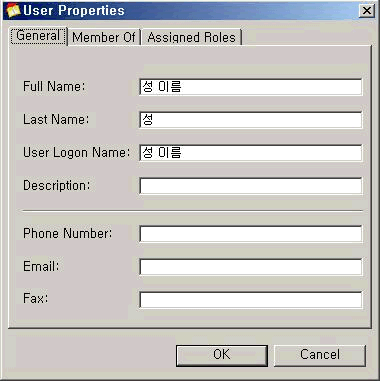
- Then you can logon to DOORS using "LAST First" as in User Logon Name.

- Successful Logon to DOORS client using "Last First"

WORKAROUND 2
- If you wants to logon using User Logon/Windows Username (LAST First Logon),
In Telelogic Directory Server, set User Logon Attribute as "sAMAccountName" (Refer to Page 34)
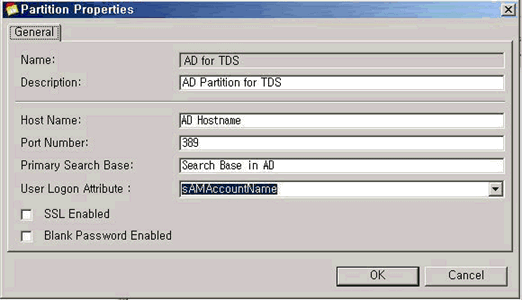
- Then, TDS will use User Logon (from Microsoft Windows Domain) to logon TDS (in User Logon Name).

- Then you can logon to DOORS using "Last First Logon" as in User Logon Name.

- Successful Logon to DOORS client using "Last First Logon"

Note: User Logon Attribute setting as UID in Telelogic Directory Server is not operational with double bytes characters.
Related Information
Was this topic helpful?
Document Information
Modified date:
23 June 2018
UID
swg21405941