Troubleshooting
Problem
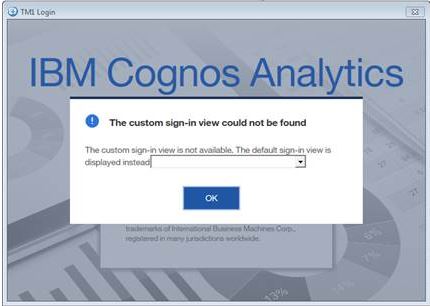
Attempts to login to CAM authenticated Planning Analytics server over Perspectives is not successful as the Cognos Namespace drop-down appears blank, not allowing users to select the namespace and login to Cognos Analytics/Cognos BI.
Symptom
- Blank Cognos Analytics/Cognos BI Namespace window is presented to users when attempting to login to CAM authenticated Planning Analytics server over Perspectives.
- Login to CAM authenticated Planning Analytics server over Architect on the same system works as expected.
- Login to native authenticated Planning Analytics server over both Perspectives and Architect on the same system works as expected.
Document Location
Worldwide
[{"Business Unit":{"code":"BU048","label":"IBM Software"},"Product":{"code":"SSD29G","label":"IBM Planning Analytics"},"Component":"Perspective","Platform":[{"code":"PF033","label":"Windows"}],"Version":"All Versions","Edition":"","Line of Business":{"code":"LOB76","label":"Data Platform"}},{"Product":{"code":"SSKVSF","label":"Planning Analytics on Cloud"},"Business Unit":{"code":"BU048","label":"IBM Software"},"Component":" ","Platform":[{"code":"","label":""}],"Version":"","Edition":"","Line of Business":{"code":"LOB76","label":"Data Platform"}},{"Product":{"code":"SSCTEW","label":"IBM Planning Analytics Local"},"Business Unit":{"code":"BU048","label":"IBM Software"},"Component":" ","Platform":[{"code":"","label":""}],"Version":"","Edition":"","Line of Business":{"code":"LOB76","label":"Data Platform"}}]
Log InLog in to view more of this document
This document has the abstract of a technical article that is available to authorized users once you have logged on. Please use Log in button above to access the full document. After log in, if you do not have the right authorization for this document, there will be instructions on what to do next.
Was this topic helpful?
Document Information
Modified date:
19 August 2019
UID
ibm11001408