Technical Blog Post
Abstract
More storage system monitoring, more copy data and in-house reporting, more hybrid cloud capabilities highlight new version of IBM Spectrum Control
Body

IBM® Spectrum Control™ V5.2.12, a member of the IBM Spectrum Storage Suite, continues to provide IT managers with more and more intelligent analytics for managing their storage environments by balancing efficiency with performance and cost savings.
Some highlights of the new release that is available include:
- Enhancements to the reporting on multiple tenants within the IBM Spectrum Control GUI.
In addition to the previously available Chargeback report, you can now create a new storage Consumer report outside of the optional Cognos BI report component.
You can also ensure that the costs for the block and file storage that is used by storage consumers is consistent across all of the reports. You can calculate the capacity and charge for the storage that is actually used by the storage consumer. For example, a database application uses thin-provisioned volumes. You want to benefit from the cost savings that are gained by using space-efficient volumes, so you calculate the capacity and cost of the capacity that is allocated rather than assigned to the application.

More types of Email reports are coming soon like Executive and Situational. Stay tuned!
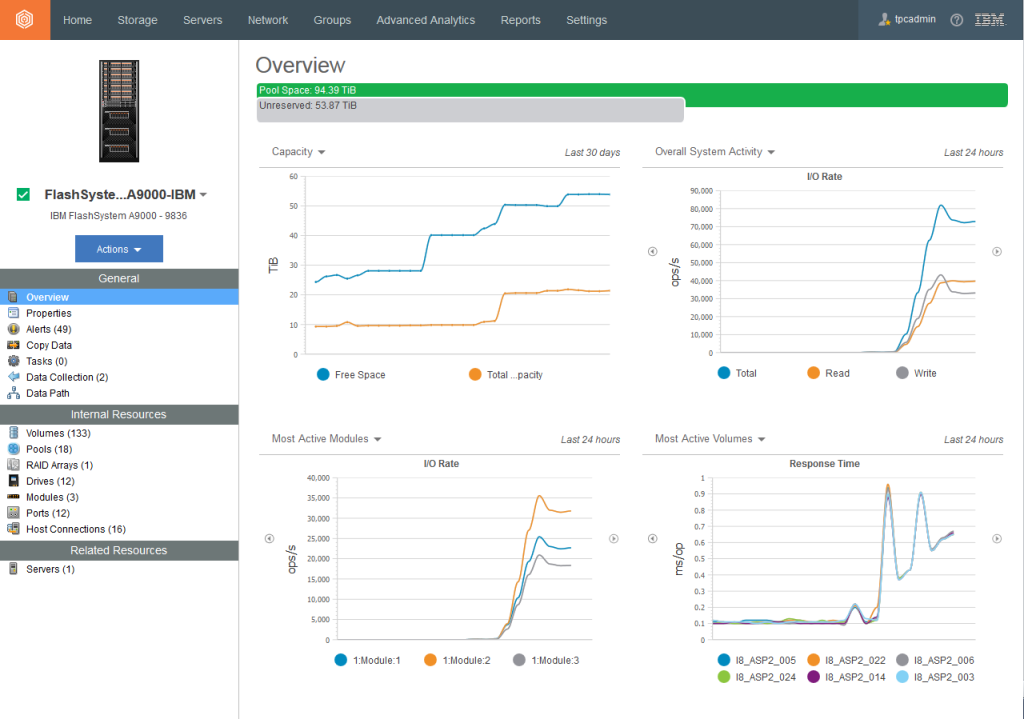
- IBM FlashSystem™ A9000 and FlashSystem A9000R storage systems added to the overall monitoring portfolio.

The storage economics are visible in the details. You can see the savings that are achieved by data reduction, compression, and data deduplication. You can also see details about the flash drives in these storage systems.
- Hybrid cloud capabilities enhanced in IBM Cloud Object Storage monitoring, the ability to monitor IBM Spectrum Scale™ and the use of Transparent Cloud Tiering.

You can monitor sites, mirrors, and vault quotas for IBM Cloud Object Storage.

You can view the amount of external storage from cloud services that are being used by the file systems in an IBM Spectrum Scale™ cluster.
See this VIDEO and learn how to monitor multiple IBM Spectrum Scale clusters, view cross cluster relationships, monitor Transparent Cloud Tiering between IBM Spectrum Scale and IBM Cloud Object Storage, and view relationships between Network Shared Disks and SAN attached storage.
- Copy Data reporting improved by adding dedicated Consistency Group and FlashCopy views.
You can analyze replication and FlashCopy relationships across your block storage environment.

More release information
For more information, as well as a detailed overview of the new release, see New for IBM Spectrum Control Version 5.2.12 in the IBM Knowledge Center.
Also, if you logged in to the GUI, you can now see more helpful context information, in the NEW What’s New page:

Downloading IBM Spectrum Control
You can download this version of the product from IBM Passport Advantage. Click the link for a new installation or an upgrade and follow the instructions for your operating system. You can then install the product by following the installation instructions in the IBM Knowledge Center.
IBM Spectrum Control Storage Insights updates
Just like its’ on-premise counterpart, IBM Spectrum Control, the SaaS offering, IBM Spectrum Control Storage Insights, contains updates that include IBM FlashSystem A9000 and IBM FlashSystem A9000R storage systems monitoring, information about external storage that is used by IBM Spectrum Scale, and increased monitoring enhancements to IBM Cloud Object Storage. However, one new bit of information was added in the recent update; the collection of asset, capacity, and performance data was recently enhanced by allowing you to install multiple data collectors. When you add a storage system, the data collector with the best response time is selected to collect the data. If you install multiple data collectors and a probe or performance monitor fails to collect data from the storage system, the response times for the data collectors are tested again, and the collector with the best response time is activated to collect the data.
Join the conversation
Are you interested in taking the first step with software-defined storage? Contact your IBM Business Partner or sales representative or join the conversation with #IBMStorage and #softwaredefinedstorage
For continuing information on IBM Spectrum Control, IBM Storage Insights and entire IBM Spectrum Storage Suite, follow me on  or Twitter, @bobby_gratz
UID
ibm16165657