General Page
However, when your Netezza system is enabled for full schema support, you can have schemas with the same name in different databases. The migration process must then be adjusted accordingly. The following section presents how your data is migrated from Netezza to IIAS.
Migrating database schemas with multiple-schema support disabled
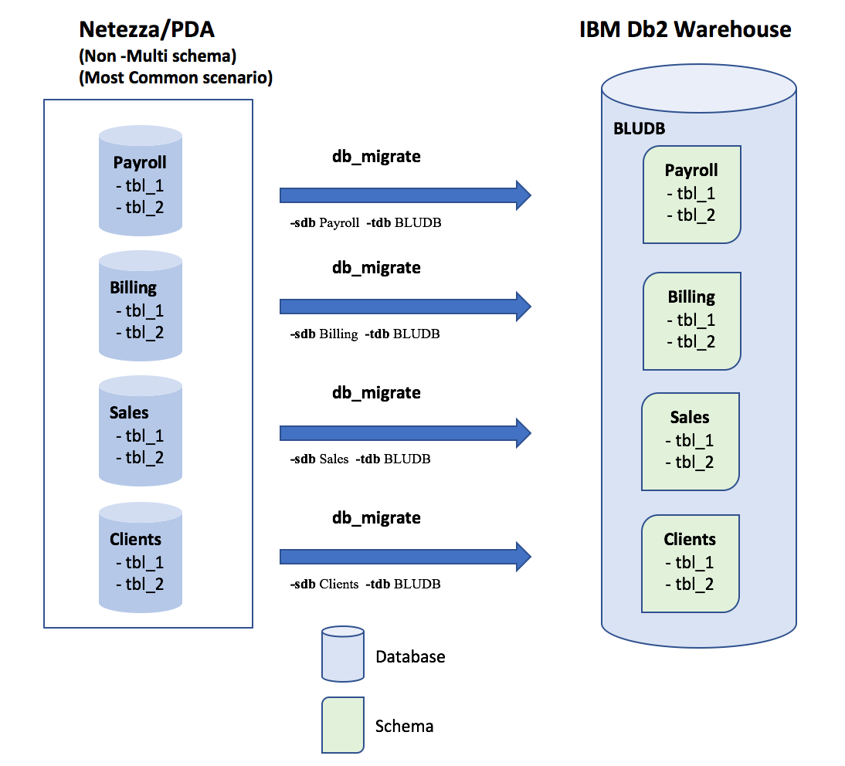
If the source Netezza system is not enabled for full-schema support, then db_migrate maps every database on the source Netezza system to a schema on Db2 Warehouse system.
Cross-database access will be mapped to cross-schema access. The double dot “..” notation for cross-database access will be mapped to cross-schema access on Db2 Warehouse system.
Target schema name can be specified by -tSchema parameter.
Migrating database schemas with multiple-schema support enabled
By default, if the source Netezza system is enabled for multiple schemas, db_migrate maps every schema from the source
Netezza system to a schema on Db2 Warehouse system, ignoring the database identifier.

Note that if a schema with same name exists in another source database (duplicate schema names), then, by default, db_migrate will merge the duplicate schemas into one at the target (See duplicate schema name Sch_2)

Two solutions are available when migrating such databases:
- You can use a prefix for target schema names when migrating with db_migrate.
When you use the -prefixSchema yes parameter, the source database name is used as a prefix for target schema name.

Tip: You can also use -prefixSchema withPrefix <your_prefix> to add a customized prefix.
- You can migrate each schema one by one and set a target schema name of your choice for each migrated schema, using the -sschema and -tschema options.

Note: The target schema name is always saved in upper case, even if provided in mixed case: ‘MixedSchema’ -> MIXEDSCHEMA.
Formal information on these db_migrate options, see https://www.ibm.com/support/knowledgecenter/SS6NHC/com.ibm.swg.im.dashdb.apdv.porting.doc/doc/db_migrate_multi_schema.html
Was this topic helpful?
Document Information
Modified date:
17 October 2019
UID
ibm10718973