Troubleshooting
Problem
User1 saves an Excel-link spreadsheet (XLS file) from within Excel 2003. User2 launches Excel 2007, and opens the XLS file. Because this file has come from Excel 2003, the file opens inside Excel's "Compatibilty Mode". User2 now makes some changes to the file, and clicks "save". The Excel window title bad says "Not Responding" and an error appears.
Symptom
The error message will vary slightly, depending on environment. For example:
Excel 2007 SP3 with Controller 8.5.0:

- Microsoft Excel - filename.xls [Compatibility Mode] (Not Responding)
Microsoft Office Excel
Microsoft Office Excel has stopped working
Windows can check online for a solution to the problem and try to recover your information and restart the program
Check online for a solution and restart the program
Restart the program
Problem signature:
Problem Event Name: APPCRASH
Application Name: EXCEL.EXE
Application Version: 12.0.6665.5003
Application Timestamp: 5061d2a8
Fault Module Name: EXCEL.EXE
Fault Module Version: 12.0.6665.5003
Fault Module Timestamp: 5061d2a8
Exception Code: c0000005
Exception Offset: 0035b049
OS Version: 6.1.7601.2.1.0.16.7
Locale ID: 1033
Additional information about the problem:
LCID: 1033
Fire: Office12Crash
skulcid: 103
Excel 2007 SP2 with Controller 10.1.1 FP2
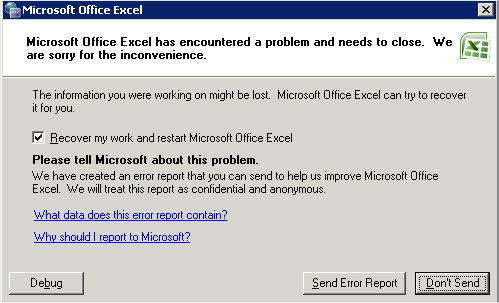
Microsoft Office Excel has encountered a problem and needs to close. We are sorry for the inconvenience.

Event Type: Error
Event Source: Microsoft Office 12
Event Category: None
Event ID: 1000
Date: 12/07/2013
Time: 10:56:58
User: N/A
Computer: SERVERNAME
Description:
Faulting application excel.exe, version 12.0.6520.5000, stamp 4ad8472d, faulting module excel.exe, version 12.0.6520.5000, stamp 4ad8472d, debug? 0, fault address 0x002ac80e.
[{"Product":{"code":"SS9S6B","label":"IBM Cognos Controller"},"Business Unit":{"code":"BU048","label":"IBM Software"},"Component":"Controller","Platform":[{"code":"PF033","label":"Windows"}],"Version":"10.2.0;10.1.1;10.1;8.5.1;8.5","Edition":"","Line of Business":{"code":"LOB76","label":"Data Platform"}},{"Product":{"code":"SSMRTZ","label":"IBM Cognos Controller on Cloud"},"Business Unit":{"code":"BU048","label":"IBM Software"},"Component":" ","Platform":[{"code":"","label":""}],"Version":"","Edition":"","Line of Business":{"code":"LOB76","label":"Data Platform"}}]
Log InLog in to view more of this document
This document has the abstract of a technical article that is available to authorized users once you have logged on. Please use Log in button above to access the full document. After log in, if you do not have the right authorization for this document, there will be instructions on what to do next.
Was this topic helpful?
Document Information
Modified date:
08 May 2025
UID
swg21643715