Question & Answer
Question
How do you make an entity the background for the chart in i2 Analyst's Notebook (ANB) version 9.x?
Cause
In IBM i2 Analyst's Notebook Version 8.x, this function was performed by selecting the entity, then under the "View" action bar pulldown, select "Make Background".
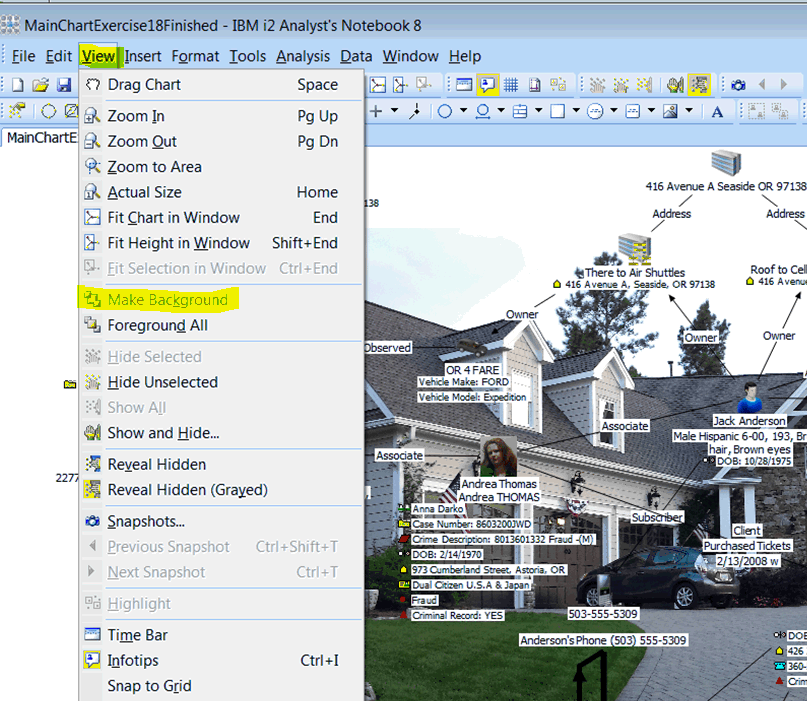
This does not exist in ANB 9.x.
Answer
This function is now located under the "Arrange" tab on the ribbon interface in ANB version 9.x.

[{"Product":{"code":"SSXUXD","label":"i2 Analyst's Notebook"},"Business Unit":{"code":"BU059","label":"IBM Software w\/o TPS"},"Component":"--","Platform":[{"code":"PF033","label":"Windows"}],"Version":"9.0.0;9.0.1;9.0.2;9.0.3","Edition":"","Line of Business":{"code":"LOB24","label":"Security Software"}}]
Was this topic helpful?
Document Information
Modified date:
16 June 2018
UID
swg21985984