Troubleshooting
Problem
User launches Controller client. User chooses database, and clicks OK. An error appears.
Afterwards, I.T. administrator launches Controller Configuration, and attempts to connect to the database. A similar error appears.
Symptom
Launching Client:
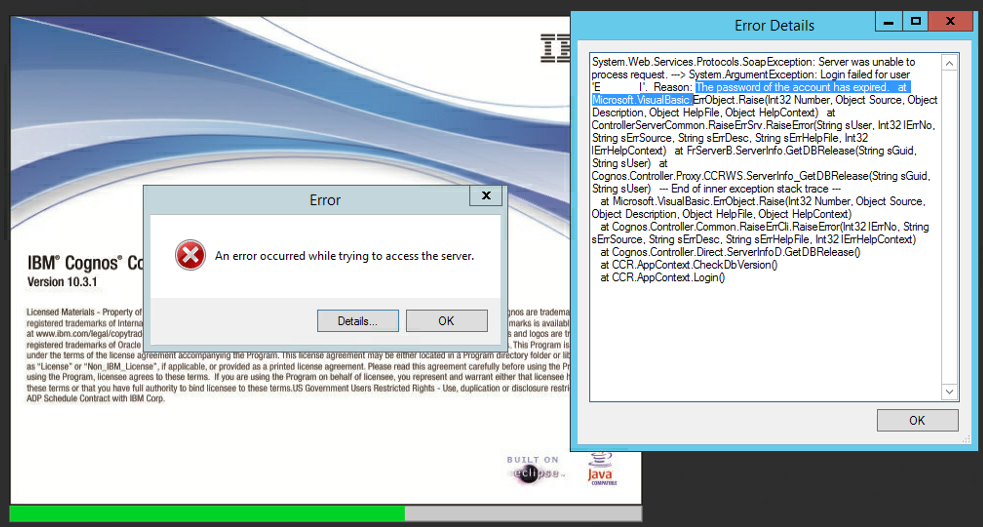
An error occurred while trying to access the server
Login failed for user 'fastnet'. Reason: The password of the account has expired.
Testing database connection (inside Controller Configuration):
Test connection failed
Microsoft Data Link Error
Test connection failed because of an error in initializing provider. Login failed for user 'fastnet'. Reason: the password of the account Must be changed.
OK
[{"Business Unit":{"code":"BU048","label":"IBM Software"},"Product":{"code":"SS9S6B","label":"IBM Cognos Controller"},"Component":"","Platform":[{"code":"PF033","label":"Windows"}],"Version":"8.5.1;8.5;8.4;8.3;10.1, 10.2.0, 10.2.1, 10.3.0, 10.3.1","Edition":"","Line of Business":{"code":"LOB76","label":"Data Platform"}},{"Product":{"code":"SSMRTZ","label":"IBM Cognos Controller on Cloud"},"Business Unit":{"code":"BU048","label":"IBM Software"},"Component":" ","Platform":[{"code":"","label":""}],"Version":"","Edition":"","Line of Business":{"code":"LOB76","label":"Data Platform"}}]
Log InLog in to view more of this document
This document has the abstract of a technical article that is available to authorized users once you have logged on. Please use Log in button above to access the full document. After log in, if you do not have the right authorization for this document, there will be instructions on what to do next.
Historical Number
1034969
Was this topic helpful?
Document Information
Modified date:
08 May 2025
UID
swg21347333