Question & Answer
Question
Can I enable both Kerberos and BA authentication within ISAM WebSEAL ? How WebSeal handles this ? Why I do get NTLM error ?
Answer
Yes it is possible to enable both authentication mechanisms and this can be seen as a way to have a fallback from Kerberos to BA for browsers not able to use Kerberos.
However you need to take in mind that an active role is played by the browser itself. Let's see some scenarios .
First of all you can enable either Kerberos and BA for the same transport by editing the WebSEAL conf file or using the ISAM LMI console Authentication tab of the related reverse proxy instance as here reported :
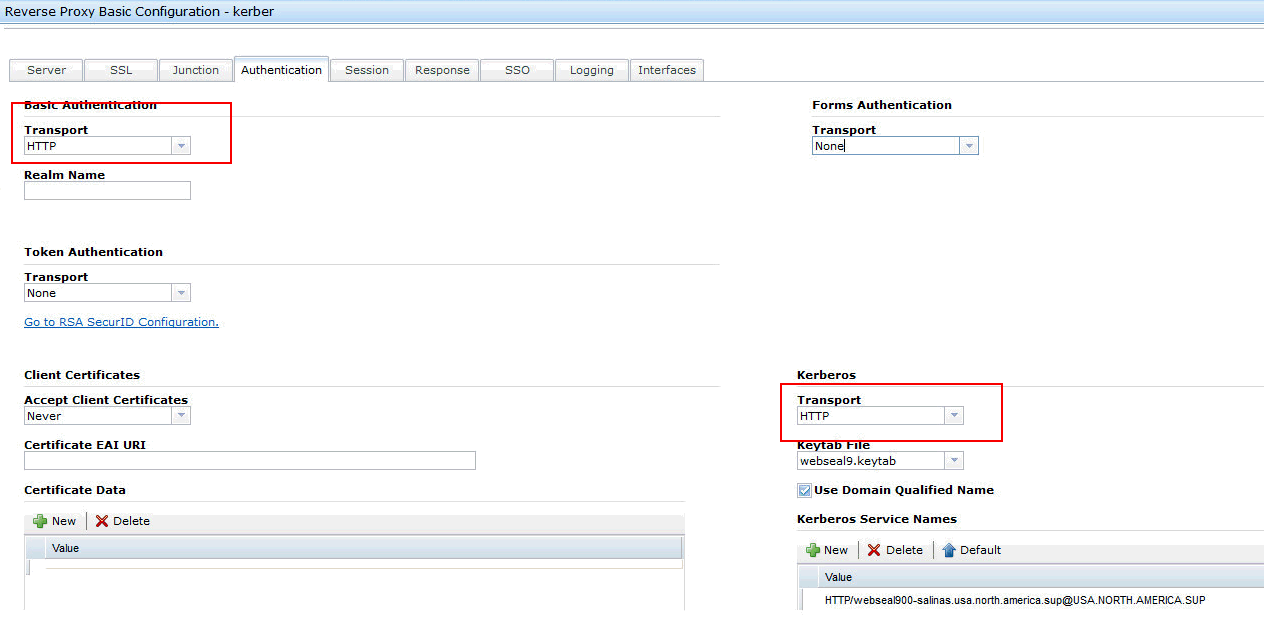
After a restart of the WebSEAL instance you can open a browser , connect to WebSEAL and by capturing tcp-ip trace, you can notice what is actually happening.
The first thing you notice is that when the browser make the initial request, WebSEAL replies with a 401 return code including either the www-authenticate header for Negotiate ( SPNEGO ) and for the Basic authentication :

At this stage the ball goes into the browser court and depending by how the browser works , it can follow up with SPNEGO or BA .
SPNEGO case :
If browser uses SPNEGO and it can get a Kerberos ticket to sent, than WebSEAL will process it and if this process succeeded it automatically signs you in without any authentication prompt. This, in ISAM WebSEAL is called Desktop Single Sign On as generally is achieved when you authenticate in your workstation using a Windows Domain account .
In the tcp-ip trace you can notice how the browser send the Authorization header ( notice that a Kerberos ticket always starts with YII... )

If the browser uses SPNEGO but can't supply a Kerberos ticket it may tries to silently use NTLM, in some other cases before sending NTLM data it may prompt for authentication, however this is not a valid BA prompt and still NTLM data is sent and once you fill in username and password.

In both cases WebSEAL will reject the authentication since NTLM is not a supported protocol by WebSEAL,

The tcp-ip trace show the Authorization header where NTLM is used like here below :

BA case :
If the browser accepts the BA challenge it than prompts you for user name and password and submit them in the next request using Authorization header :

Here below an example using two browsers ( IE and Firefox ) on the same workstation session, but configured in a different ways and different results are obtained :

CONCLUSION :
ISAM WebSEAL can be configured to use either BA and Kerberos authentication mechanism however its role is just to send the 401 return code with the double www-authenticate challenge and wait for the browser to reply.
All the different behaviours we have seen are generally related to specific browser ( or workstation ) settings so outside of any ISAM WebSEAL configuration option that you may apply.
[{"Product":{"code":"SSPREK","label":"Tivoli Access Manager for e-business"},"Business Unit":{"code":"BU059","label":"IBM Software w\/o TPS"},"Component":"WebSEAL","Platform":[{"code":"PF025","label":"Platform Independent"}],"Version":"7.0;8.0;9.0","Edition":"","Line of Business":{"code":"LOB24","label":"Security Software"}}]
Was this topic helpful?
Document Information
Modified date:
16 June 2018
UID
swg21983284