Troubleshooting
Problem
How to install Open Source R on Netezza
Symptom
Installation.
Resolving The Problem
Download the following packages to the directory where the NetezzAnalyticsR_3.0.1.zip is unzipped in /nzscratch directory.
Please visit http://ibm.co/1sh409E where to get following packages........................there is a InstallOpenSourceR.pdf.....
bash-4.2.tar.gz
coreutils-8.13.tar.gz
findutils-4.4.2.tar.gz
grep-2.9.tar.gz
libiconv-1.14.tar.gz
libpthread-stubs-0.1.tar.bz2
make-3.82.tar.gz
ncurses-5.9.tar.gz
pkg-config-0.28.tar.gz
R-3.0.2.tar.gz
readline-6.2.tar.gz
sed-4.2.tar.gz
tar-1.26.tar.gz
termcap-1.3.1.tar.gz
The next step is to run the installOpenSourceR.sh with –p option and password “fruitloop”.
./installOpenSourceR.sh –p fruitloop
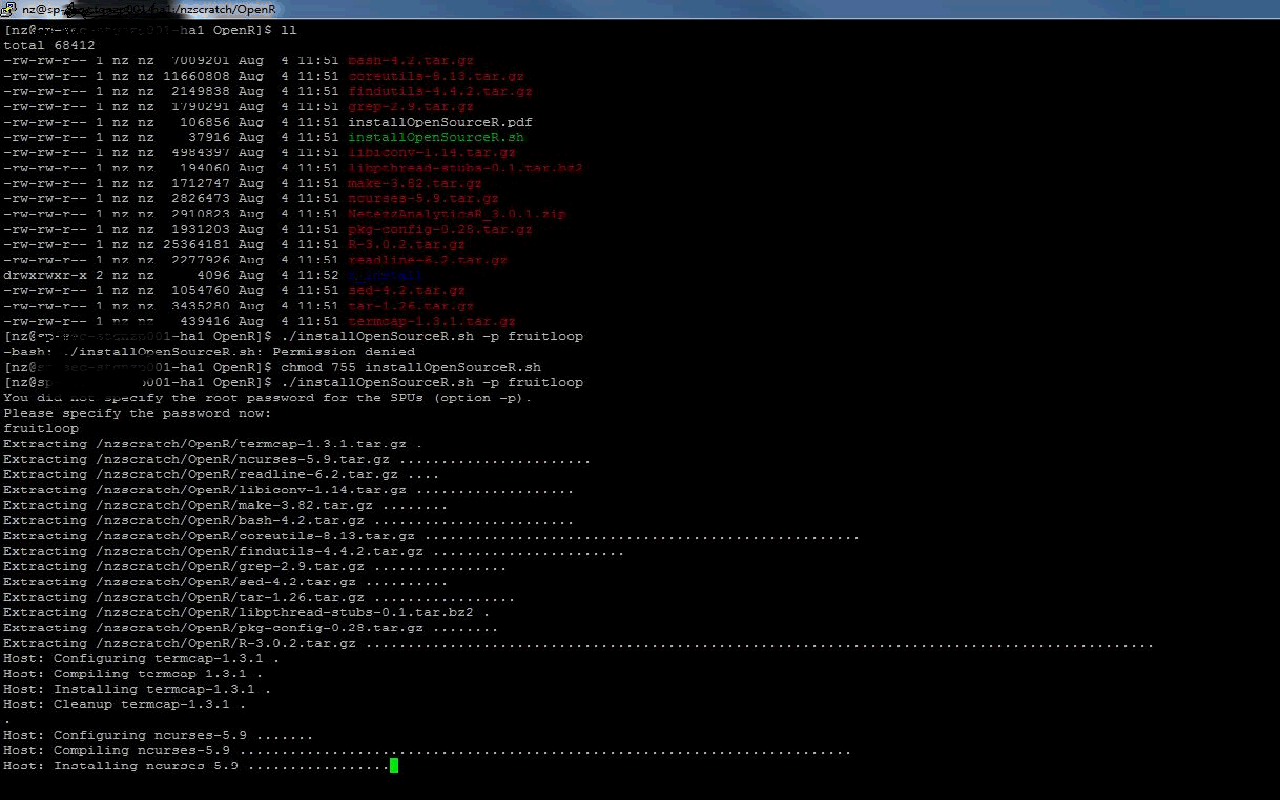
It will compile and install for Host and SPU separately, then it will create the r_3.0.2_overlay file is created. After which it will give out a summary of time taken to install R with successful completion.

Now to check if R is installed correctly.
/nz/export/ae/languages/r/3.0/host64/bin/R
This will give you the R prompt (>).

Was this topic helpful?
Document Information
Modified date:
17 October 2019
UID
swg21693307