Troubleshooting
Problem
While login into ICP console, the ICP console will show error message 'An error occurred while execution of the kube REST call for namespace'.
Symptom
From the ICP console, you could see below detailed error messages.
Unexpected response code 401 from request: GET https://icp-management-ingress:8443/idmgmt/identity/api/v1/users/admin/getTeamResources HTTP/1.1 Accept: application/json Cookie: *** Authorization: bearer *** HTTP/1.1 401 Server: openresty/1.11.2.4 Date: Tue, 13 Mar 2018 23:14:26 GMT Content-Type: application/json; charset=utf-8 Transfer-Encoding: chunked Connection: close Vary: Origin, Accept-Encoding Access-Control-Allow-Credentials: true X-Xss-Protection: 1; mode=block X-Frame-Options: SAMEORIGIN Strict-Transport-Security: max-age=15552000; includeSubDomains X-Download-Options: noopen X-Content-Type-Options: nosniff X-Dns-Prefetch-Control: off {"error":{"statusCode":401,"name":"Error","message":"An error occurred while execution of the kube REST call for namespace"}}
Cause
The issue is due to the /etc/hosts file on ICP master node does not have entry for cluster CA domain (e.g.: mycluster.icp by default). So that the ICP Kubernetes apiserver communication was failing.
Environment
Platform independent.
Diagnosing The Problem
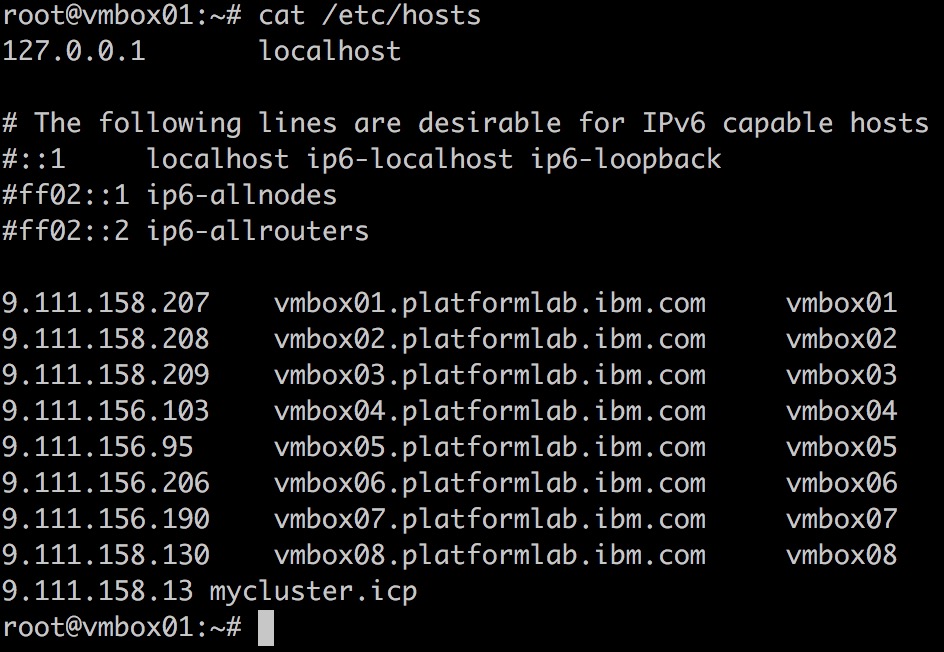
You can check the contents of /etc/hosts on ICP master node, the entry for cluster CA domain (e.g.: mycluster.icp by default) is missing.
Resolving The Problem
Ensure the /etc/host file includes the entry for cluster CA domain. If the /etc/hosts file does not include the entry for cluster CA domain, you need to:
- Disable the management of /etc/hosts by network manager or other system components.
- Add cluster CA domain entry into /etc/hosts file.
- Restart the ICP nodes.
Below is the example of /etc/hosts file in ICP cluster.
Was this topic helpful?
Document Information
Modified date:
25 July 2018
UID
ibm10717733