Troubleshooting
Problem
IBM WebSphere Adapters for JDBC cannot retrieve the metadata from remote table synonym through the external service wizard. Note: A remote table implies that the table is defined in the remote database and is configured to be accessible in the local database using the database link.
Symptom
In the Find Objects in the Enterprise System window, add the synonym.
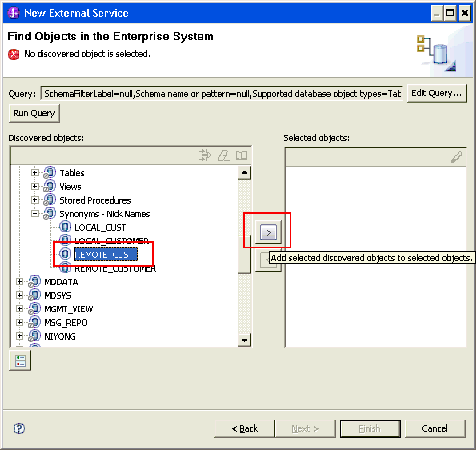
The Specify the Configuration Properties for XXX window is displayed.

In the Select one or more columns area, when you try to specify the primary key column by clicking the Add button, no columns are listed in the Add Value window. Hence, you will not be able to add the remote table synonym.

Cause
This is an Oracle driver defect.
Resolving The Problem
You can define query business objects and batch SQL business objects as a workaround for data manipulation on the remote table synonyms.
For example, consider the remote table synonym REMOTE_CUST. The following example defines a query business object to retrieve records, and a batch SQL business object to update records as shown below.
1. In the Specify the Query Properties window, specify one query and one batch business object.

2. Configure the query business object for REMOTE_CUST, as shown in the figure below.

3. Configure the batch SQL business object for REMOTE_CUST, as shown in the figure below.

Was this topic helpful?
Document Information
Modified date:
15 June 2018
UID
swg21431600