Troubleshooting
Problem
This technote resolves the SQL Error that occurs while trying to start the IBM Rational Requirement Composer Server Tomcat services.
Symptom
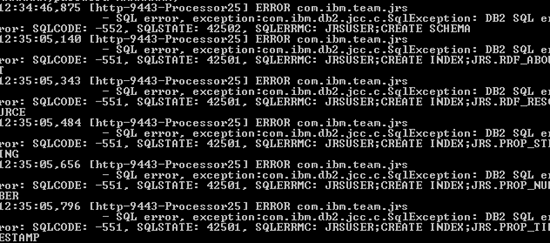
The following error can be seen when starting the Tomcat service: error: SQLCODE: -552, SQLSTATE: 42502, SQLERRMC: JRSUSER;CREATE SCHEMA [http-9443-Processor25] ERROR com.ibm.team.jrs - SQL error, exception:com.ibm.db2.jcc.c.SqlException: DB2 SQL error: SQLCODE: -551, SQLSTATE: 42501, SQLERRMC: JRSUSER;CREATE INDEX;JRS.RDF_ABOUT [http-9443-Processor25] ERROR com.ibm.team.jrs - SQL error, exception:com.ibm.db2.jcc.c.SqlException: DB2 SQL error: SQLCODE: -551, SQLSTATE: 42501, SQLERRMC: JRSUSER;CREATE INDEX;JRS.RDF_RESOURCE [http-9443-Processor25] ERROR com.ibm.team.jrs - SQL error, exception:com.ibm.db2.jcc.c.SqlException: DB2 SQL error: SQLCODE: -551, SQLSTATE: 42501, SQLERRMC: JRSUSER;CREATE INDEX;JRS.PROP_STRING [http-9443-Processor25] ERROR com.ibm.team.jrs - SQL error, exception:com.ibm.db2.jcc.c.SqlException: DB2 SQL error: SQLCODE: -551, SQLSTATE: 42501, SQLERRMC: JRSUSER;CREATE INDEX;JRS.PROP_NUM [http-9443-Processor25] ERROR com.ibm.team.jrs - SQL error, exception:com.ibm.db2.jcc.c.SqlException: DB2 SQL error: SQLCODE: -551, SQLSTATE: 42501, SQLERRMC: JRSUSER;CREATE INDEX;JRS.PROP_TIMESTAMP
[http-9443-Processor25] ERROR com.ibm.team.jrs
- SQL error, exception:com.ibm.db2.jcc.c.SqlException: DB2 SQL
Cause
The Jazz Rest Services database user may not have full administrator permission on the IBM Rational Composer Server.
Diagnosing The Problem
Resolving The Problem
Adding the Jazz Rest Services database user to the administrator group will resolve the problem.
To add the the Jazz Rest Services database user to the administrator group
- Open Control Panel
- Click on Administrative tools
- Click on Computer Management
- Expand the local users and group folder
- Click on the Groups folder
- Right Click on the Administrators
- In the field of members of click add to add the Jazz Rest Services user
This users should be created on the Operating systems once you have ran the server initialization by default this user is called "jrsuser".
Was this topic helpful?
Document Information
Modified date:
16 June 2018
UID
swg21389003