Question & Answer
Question
IBM Java 7 shows security alert with “Java Update Needed” dialog box when running Java web applications(Applets , Java web start /JNLP) in any browser.
Answer
From IBM Java 7 SR 5 onwards , a new feature was introduced to alert the users when the Java is expired or a new level of Java is available. This feature mainly warns user to upgrade to the latest Java level with all security fixes.
This security feature triggers when the user attempts to launch any applet or Java web start applications/JNLP. If the IBM Java is not up-to-date, the user will be alerted and directed to select either of these options.
“Update (recommended)”
“Block “
“Later”
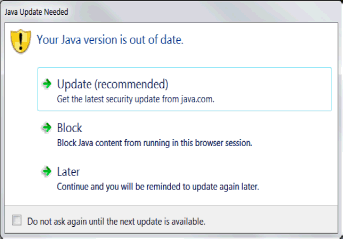
On selection of “Update (recommended)” option, IBM JAVA tries to contact the Oracle Java update server which is incorrect. We have opened APAR IV47329 to fix this bug in IBM JAVA.
Work around :
1.Click on “Later” option to continue the application.
2.To update the Java version to latest level, do not select “Update (recommended)” option in the above (Fig-1) dialog box. Instead contact the IBM product support team for getting latest version of IBM Java.
Related Information
Was this topic helpful?
Document Information
Modified date:
15 June 2018
UID
swg21665247