Troubleshooting
Problem
Cannot connect to WebLogic with IBM FileNet Configuration Manager.
Symptom
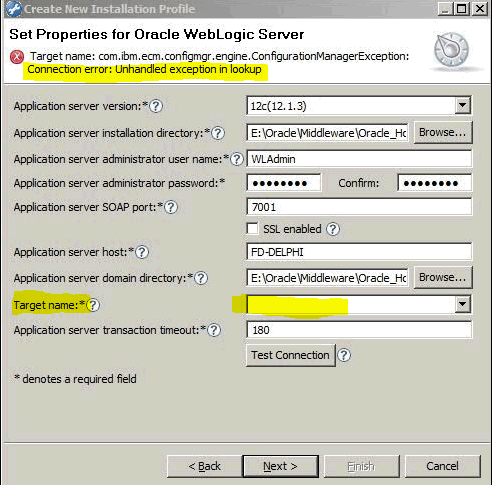
Setting the application server settings results in an error when trying to populate the 'Target name' filed.
'Connection error: Unhandled exception in lookup'.
Cause
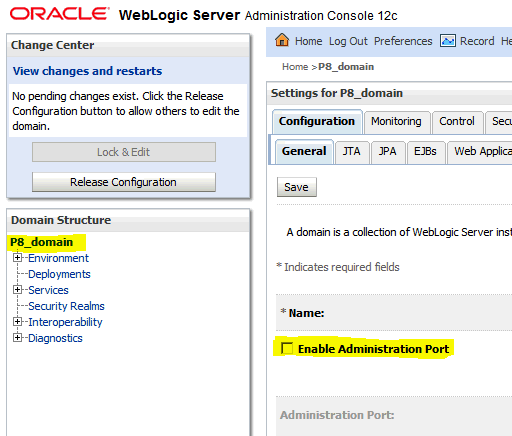
The checkbox in the WebLogic admin console for 'Enable Administration Port' has been enabled.
Environment
Weblogic 11g and 12c.
Diagnosing The Problem
Unable to connect to the WebLogic server instance using FileNet Configuration Manager.
Error: 'Connection error: Unhandled exception in lookup'.
Resolving The Problem
1. Log into WebLogic admin console.
2. Under 'Domain Structure' select the WebLogic domain name.
- This brings up the 'Settings for <your domain>' page.
3. Uncheck 'Enable Administration Port'.
4. Start IBM FileNet Configuration Manager and go to the 'Application Server' properties page.
5. Ensure that the connection to the WebLogic server is successful and that the 'Target name' field is populated via the drop down with the jvm's of the server instance.
Was this topic helpful?
Document Information
Modified date:
17 June 2018
UID
swg22002198