Technical Blog Post
Abstract
How to use different mime types and sub-type for the same AS2 partner
Body
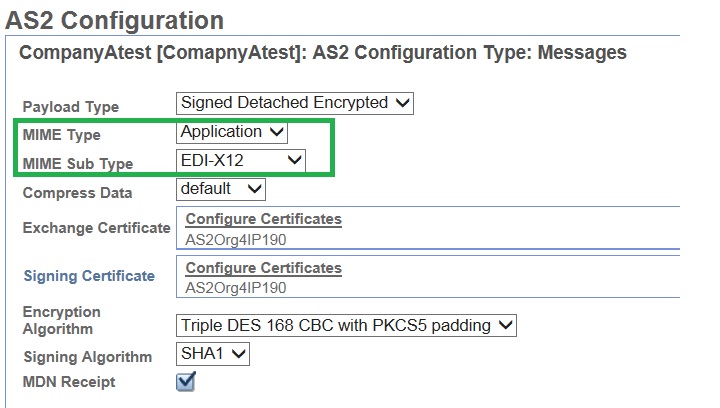
When you configure an AS2 partner setup in IBM Sterling B2B Integrator (ISBI), you need to specify the mime type and sub-type to be assigned to the messages being exchanged.
The configuration will allow you to choose one mime type and sub-type per trading partner setup from a list of available options and the chosen option will be harcoded into the partner profile configuration.
There are occasions when a remote partner will request different types of files to be sent using different mime types or sub-types; for example, EDI files will need to be sent as "application/EDI-X12" and xml files need to be sent as "application/XML".
In order to achieve the scenario mentioned above in ISBI, you will need to configure two different AS2 partner profiles for each of the required mime types and/or sub-types combinations.
Taking into account that the relationship between the partner profile and organization AS2 identifiers needs to be unique, you have two possible solutions:
- Request two AS2 identifiers from your partner, create two different AS2 partner profiles with a slightly different name and assign to each the unique AS2 identifier and mime type/sub-type.
Partner Setup 1:

Partner Setup 2:


Then create a relationship for each AS2 partner profile with your current organization.


- If the partner cannot provide two AS2 identifiers, then you need to create a new one yourself by creating a new second organization and assign to it another AS2 identifier of your choice.
AS2 Organization 1:

AS2 Organization 2:

Then create the two AS2 partner profiles with slightly different names and the corresponding mime types/sub-type, but with the same AS2 identifier.
Partner Setup 1:
Partner Setup 2:

Finally, create a relationship between each AS2 partner profile and one of the two organizations you have created so that the relationships are unique.

Note that in this second scenario, you will need to provide your two AS2 identifiers to your partner that needs to configure them accordingly on their own AS2 application.
UID
ibm11121919