How To
Summary
You might have column headings defined for your files and would like those to display instead of the column name. This document shows you how to display the column headings in ACS Run SQL Scripts.
Steps
First, in your JDBC settings you need to check the extended metadata options under the other tab.

Under Edit and preferences from the Run SQL Script Window you need to select the column heading you would like displayed from the Results tab.
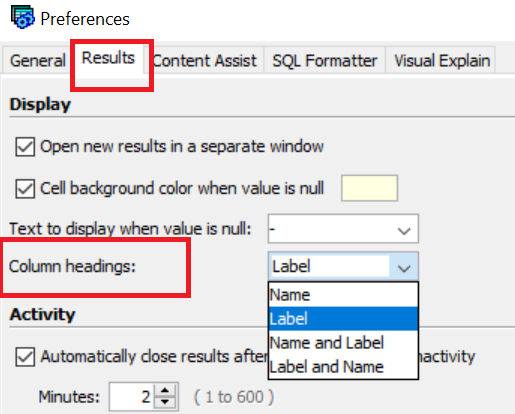
If you make any changes to your current configuration, you need to close the Run SQL Script Window and reconnect.
Document Location
Worldwide
[{"Type":"MASTER","Line of Business":{"code":"LOB66","label":"Technology Lifecycle Services"},"Business Unit":{"code":"BU070","label":"IBM Infrastructure"},"Product":{"code":"SSRQKY","label":"IBM i Access Client Solutions"},"ARM Category":[{"code":"a8m0z0000001goLAAQ","label":"IBM i Db2-\u003EACS \/ Navigator \/ Run SQL Scripts \/ ODBC"}],"ARM Case Number":"TS011626358","Platform":[{"code":"PF012","label":"IBM i"}],"Version":"All Versions"}]
Was this topic helpful?
Document Information
Modified date:
22 December 2022
UID
ibm16851473