How To
Summary
You can download a spool file using Access Client Solutions without using IBM Navigator for i
Objective
To download a spoolfile without needing access to IBM Navigator for i
Environment
Access Client Solutions running on a pc, mac or linux
Steps
From an Access Client Solutions 5250 session:
1) Go to Actions and select Printer Output
a separate window opens showing your spool files.

2) Highlight the spool file you want to download and go actions and select download
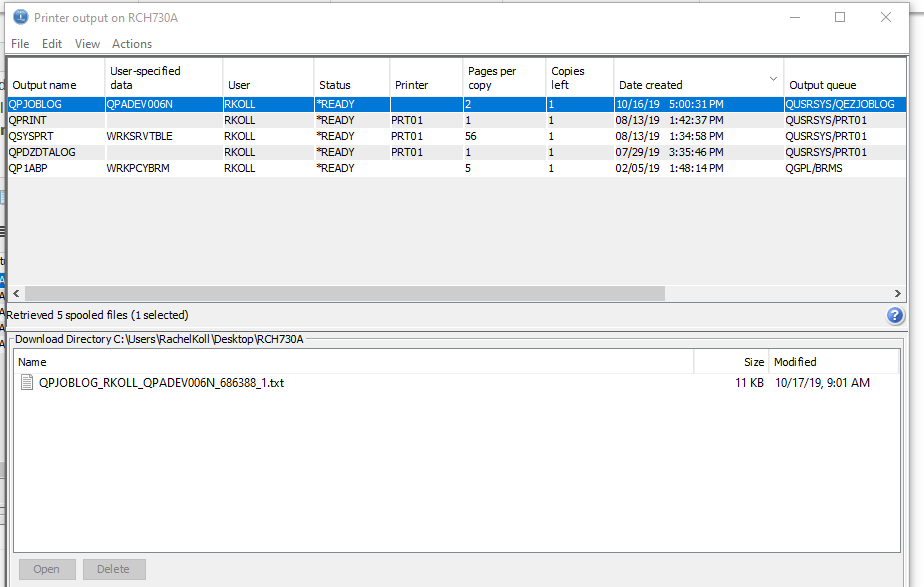
3) Highlight the file in the bottom and drag and drop it to the pc.
Additional Information
1) If you want the file to copy as Text you will need to go to Edit-Preferences and uncheck the box for PDF
PDF will be used by default only if it is available.
( The host supports PDF transformations if the Transform Services product (option 1) is installed and functional. )

2) You can also change the users spool files by going to Edit-Filter
(It is not recommended to do ALL USERS as that is usually too large)

Document Location
Worldwide
[{"Type":"MASTER","Line of Business":{"code":"LOB68","label":"Power HW"},"Business Unit":{"code":"BU070","label":"IBM Infrastructure"},"Product":{"code":"SWG60","label":"IBM i"},"ARM Category":[{"code":"a8m0z0000000CTpAAM","label":"IBM i Access-\u003EAccess Client Solutions"}],"ARM Case Number":"","Platform":[{"code":"PF012","label":"IBM i"}],"Version":"7.2.0;7.3.0;7.4.0;7.5.0;and future releases"}]
Was this topic helpful?
Document Information
Modified date:
20 December 2024
UID
ibm11088494