Troubleshooting
Problem
How to update the choice list properties but instead of using FEM, using ACCE?
Cause
FEM and ACCE UI are so much difference. FEM is removed starting CPE 5.2.1, the users may not know the ACCE operations that are equivalent in FEM
Resolving The Problem
Using FEM:
1. Bring up FEM
2. Navigate to Object Stores > select the object store
3. Navigate to Document Class > select the class required to update the choice list
4. Right click on the selected document class > select Properties required to edit the choice list
5. Click on the Properties Definition > select the property definition required to edit the choice list
6. Click on the Edit tab > click on More tab
7. Look for the Choice List field > click on the arrow down button to select the desired choice list
8. Click on OK, then OK to save it.
Using ACCE:
1. Bring up ACCE
2. Navigate to Object Stores tree > click on the object store to open the object store tab
3. Navigate to the Data Design and Classes folder > expand the Document Class and select the document class (TestClass1 is the example shown below) that is required to update the choice list, to open the Document Class tab
4. From the Properties tab, click on arrow down button and select the property definition you want to modify; In this case, select the ChoiceListStringProp to modify
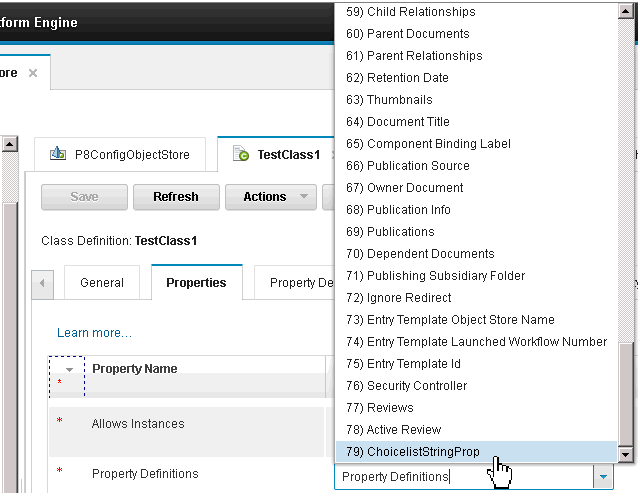
5. ACCE will open that property definition in another tab which is the ChoiceListStringProp(79) shown below

6. Click on the arrow down button to show the Choice List menu

7. Modify the property definition as required. In this case, you need to find the Choice List Object, copy it and paste it to the Choice List field in order to update the field
a. To find the Choice List Object, navigate to Data Design > click on the Choice Lists. ACCE will open the Choice Lists tab

b. The example shows the current Choice List is ChoiceList2_string. We will update it to the ChoiceList3
i. Click on the "Choicelist3", ACCE will open the ChoiceList3 tab. Navigate to the ChoiceList3, click on the "Properties" tab

ii. Look for the "This" field, and the arrow down button, select the "Copy Object Reference"

iii Go back to the ChoiceListStringProp tab, look for the Choice List field and the arrow down button to bring up the choice list menu

And select the Paste Object

8. Go back to the Class Definition tab and click Save
Was this topic helpful?
Document Information
Modified date:
17 June 2018
UID
swg21959272