Question & Answer
Question
How do I install the Database Configuration Utility for iBase?
Cause
The Database Configuration Utility can be used to configure iBase database connection (IDB) files, to change authentication methods and/or database server name.
Answer
The Database Configuration Utility can be installed using the iBase install wizard, either when deploying a new installation or modifying an existing one.
1. Launch the iBase install wizard and click Next.
If you are modifying an existing iBase installation, select the 'Modify' radio button and click Next.
If you are deploying a new iBase installation, accept the licence agreement and choose a 'Custom' installation.
2. At the feature selection screen, expand the Extended Features section.
3. Click on the Tools feature, and select 'This feature will be installed on the local hard drive.

4. Click on the Next button, then the Install button to finish your installation.
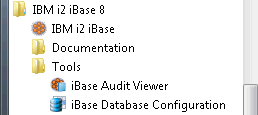
5. Once installed, you can find the tool on the Start menu under All Programs > IBM i2 iBase 8 > Tools
[{"Product":{"code":"SSXW43","label":"i2 iBase"},"Business Unit":{"code":"BU059","label":"IBM Software w\/o TPS"},"Component":"--","Platform":[{"code":"PF033","label":"Windows"}],"Version":"8.9.5;8.9.1;8.9.11","Edition":"","Line of Business":{"code":"LOB24","label":"Security Software"}}]
Was this topic helpful?
Document Information
Modified date:
16 June 2018
UID
swg21679223