Question & Answer
Question
How do you determine the storage being used by a User Profile.
Cause
With the introduction of the IBM i SQL Service USER_STORAGE view, you can create an SQL report containing the storage being used by a user profile.
Authorization:
You must have *OBJOPR and *READ authority to a *USRPRF or it will not be returned. To see information for independent ASPs (iASPs), the iASP must be varied on.
You must have *OBJOPR and *READ authority to a *USRPRF or it will not be returned. To see information for independent ASPs (iASPs), the iASP must be varied on.
User storage is broken down by SYSBAS and iASPs.
Using the RUN SQL Scripts tool, run the following SQL Statement:
  SELECT *
    FROM QSYS2/USER_STORAGE
    WHERE USER_NAME = 'HUGO'
          OR USER_NAME = 'V6CASTIL'
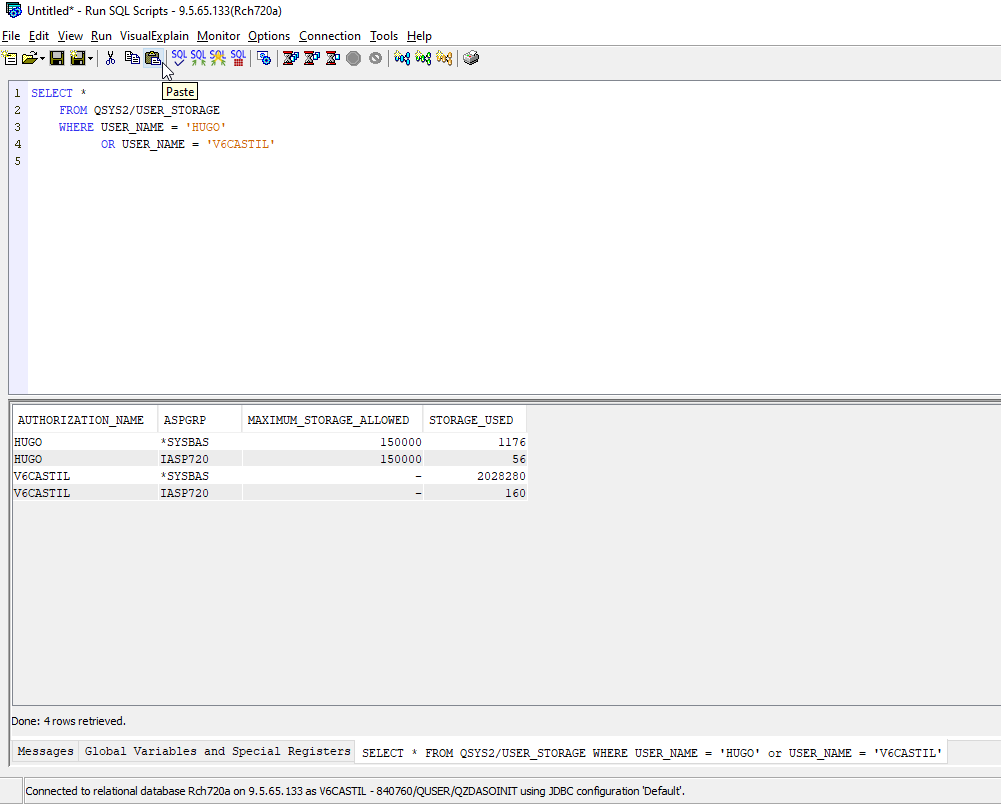
Note 1: The report contains storage information on both the V6CASTIL and HUGO user profiles
Note 2: The report contains storage information for bot the *SYSBAS and Independent ASPs
More information on the USER_STORAGE view can be found:
https://www.ibm.com/support/knowledgecenter/ssw_ibm_i_74/rzajq/rzajqviewuserstorage.htm
[{"Line of Business":{"code":"LOB57","label":"Power"},"Business Unit":{"code":"BU058","label":"IBM Infrastructure w\/TPS"},"Product":{"code":"SWG60","label":"IBM i"},"ARM Category":[{"code":"a8m0z0000000CHyAAM","label":"Security"}],"ARM Case Number":"","Platform":[{"code":"PF012","label":"IBM i"}],"Version":"7.2.0;7.3.0;7.4.0"}]
Was this topic helpful?
Document Information
Modified date:
11 November 2020
UID
ibm16332285