Question & Answer
Question
How to discover Siebel Integration Objects with WebSphere Business Integration Adapters (WBI) and WebSphere Adapter for Siebel Business Applications?
Cause
The design changed between the discovery agents of WBI and JCA technologies.
Answer
For the WebSphere Business Integration for Siebel Business Applications, Siebel Integration Objects can be discovered with the Siebel ODA (Object Discovery Agent) as shown in the picture below.

With the WebSphere Adapters for Siebel Business Applications, the design of the metadata discovery changed. The discovery for "Integration Objects" is integrated into the discovery process for "Siebel Business Services".
Example:
(1) Select "Siebel Business Services" and perform a query for "EAI Siebel*" as below.

Add the "Query" (or something else) to the right.
(2) A popup dialog will be shown and the user can choose "Integration Object" (IO) as Siebel Message attribute. Note that the type of Siebel Message is "Hierarchy" in Siebel server, so it can be assigned to any IOs.
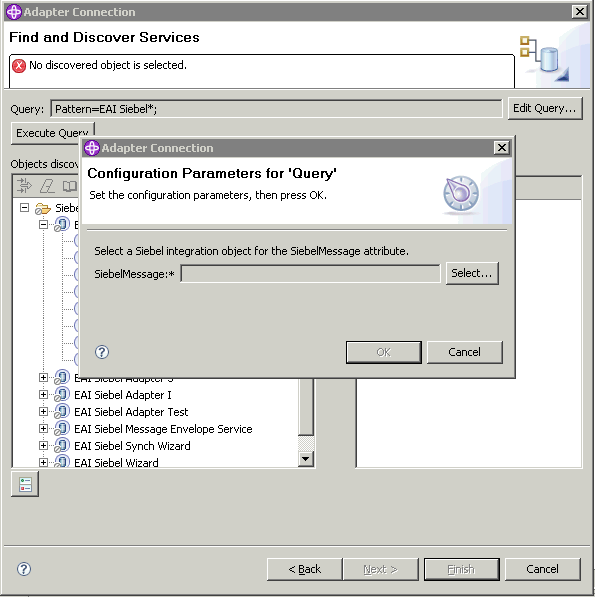
(3) Click "Select" to choose the IO from the list for SiebelMessage. This is similiar to "Integration Object" in the ODA.

After the discovery is finished, the IO will be mapped to the attribute "SiebelMessage" automatically.
The artifacts for Business Services and Integration Objects are generated automatically as well.
[{"Product":{"code":"SSMKUK","label":"WebSphere Adapters Family"},"Business Unit":{"code":"BU053","label":"Cloud & Data Platform"},"Component":"Adapter for Siebel","Platform":[{"code":"PF025","label":"Platform Independent"}],"Version":"7.5;7.0;6.2;6.1;4.6","Edition":"","Line of Business":{"code":"","label":""}}]
Was this topic helpful?
Document Information
Modified date:
22 June 2018
UID
swg21457649