How To
Summary
This document provides detailed view how to connect an E980 with dual Flexible Service Processor (FSP) to one or two Hardware Management Consoles (HMC).
Environment
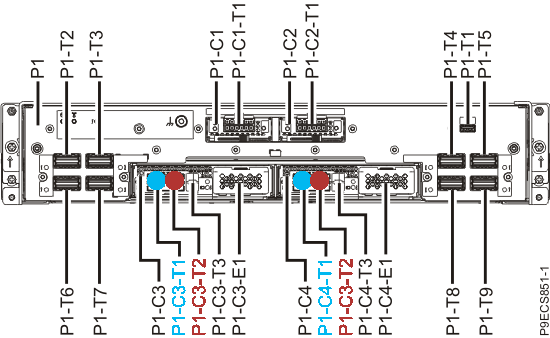
The E980 System Control Unit (SCU) provides redundant Flexible Service Processors (FSP). Each FSP has two ethernet connectors: one for HMC1 (port T1) and another one for an optional HMC2 (port T2).
The FSP are located in C3 and C4. Each HMC must be connected to both FSP where each HMC must use a different IP range.
The FSP are located in C3 and C4. Each HMC must be connected to both FSP where each HMC must use a different IP range.
Steps
First HMC (blue) is connected both FSP T1 port, the second HMC (red) is connected to both FSP T2 port. The second HMC is optional but strongly recommended for redundancy. Instead of a physical HMC IBM also offers a virtual HMC (vHMC).
Private network overview

System Control Unit (SCU) details
Document Location
Worldwide
[{"Line of Business":{"code":"LOB57","label":"Power"},"Business Unit":{"code":"BU058","label":"IBM Infrastructure w\/TPS"},"Product":{"code":"TI0007I","label":"Power System E980 Server (9080-M9S)"},"ARM Category":[],"Platform":[{"code":"PF025","label":"Platform Independent"}],"Version":"All Version(s)"}]
Was this topic helpful?
Document Information
Modified date:
06 December 2021
UID
ibm16426837