Troubleshooting
Problem
How to install a signed certificate on the HMC.
Resolving The Problem
How to install a signed certificate on the HMC.
How to get to the Wizard:
Classic GUI: HMC Management -> Manage Certificates -> Create -> New Certificate
Enhanced+ GUI: Click Padlock on left panel -> Systems and Console Security -> Manage Certificates -> Create -> New Certificate
After that the wizard will open. The HMC does have the option as well, as you can see below, to do a Self-signed certificate. Where-as the HMC signs the certificate itself, rather than a known Certificate Authority.
1) Generate a signing request
Click Create, New Certificate, signed by a certificate authority


Save signing request, csr.file.
2) Sign the signing request
3) Import the signed certificate and the CA
Use the "Manage Certificates" task to import the signed certificate (i.e. file /tmp/server.crt) and the CA certificate (i.e. /tmp/ca.crt) after scping them to the system with the remote browser.
How to get to the Wizard:
Classic GUI: HMC Management -> Manage Certificates -> Create -> New Certificate
Enhanced+ GUI: Click Padlock on left panel -> Systems and Console Security -> Manage Certificates -> Create -> New Certificate
After that the wizard will open. The HMC does have the option as well, as you can see below, to do a Self-signed certificate. Where-as the HMC signs the certificate itself, rather than a known Certificate Authority.
1) Generate a signing request
Click Create, New Certificate, signed by a certificate authority
Save signing request, csr.file.
2) Sign the signing request
3) Import the signed certificate and the CA
Use the "Manage Certificates" task to import the signed certificate (i.e. file /tmp/server.crt) and the CA certificate (i.e. /tmp/ca.crt) after scping them to the system with the remote browser.
We have a video that shows the proper order of installing a certificate chain.
Note: If you cancelled out of the import (i.e. in your example at the point when being asked for the optional signing certificate(s)) you should not have to regenerate the request and just startup the import task again. However, if you import just the signed server certificate and specify no signing certificates when prompted, this will install the signed server certificate and there is no option later to add the signing certificate(s) if there are any. In other words, if you forget (or ignore) to import the signing certificates when importing the signed server certificate, you do not have an option to later add them.

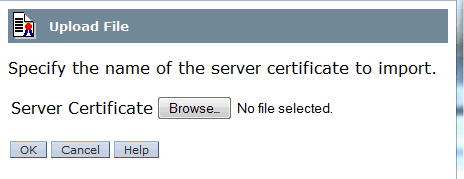
Specify the signed server certificate (server.crt).


Add one (or more) signer certificates (ca.crt). When importing multiple signers (a certificate chain) list the signers in order with the root CA last.


4) Reboot
You must reboot (not just the HMC prompted restart) for 5250 proxy to pick up the change.
5) Add the CA to the IBM Key Manager
In iSeries Access for Windows, add the signer certificate if needed. Once the CA is added, you can connect to any HMC with a server certificate signed by the CA.

The result should be a certificate chain with at minimum of the CA followed by the server certificate.
Note: If you cancelled out of the import (i.e. in your example at the point when being asked for the optional signing certificate(s)) you should not have to regenerate the request and just startup the import task again. However, if you import just the signed server certificate and specify no signing certificates when prompted, this will install the signed server certificate and there is no option later to add the signing certificate(s) if there are any. In other words, if you forget (or ignore) to import the signing certificates when importing the signed server certificate, you do not have an option to later add them.
Specify the signed server certificate (server.crt).
Add one (or more) signer certificates (ca.crt). When importing multiple signers (a certificate chain) list the signers in order with the root CA last.
4) Reboot
You must reboot (not just the HMC prompted restart) for 5250 proxy to pick up the change.
5) Add the CA to the IBM Key Manager
In iSeries Access for Windows, add the signer certificate if needed. Once the CA is added, you can connect to any HMC with a server certificate signed by the CA.
The result should be a certificate chain with at minimum of the CA followed by the server certificate.
cs6hmcb:~ # openssl s_client -connect localhost:443 -showcerts
cs6hmcb:~ # openssl s_client -connect localhost:443 -showcerts
CONNECTED(00000003)
depth=1 C = US, ST = MN, L = Rochester, O = igsc, OU = dxd, CN = David Dilling, emailAddress = ddilling@us.ibm.com
verify error:num=19:self signed certificate in certificate chain
verify return:0
---
Certificate chain
0 s:/C=US/ST=Minnesota/L=Rochester/O=IBM/OU=igsc/emailAddress=ddilling@us.ibm.com/CN=cs6hmcb.rchland.ibm.com
i:/C=US/ST=MN/L=Rochester/O=igsc/OU=dxd/CN=David Dilling/emailAddress=ddilling@us.ibm.com
-----BEGIN CERTIFICATE-----
MIIElTCCAn0CAQEwDQYJKoZIhvcNAQEFBQAwgYcxCzAJBgNVBAYTAlVTMQswCQYD
VQQIDAJNTjESMBAGA1UEBwwJUm9jaGVzdGVyMQ0wCwYDVQQKDARpZ3NjMQwwCgYD
VQQLDANkeGQxFjAUBgNVBAMMDURhdmlkIERpbGxpbmcxIjAgBgkqhkiG9w0BCQEW
E2RkaWxsaW5nQHVzLmlibS5jb20wHhcNMTQwNjEzMTQ1NjE5WhcNMTUwNjEzMTQ1
NjE5WjCBmDELMAkGA1UEBhMCVVMxEjAQBgNVBAgMCU1pbm5lc290YTESMBAGA1UE
BwwJUm9jaGVzdGVyMQwwCgYDVQQKDANJQk0xDTALBgNVBAsMBGlnc2MxIjAgBgkq
hkiG9w0BCQEWE2RkaWxsaW5nQHVzLmlibS5jb20xIDAeBgNVBAMMF2NzNmhtY2Iu
cmNobGFuZC5pYm0uY29tMIIBIjANBgkqhkiG9w0BAQEFAAOCAQ8AMIIBCgKCAQEA
1h6nVx78kmHCFTH0pN4MtyBYIbTIbJUnKvW7ltCuW0qv9nolcs58ZbZYXm8t3OeY
0dMem+NX0LVUnBDHzVaCW33upYSNbi6ttnRGuL9Zv7fVsqDqh/DA1T4HXAP9mXeO
ZdfXG7nMCxezucgkLitjRsn1R2b8qhM1876euHabgnogtRUkcsW5OIqyMPscRQRn
oLeWWBq/jErBFEAYgEHbPI14bLxXaqMLNVqRwoQ1CLsEDLYBzM6NM1ZqSKk3Dfit
EhcuI6uBbMvHV0j9cas9zo6+Pwr/tAUrKcWCwmCOELwHot8Fjg8QsxFV8MZeRSNy
ltgmQwaFPdiqmjyDodaVuQIDAQABMA0GCSqGSIb3DQEBBQUAA4ICAQB8htGRN+Ws
BKY7u6h5fwKLxadlOcIk+PdfdDvqqjmVc1uyWZfw5wzAltZ1JnzVnsW0W2B0Z33m
Xqr643pnHuMHqi16bKj3iTkW6569fyV8XWsEfR9YPUa9F0A2ps/2go4u8GRLWBlj
0UuMWu01c4dmvm5iY7kxpxlGrdSiBQzPTbkJY7xd7R73kJjwyfs2feDh9S604xWI
TMKGCHKO2SpNAqH08A0ml7+cruJvXu80nXGwo9GAfjoQvXL8ZA0qM7Y2YpphZjSy
uKZCio5H7/0a00s6OhHDbIxoicIB952W22/vK4d3D/rDKLlNeQiV1hWL3WI6xmpM
POqIUUcHW7nL5YSyNcAjlzvJgbqe0TEw12CsGlwd3y1P6VIr8M17M3M4QnXCyuPl
+qtoj8ahcV5uHrZJux4NR+ou4WEexv0DLdC100N1KPRtu2zWwMBgdesJErlOkqMI
j/xBKk6LXdKTdGSgJqjRQBa12wdLHfkRFuy2KPTxEHzyA/i6gfVa/e5oKYNJa+b0
/jgS8vMiGtc4kLXeCbDA0zt4DUfLjQAtCXaf7mQvVLxIgmQWimQ2eTMD4rUiu45f
LUdwTb9lBAvwzKt74ZMWUbh0ne/QCUEOTDhm9eiCVAQSY8C3O8GbuPQqPPKv6hjZ
NMyyY9ldR9rI47vJ3a/MON+jBpuUQL5efA==
-----END CERTIFICATE-----
1 s:/C=US/ST=MN/L=Rochester/O=igsc/OU=dxd/CN=David Dilling/emailAddress=ddilling@us.ibm.com
i:/C=US/ST=MN/L=Rochester/O=igsc/OU=dxd/CN=David Dilling/emailAddress=ddilling@us.ibm.com
-----BEGIN CERTIFICATE-----
MIIF4zCCA8ugAwIBAgIJAOdmf0DjZ5BCMA0GCSqGSIb3DQEBBQUAMIGHMQswCQYD
VQQGEwJVUzELMAkGA1UECAwCTU4xEjAQBgNVBAcMCVJvY2hlc3RlcjENMAsGA1UE
CgwEaWdzYzEMMAoGA1UECwwDZHhkMRYwFAYDVQQDDA1EYXZpZCBEaWxsaW5nMSIw
IAYJKoZIhvcNAQkBFhNkZGlsbGluZ0B1cy5pYm0uY29tMB4XDTE0MDYxMzE0NTU0
MloXDTE1MDYxMzE0NTU0MlowgYcxCzAJBgNVBAYTAlVTMQswCQYDVQQIDAJNTjES
MBAGA1UEBwwJUm9jaGVzdGVyMQ0wCwYDVQQKDARpZ3NjMQwwCgYDVQQLDANkeGQx
FjAUBgNVBAMMDURhdmlkIERpbGxpbmcxIjAgBgkqhkiG9w0BCQEWE2RkaWxsaW5n
QHVzLmlibS5jb20wggIiMA0GCSqGSIb3DQEBAQUAA4ICDwAwggIKAoICAQC683Aj
FDJJFegJebATUhqJADRbRq1g6W2P7rty5OZcaokYzuOk9cOGFSzPBey66S7T4PDO
kJ7LH2sn7HvK9lO4Zm5BXpUxxHNgRyfOCGL5KcpPPx66ca/aJOWjVClL+kGSgB0v
LRoyNV//MeAYgDISIt8SD9eHy+IFJbe4gTEhcnYASVyG8KOWolCTlGOTn02TSUh/
jnapO4Ew11Bms0OfMcmxpKZwwEJgGhIHmE4OD30gY0yhgtfgtdDw5vjS8N7rYTrO
bQvA6Dhud2KAmq2B0xiOvH8PAkpjU5ZjPNj7jlDk0pPbtfaYbwzNXUgYkjOJ2we1
de0yUfqixITIunSF9XuIGXbwDd8ocorn8Z++OpJWrUHHscU7e35f4PpjJpS5TmKb
olKn5V+SX0kMEz44yDzitvJAx73wcF7psjJqUUINBeB4Re4M7L7mQp8cTz63nH8P
mPZbF8yGeN8g5uO3aTDGKyQKxvUxnL62k9RYcQirk5hn4a1DkpdG+t3Crv9d7pT8
+RbY180NTgmPIwQ3Tk4qaQ2mWD6ttYcQts/Vc9Dy/gESJ2NWHF3KW0CtedfYu5y7
mQgXSk1nrAoMwf7fQC3f1ZIPT72apf/MP6sXvPEZIgQoPi485jurrZu/vcNiqPZq
0CVyKHg2iNuBOnw8hgWcy8WPvLgy7kUptoY07wIDAQABo1AwTjAdBgNVHQ4EFgQU
IZefSjRwai9NbPvBIUMOP6ztlgswHwYDVR0jBBgwFoAUIZefSjRwai9NbPvBIUMO
P6ztlgswDAYDVR0TBAUwAwEB/zANBgkqhkiG9w0BAQUFAAOCAgEAlXbUfoMauA7I
c7PU4CYHhzQ9en1/scxVRHV2lR9IgKyLIIRypvyplkBh0n0rl2nSHHfRWMFz1dRR
lTO3qZDGENicikWBRUZG7aC3I90uVE7uI7Elzy9qMDZP2i6YrHjyQItVXrF9827f
c//g271UQnwdkPS9yTzp2hn1K+qWtaJHd+QWl6RnXwBPQKqTnPrChBWvqXcEaeQx
wTO4tQi3G5xOVSKgKhj8GCoE4iNR2FKiYSQpwnOujKH3nSrzrgRJOAcrKl9MOHBD
eZNHhlrnetj7uzcxuovWe/vQHURUUVrB1ghYINRPzB4qV5n+SdX76dqcifuwWXB7
bu41Ps7EmnLkCHxGER499ToJNMOA6Xr+CTZukrVpPTsx7OU85VCpCLItmukbQlap
Y49frY/tVsVZgqRQBZ+oTnlygaehUXMdFhRLl9E/cCm4w7zjeuOWSrepLKNu5PxC
4GckfylhZP561veQN+FSKVJbvpuz1Q8ZTlD04n/mffeAxoOTyhvcYD+5tG760FTX
G1LrX3VYulsGgBjqidiOuMik2RN6CeOb4OMxj7ZurPiwPQ5GSdB1DhFRWD7R7ZjP
PZjaTQJZVHdkeuZxkpMiUGN/8AeF8SOrcUbNvRIJxvFJXo5C/4CDsS6rXESio/MM
+qWr8gbMmgGXEx1vQ0PNIDMpQ/+t2f4=
-----END CERTIFICATE-----
---
Server certificate
subject=/C=US/ST=Minnesota/L=Rochester/O=IBM/OU=igsc/emailAddress=ddilling@us.ibm.com/CN=cs6hmcb.rchland.ibm.com
issuer=/C=US/ST=MN/L=Rochester/O=igsc/OU=dxd/CN=David Dilling/emailAddress=ddilling@us.ibm.com
---
No client certificate CA names sent
---
SSL handshake has read 3386 bytes and written 509 bytes
---
New, TLSv1/SSLv3, Cipher is EDH-RSA-DES-CBC3-SHA
Server public key is 2048 bit
Secure Renegotiation IS supported
Compression: NONE
Expansion: NONE
SSL-Session:
Protocol : TLSv1
Cipher : EDH-RSA-DES-CBC3-SHA
Session-ID: 539B4DB30060E5080A994F70358C5AC957ECD24252320D6544F735A79E36CC1B
Session-ID-ctx:
Master-Key: 07715E52A71F8BE8D0F3FB1761DB0DC1BB8CE3AE6063A637E6B6BE25D51FC2E7C59F5C80D10D13E514186C9010710BE2
Key-Arg : None
PSK identity: None
PSK identity hint: None
SRP username: None
Start Time: 1402686899
Timeout : 300 (sec)
Verify return code: 19 (self signed certificate in certificate chain)
---
[{"Product":{"code":"SSB6AA","label":"Power System Hardware Management Console Physical Appliance"},"Business Unit":{"code":"BU054","label":"Systems w\/TPS"},"Component":"HMC","Platform":[{"code":"PF025","label":"Platform Independent"}],"Version":"Version Independent","Edition":"","Line of Business":{"code":"LOB08","label":"Cognitive Systems"}}]
Historical Number
553627573
Was this topic helpful?
Document Information
Modified date:
03 November 2021
UID
nas8N1012442