Fix Readme
Abstract
Fatal Error windows appears when testing a Query Subject or validating joins.
Full Error:
BmtActionsHelper.cpp(488):CCLSystemError: CCL_RETHROW: BmtActionsHelper::DoAction
BmtActionsHelper.cpp(488):CCLSystemError: CCL_RETHROW: BmtActionsHelper::DoAction
CCLIDOM_HELPER.cpp(328): CCLSystemError: CCL_RETHROW: CCLIDOM_Heloper::write
Content
When the following error when testing Query Subject or Validating joins appears:
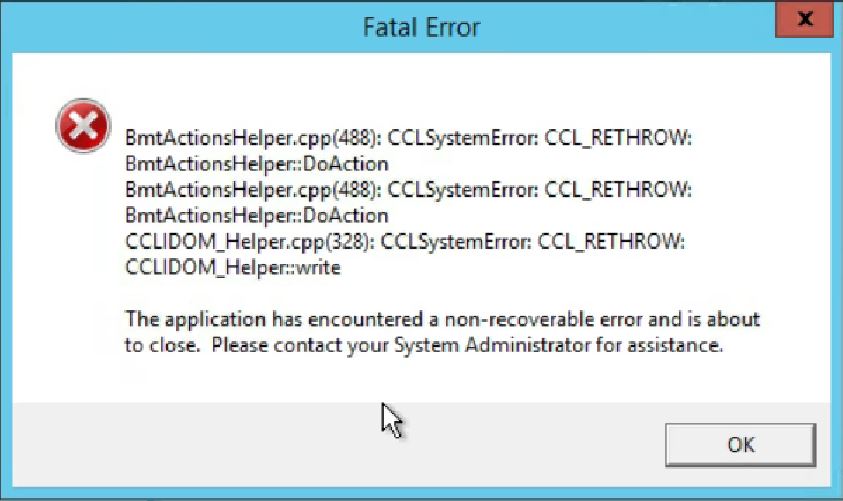
First thing to try when this error is encountered is to close any open Framework Manager instances and delete or move files from the <framework_manager_install>\temp folder.
Then Launch Framework Manager and try the steps again to see if the issue is resolved.
If the problem persists this issue may be caused by the user(s) not having Capabilities to Desktop Tools and Data Manager.
Fix:
- Go to Administration Console
- Select the "Security" tab
- On the left hand explorer pane select "Capabilities"
- Find Data Manager and select the drop down to find Properties
- Select properties and then select the "Permissions" tab
- For the users that need to create/modify or publish models they will need to be granted: Read, Write, Execute, Traverse, Set Policy
- Once set select "OK" and repeat for "Desktop Tools" capability
Was this topic helpful?
Document Information
Modified date:
18 December 2020
UID
ibm10716515