Troubleshooting
Problem
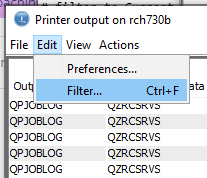
In Printer Output of IBM i Access Client Solutions (ACS), you select Edit -> Filter...
The following screen (Set Filter) has all the options grayed out however:

This happens regardless of what system you are accessing.
Symptom
Filter options of Printer Output are not available.
Cause
During the deployment of IBM i ACS, a dialog box was presented asking "Is it ok to view printer output for all users?"

If you selected 'No', the Filter options of Printer Output are not available.
Environment
IBM i ACS clients.
Resolving The Problem
The AcsConfig.properties files can be edited to modify this behavior. The AcsConfig.properties file can be found in the path that IBM i ACS was deployed, typically:
C:\Users\<Public or username>\IBM\ClientSolutions
Edit AcsConfig.properties, and search on "filter". You will find a section with comments describing the setting, with the following line NOT commented out:
com.ibm.iaccess.splf.FilterRestricted=true
Comment out the above line (by prefacing it with a "#" as the lines above it are), save the file, and restart IBM i ACS to resolve the issue. Be sure to search for all possible instances of the above line in the file.
Related Information
Document Location
Worldwide
[{"Business Unit":{"code":"BU070","label":"IBM Infrastructure"},"Product":{"code":"SSRQKY","label":"IBM i Access Client Solutions"},"ARM Category":[],"Platform":[{"code":"PF012","label":"IBM i"}],"Version":"All Versions","Edition":"","Line of Business":{"code":"LOB66","label":"Technology Lifecycle Services"}}]
Was this topic helpful?
Document Information
Modified date:
22 June 2026
UID
ibm16188571