Troubleshooting
Problem
The cluster generic resource does not failover to the next group.
Symptom
Tivoli Storage Manager client schedule fails to start after failover.
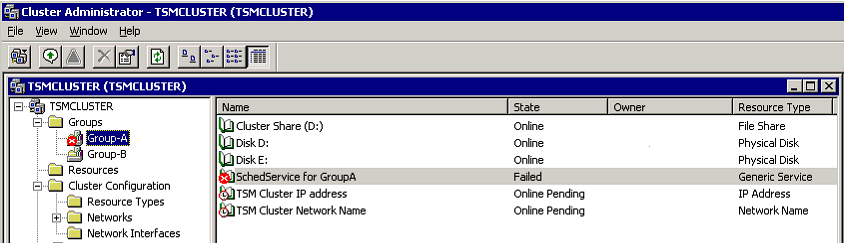
The Cluster Administrator can be used to verify that the generic resource fails to failover.
To force a fail over right click on the group name and choose “Move Group”
Below is an image after a forced failover where the cluster generic service for a cad managed schedule has failed to failover.
Cause
The service name specified for the Cluster Generic Service does not exist on the failover system.
Environment
Windows
Resolving The Problem
Check to make sure that the service specified by the Cluster Generic Service Resource has the exact name and parameters on each physical system of the cluster.
For example, the "TSM Client Acceptor" daemon (dsmcad) service name specified in the Cluster Generic Service Resource must be defined on each physical system in the cluster. The name for the service on each physical system can be found by going to Start -> Control Panel -> Administrative Tools -> Services, and finding the name in the list of services that appears. Alternatively, the following MS-DOS command can be used (run from the B/A client directory):
dsmcutil list
Example of the "TSM Client Acceptor" daemon service name within the Cluster Generic Service Resource "SchedService":

Example 'dsmcutil list' output on each of the 2 physical systems of the cluster, confirming the "TSM Client Acceptor" service name matches that of the Cluster Generic Service Resource:
SystemA:

SystemB:

If needed, the following command can be used to install the dsmcad on the physical host of the cluster:
- dsmcutil install cad /name:"YourTSMCADnameHere" /node:nodename /password:pswd /startnow:yes /optfile:"x:\path\to\opt\file" /cadschedname:"TSMschedNameHere"
The following command can be used to uninstall the dsmcad on a Tivoli Storage Manager client machine, if the name is incorrect (use the above install command to reinstall it correctly afterwards):
- dsmcutil remove cad /name:"YourTSMCADnameHere"
Note: the same procedure applies if the Cluster Generic Service Resource is a Tivoli Storage Manager scheduler service. The dsmcutil command syntax would change accordingly to the following:
- dsmcutil install sched /name:"TSMschedNameHere" /node:nodename /password:pswd /startnow:yes /optfile:"x:\path\to\opt\file" /clusternode:yes /clustername:"YourMSCSName"
The following command can be used to uninstall the scheduler service on a Tivoli Storage Manager client machine, if the name is incorrect (use the above install command to reinstall it correctly afterwards):
- dsmcutil remove /name:"TSMschedNameHere"
Note: the passwords used by the services must match during the setup on each system..
Product Synonym
TSM
Was this topic helpful?
Document Information
Modified date:
17 June 2018
UID
swg21297431