Troubleshooting
Problem
The Unified Extensible Firmware Interface (UEFI) / Integrated Management Module (IMM) log has one or more instances of the following event, depending on the firmware level. UEFI/IMM logs 1 Error event with third quarter 2011 firmware: Sensor "Ext QPILink 2" has transitioned to critical from a less severe state UEFI/IMM logs a pair of Warning events with fourth quarter 2011 firmware: Sensor "Ext QPI Link 1" has transitioned from normal to non-critical state Sensor "Ext QPI Link 2" has transitionedfrom normal to non-critical state The Intelligent Platform Management Interface (IPMI) System Event Log (SEL) Parser Output has one or more instances of the following event: Transition to Critical from less severe The IPMI Log has one or more instances of the following event: (Slot/Connector - ): Assertion: Transition to Critical from less severe. Light Emitting Diodes (LEDs) are lit depending on the firmware level. Third Quarter 2011 UEFI/IMM: The "Link" LED on the Light Path D
Resolving The Problem
Source
RETAIN tip: H204308
Symptom
The Unified Extensible Firmware Interface (UEFI) / Integrated Management Module (IMM) log has one (1) or more instances of the following event, depending on the firmware level.
UEFI/IMM logs 1 Error event with Third Quarter 2011 firmware:
| Sensor "Ext QPI Link 2" has transitioned to critical from a less severe state |
UEFI/IMM logs a pair of Warning events with Fourth Quarter 2011 firmware:
| Sensor "Ext QPI Link 1" has transitioned from normal to non-critical state Sensor "Ext QPI Link 2" has transitioned from normal to non-critical state |
The Intelligent Platform Management Interface (IPMI) System Event Log (SEL) Parser Output has one (1) or more instances of the following event:
| Transition to Critical from less severe |
The IPMI Log has one or more instances of the following event:
| (Slot/Connector - ): Assertion: Transition to Critical from less severe. |
Light Emitting Diodes (LEDs) are lit depending on the firmware level.
Third Quarter 2011 UEFI/IMM:
The "Link" LED on the Light Path Diagnostics (LPD) panel is lit and, at the back of the chassis, the QPI Scalability Cable Port-2 LED is blinking.
Fourth Quarter 2011 and later UEFI/IMM:
No LPD LEDs are lit. At the back of the chassis, the QPI Scalability Cable Port-1 and Port-2 LEDs are blinking.
If the Operating System (OS) is heavily stressed when the above External External QuickPath Interconnect (QPI) Link event occurs, and if Fourth Quarter 2011 code is installed, then the OS may log the following events, and may hang within 1 to 6 hours:
Microsoft Windows Server 2008 Release 2 (WS08R2) with Microsoft Cluster Services (MSCS) running:
| WHEA Event ID 19 A corrected hardware error occurred. Processor core error source:1 Error Type:10 Processor ID:130 (Processor IDs may vary) |
Note: Hangs have not been observed on WS08R2 without MSCS running.
VMware ESX 4.1:
| CPU60:4156)MCE: 1363: MCE on CPU60 bank1: Status:0x9800004000020e0f Misc:0x2 Addr:0x0: Valid.Err enabled.Misc valid. CPU60:4156)MCE: 1367: Status bits: "Bus and Interconnect: OtherTrans Bus Generic error." |
VMware ESX 5.0:
| CPU61:8253)MCE: 1278: CMCI on CPU61 bank1: Status:0x9800004000020e0f Misc:0x2 Addr:0x0: Valid.Err enabled.Misc valid. CPU61:8253)MCE: 1282 Status bits: "Bus and Interconnect: OtherTrans Bus Generic error." |
Other Linux OS's may show similar MCE or CMCI events.
For Reference:
Third Quarter 2011 Code levels (released October, 2011)
- UEFI v1.71a, Build ID g0e171a
- IMM v1.30, Build ID yuooc7e
- Field Programmable Gate Array (FPGA) v2.01, Build ID g0ud72b
Fourth Quarter 2011 Code levels (released February, 2012)
- UEFI v1.73, Build ID g0e173b
- IMM v1.32, Build ID yuood4g
- FPGA v2.02, Build ID g0ud81b
Affected configurations
The system may be any of the following IBM servers:
- System x3850 X5, type 7143, any model
- System x3850 X5, type 7191, any model
This tip is not software specific.
This tip is not option specific.
The system is configured with four CPU's.
The system has the symptom described above.
Solution
This behavior is corrected by the following steps:
- Shut down the server.
- Remove AC power from the server.
- Replace both Pass 4 QPI Wrap cards (FRU 46M0000) with Pass 5 QPI Wrap Cards (FRU 00D0561).
- Restore AC power and power up the server.
- In the F1 Setup menu, restore the operating mode to 'Maximum Performance' as follows:
F1 Setup --> System Settings --> Operating Modes --> Maximum Performance
- Update system firmware (FPGA, Integrated Management Module (IMM), Unified Extensible Firmware Interface (UEFI)) to the latest available levels.
If two (2) or more x3850 X5 7143 servers exhibit the symptoms and require card replacements, then the following must be done.
Also, if any pro-active replacements are requested for servers that do not exhibit the symptoms, the following must be done:
- Contact IBM Client Support and ask to open a CMT Complaint and engage the Project Office.
- In conjunction with the CMT Complaint, IBM Client Support should open a Problem Management Report (PMR) and escalate it to Product Engineering. Provide the number of x3850 X5 7143 servers that QPI Wrap cards are being requested for in the PMR.
- Until the Pass 5 QPI Wrap card replacements are installed, the workaround should be followed.
QPI Wrap cards for pro-active replacements based on this tip are available until December 31, 2013.
- Contact IBM Client Support and ask to open a CMT Complaint and engage the Project Office.
Workaround
Use the following workaround to avoid the OS hangs if the Pass 4 QPI Wrap cards are installed:
    Update the system firmware to the latest levels.
The Ext QPI Link 2 error still may occur with this firmware package but the OS hangs will not.
See the Details section for more information.
Additional information
Only System x3850 X5 servers, Type 7143, with Intel E7-xxxx (Westmere) family processors are affected.
This event occurs as a result of a combination of noise on the external QuickPath Interconnect (QPI) link wrap card and a hardware sensitivity to the noise.
The event indicates that the external QPI link width has been reduced as a result of the noise, but is still functional. Because of redundant QPI link paths that remain at full width, server performance is not affected in most applications when the External QPI link 2 width is reduced.
See the following file for reference:
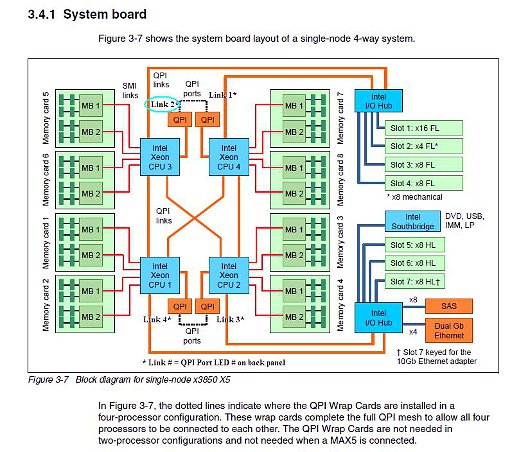
The preceding diagram is from "IBM eX5 Portfolio Overview" available for download at this link:
In most 7143 servers, the event never occurs. In those servers where the event occurs, it is intermittent depending on the extent of the noise and the component sensitivity to the noise. When it occurs, the event may occur as frequently as during each Power On Self Test (POST) or as long as several weeks after loading the operating system. The frequency of the events does not correlate with workload. However, subsequent hangs do correlate with workload.
If the event occurs when running with the Third Quarter 2011 firmware package, the link geometry changes, and although the link runs at reduced bandwidth, the original noise source no longer exists and further degradation is not expected. Because the remaining links continue to run at full bandwidth, users will likely not see any impact under normal everyday operations. There is negligible impact on platform latency, QPI bandwidths to I/O or between most processor sockets. Communications on the affected link may be affected in High Performance Compute (HPC) workloads and some memory specific transactions.
It was previously reported that the Fourth Quarter 2011 UEFI and IMM (released in February, 2012) would contain a fix. An issue was discovered with this firmware package that can result in an Operating System (OS) hang within a few hours after the system encounters the Ext QPI Link event while the OS is experiencing heavy stress. The hang has been observed only in VMware ESXi 4.1 and ESXi 5.0 (vSphere), and Windows 2008 R2 with MSCS running. To avoid the hang, systems running with these OS configurations should install the Pass 5 QPI Wrap cards.
A fix for the OS hang was provided in the Second Quarter 2012 firmware package, but while the fix resolved some instances, it was determined not to be effective for all cases.  Replacing the Pass 4 QPI Wrap cards with Pass 5 QPI Wrap cards resolved the OS hangs in all cases.
The Pass 5 QPI Wrap cards have been redesigned to remove the source of the noise. Because the noise no longer occurs, neither will the OS hangs, regardless of firmware level.
Prior to installing the Pass 5 QPI Wrap cards, whether they are shipped from FRU stock, or shipped as an Option kit, inspect the bar code label on the card assembly to insure they are FRU part number 00D0561. If an incorrect card was shipped, contact IBM Client Support for a replacement.
After installing the Pass 5 QPI Wrap cards, system firmware (FPGA, UEFI, IMM) should be updated to the latest level.
If the Workaround to down level the x3850 X5 7143 server to the Q3 2011 firmware package has been applied, it is recommended to remain at that level until Pass 5 QPI Wrap cards are installed to avoid the OS hangs. Pass 5 QPI Wrap cards should be installed prior to updating firmware beyond Q3 2011 levels.
Some users were previously directed to change the Operating mode in the UEFI Setup Utility to 'Power Efficiency' to reduce the likelihood of the Ext QPI Link event. After installing the Pass 5 QPI Wrap cards, the Operating mode may be safely restored to the default setting of 'Maximum Performance.'
x3850 X5, Machine Types 7143 and 7191 servers, and Option Kits part number 49Y4379,  began shipping with Pass 5 QPI Wrap cards on 2012-05-23, from all manufacturing sites.
x3850 X5, Machine Type 7145, servers have processors that operate with lower QPI Link speeds, and are not susceptible to the noise issue, so the Ext QPI Link events do not occur. Although obsoleted, Pass 4 QPI Wrap cards, FRU Part number 46M0000, may continue to be used in 7145 servers without risk.
Third quarter firmware is available from Fix Central by doing the following:
- Click the highlighted text to rerun the query to include superseded fixes, as shown in the picture below.

- Scroll to the UEFI, IMM or FPGA section, and click "Show Superceded Fixes" as shown below.

Document Location
Worldwide
Was this topic helpful?
Document Information
Modified date:
30 January 2019
UID
ibm1MIGR-5089038