IBM Support

EWM displays validation error after upgrade for operations using a custom process template

Troubleshooting


Problem

After successfully upgrading from IBM Engineering Lifecycle Management (ELM) 7.0.2 I encounter validation errors in IBM Engineering Workflow Management (EWM) when using a specific custom process template. I am not able to import or export the process template. Extracting a process template in Eclipse client from projects based on the process template fails. Creating a new project area using the process template also fails.
 
Fig 1: Importing the process template that was exported from EWM 7.0.2 SR1.
 
Import template
 
Fig 2: Creating a new project area using the upgraded process template.
 
Example error

Symptom

Validation errors occur saying that types should not contain any special characters except underscore, hyphen and dot and the beginning character may be underscore, but not a number.

Cause

The validation for process templates has been strengthened from EWM 7.0.3. If custom attributes contain any special characters such as hidden tab characters, validation errors will occur in the below scenarios:

1) Save a new custom attribute that does not meet validation requirements.
2) Import a process template that does not meet validation requirements.
3) Export a process template that does not meet validation requirements.
4) Extract a process template from a project area that does not meet validation requirements.
5) Create a project area using a process template that does not meet validation requirements.
 
If text has been cut and pasted, special characters may be pasted into fields without knowledge.

Environment

IBM Engineering Workflow Management 7.0.3 or above.

Resolving The Problem

If you are importing a process template that was exported from EWM 7.0.2 or earlier version you can remove the special characters manually from the specification.txt file in the process template. 

1. Unzip the process template.

2. Carefully edit the specification.txt in a text editor to remove special characters. 
Do not remove any other content, as this may break the template. Special characters will appear as their HTML encoded numeric character references. For example, a tab character will be represented as 	. Since many special characters start with &# you can search using that string.
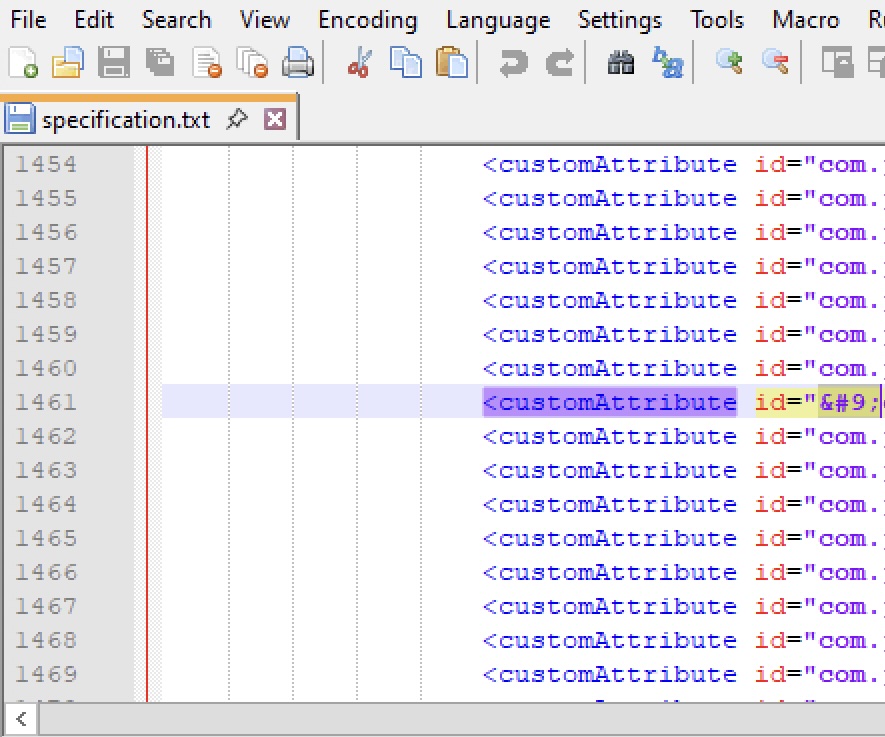
Example HMTL special characters

3. Zip up the process template using the same folder structure.

If you have upgraded your EWM and do not have a copy of the process template, look for the attribute indicated in the validation error message in EWM. Check the checkbox "Show only custom attributes". Take note of the attribute type and name and other details. These attributes will need to added back once a project area is created using the new process template.

Show only custom attributes

1. Delete the problematic attribute(s) and save the project area.

2. Extract the process template for the project area using the Eclipse client. 

Extract Process Template

Specify a new name and process ID for the template.


Process ID

3. You can now use the new process template without any validation errors.

Note: In many cases you can use and update attributes that contain special characters added to EWM in a previous version, as the validation does not apply to existing work item attribute content.

Document Location

Worldwide

[{"Type":"MASTER","Line of Business":{"code":"LOB77","label":"Automation Platform"},"Business Unit":{"code":"BU048","label":"IBM Software"},"Product":{"code":"SSUC3U","label":"IBM Engineering Workflow Management"},"ARM Category":[{"code":"a8m0z000000CbRPAA0","label":"Jazz Team Server-\u003EAdministration-\u003EProcess Templates"}],"ARM Case Number":"TS020235403","Platform":[{"code":"PF025","label":"Platform Independent"}],"Version":"and future releases;7.0.3"}]

Product Synonym

EWM

Document Information

Modified date:
12 September 2025

UID

ibm17244760