Troubleshooting
Problem
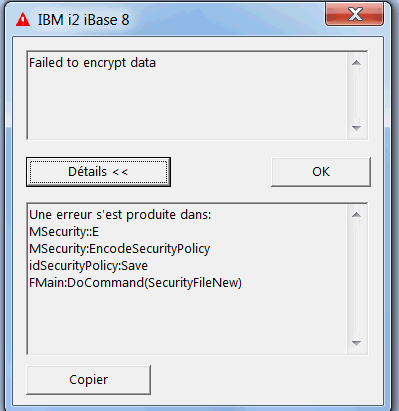
When trying to create a security file on IBM i2 iBase, the user gets this error message : "Failed to encrypt data" And the security file cannot be created.
Symptom
The details of the error message are :
"An error occurred in
MSecurity::E
MSecurity:EncodeSecurityPolicy
idSecurityPolicy:Save
FMain:DoCommand(SecurityFileNew) :
Cause
The problem comes from the following registry key :
"HKLM\System\CurrentControlSet\Control\Lsa\FIPSAlgorithmPolicy\Enabled"
Its value was at 1 :

The default value should be 0.
Diagnosing The Problem
In the registry software (regedit), check the value of the key
"HKLM\System\CurrentControlSet\Control\Lsa\FIPSAlgorithmPolicy\Enabled"
Resolving The Problem
Change the value of the key "HKLM\System\CurrentControlSet\Control\Lsa\FIPSAlgorithmPolicy\Enabled"
Change it to 0 (zero)
Was this topic helpful?
Document Information
Modified date:
16 June 2018
UID
swg21664926