Troubleshooting
Problem
Error "DMPCHK_NODUMPACCESS" in AIX Error log report.
In normal situation you should not encounter this error as when the operating system is installed, the primary dump device is automatically configured so something caused this configuration to be missing and the error is logged in error report. This could happen because of incorrect configuration done by system admin or possible situations that makes the dump device can not be accessed..
Symptom
Detailed Error
LABEL: DMPCHK_NODUMPACCESS
IDENTIFIER: 6D87B1C0
Date/Time: Wed Feb 3 15:00:01 2021
Class: O
Type: UNKN
WPAR: Global
Resource Name: dumpcheck
Class: O
Type: UNKN
WPAR: Global
Resource Name: dumpcheck
Description
The dump device can not be accessed.
The dump device can not be accessed.
Probable Causes
The access to the dump device is currently unavailable.
The access to the dump device is currently unavailable.
Recommended Actions
Check the dump device access and configuration.
Check the dump device access and configuration.
Detail Data
Dump Device
primary
Dump Device
primary
Cause
"DMPCHK_NODUMPACCESS" event reported in the error log report of AIX server indicates that dump device can not be accessed.
Diagnosing The Problem
Scenario 1- The primary dump device is not configured and not available as shown in the following screenshot.
Check dump device settings using the following command
# sysdumpdev -l
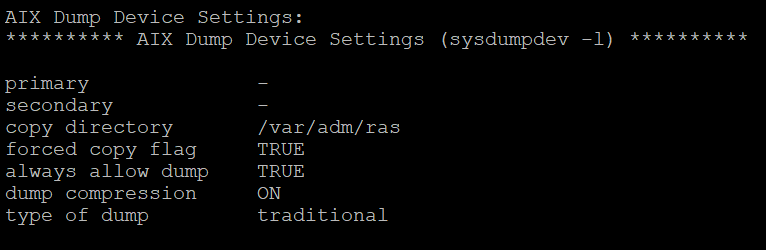
For some users errors ,there is no primary dump device available in the server, which is required for AIX to successfully capture a dump. When an unexpected system halt occurs or a reboot with forced dump takes places, the system dump facility automatically copies selected areas of kernel data to the primary dump device.
Resolving The Problem
Create a dedicated dump device (dumplv) and set it to primary dump device.
It is required to capture the dump in case of any system crash time or reboot with forced dump. Hence configure dump device in the LPAR.
Scenario 2- dump device is in closed/syncd state
A) Run dump check utility
# /usr/lib/ras/dumpcheck -p
The access to the dump device is currently unavailable
The access to the dump device is currently unavailable
B) Issue the following command
# lsvg -l rootvg
dump_lv jfs2 20 40 2 closed/syncd N/A
It shows that dump device is in closed/syncd state that's why primary dump device not available.
# sysdumpdev -l
primary -
secondary /dev/sysdumpnull
copy directory /var/adm/ras
forced copy flag TRUE
always allow dump TRUE
dump compression ON
type of dump traditional
C) Run the following commands to make it open/syncd.
primary -
secondary /dev/sysdumpnull
copy directory /var/adm/ras
forced copy flag TRUE
always allow dump TRUE
dump compression ON
type of dump traditional
C) Run the following commands to make it open/syncd.
# syncvg -l dump_lv
# lsvg -l rootvg
dump_lv jfs2 20 40 2 open/syncd N/A
# sysdumpdev -l
primary /dev/dump_lv
secondary /dev/sysdumpnull
copy directory /var/adm/ras
forced copy flag TRUE
always allow dump TRUE
dump compression ON
type of dump traditional
primary /dev/dump_lv
secondary /dev/sysdumpnull
copy directory /var/adm/ras
forced copy flag TRUE
always allow dump TRUE
dump compression ON
type of dump traditional
After setting the primary dump device issue should be resolved.
Please refer to below link for more information on "Managing System Dump Devices" and configure a dedicated dump device.
https://www.ibm.com/support/pages/managing-system-dump-devices
https://www.ibm.com/support/pages/managing-system-dump-devices
To investigate dump device errors please collect snap -ac from the problem server and contact AIX support team for further investigation.
Cheers
Related Information
Document Location
Worldwide
[{"Line of Business":{"code":"LOB08","label":"Cognitive Systems"},"Business Unit":{"code":"BU058","label":"IBM Infrastructure w\/TPS"},"Product":{"code":"SWG10","label":"AIX"},"ARM Category":[{"code":"a8m0z000000cvydAAA","label":"Dumps"}],"ARM Case Number":"","Platform":[{"code":"PF025","label":"Platform Independent"}],"Version":"All Version(s)"}]
Was this topic helpful?
Document Information
Modified date:
08 February 2021
UID
ibm16412273