IBM Support

"Error Contacting User Manager" when launching Controller, caused by missing 'IBM Cognos Controller User Manager' Windows service

Troubleshooting


Problem

User launches Controller. User receives error.

Symptom
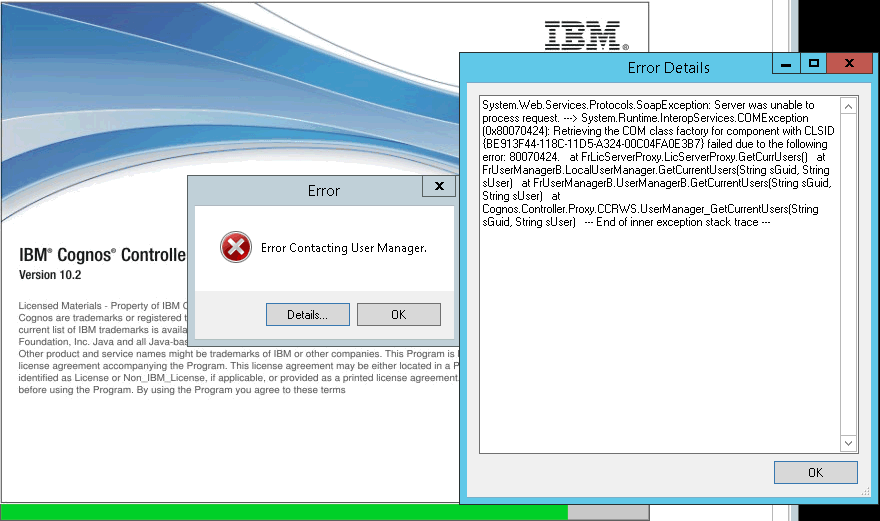

Error Contacting User Manager.

Error Details:
System.Web.Services.Protocols.SoapException: Server was unable to process request. ---> System.Runtime.InteropServices.COMException (0x80070424): Retrieving the COM class factory for component with CLSID {BE913F44-118C-11D5-A324-00C04FA0E3B7} failed due to the following error: 80070424.
at FrLicServerProxy.LicServerProxy.GetCurrUsers()
at FrUserManagerB.LocalUserManager.GetCurrentUsers(String sGuid, String sUser)
at FrUserManagerB.UserManagerB.GetCurrentUsers(String sGuid, String sUser)
at Cognos.Controller.Proxy.CCRWS.UserManager_GetCurrentUsers(String sGuid, String sUser)
--- End of inner exception stack trace ---

[{"Product":{"code":"SS9S6B","label":"IBM Cognos Controller"},"Business Unit":{"code":"BU048","label":"IBM Software"},"Component":"Controller","Platform":[{"code":"PF033","label":"Windows"}],"Version":"10.2.0","Edition":"","Line of Business":{"code":"LOB76","label":"Data Platform"}},{"Product":{"code":"SSMRTZ","label":"IBM Cognos Controller on Cloud"},"Business Unit":{"code":"BU048","label":"IBM Software"},"Component":" ","Platform":[{"code":"","label":""}],"Version":"","Edition":"","Line of Business":{"code":"LOB76","label":"Data Platform"}}]

Log InLog in to view more of this document

This document has the abstract of a technical article that is available to authorized users once you have logged on. Please use Log in button above to access the full document. After log in, if you do not have the right authorization for this document, there will be instructions on what to do next.

Document Information

Modified date:
08 May 2025

UID

swg21680788