Troubleshooting
Problem
This document provides information about how to determine the ODBC driver version for IBM i Access for Windows and IBM i Access Client Solutions - Windows Application Package.
Resolving The Problem
The ODBC driver is a part of IBM i Access for Windows or the IBM i Access Client Solutions - Windows Application Package and can only be installed with one of those two software packages. Note that IBM i Access for Windows v710 was withdrawn from support in 2019. The replacement for that product is IBM i Access Client Solutions and the Windows Application Package.
The ODBC driver is delivered in the file C:\Windows\System32\cwbodbc.dll. The file is registered with the ODBC administrator during the installation. The installation directory is dependent on the version and release and the version of Microsoft Windows (32-bit versus 64-bit).
The version of the DLL must match the IBM i Access for Windows service pack. The cwbodbc.dll has dependencies on many other IBM i Access for Windows dlls. Never copy or install another version of cwbodbc.dll unless directed to do so by an IBM i Support representative.
To check the version of the DLL, open the ODBC Data Source Administrator (Windows search; type in "ODBC"), and select the driver on the Drivers tab as shown below:
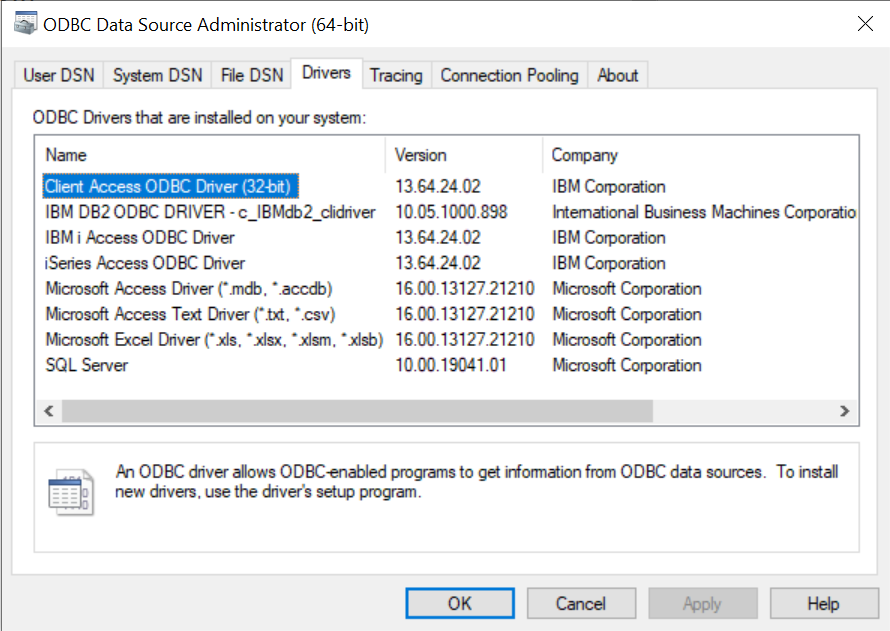
The driver version syntax is XX.00.YY.ZZ where XX maps to a specific IBM i Access for Windows or IBM i Access Client Solutions - Windows Application Package version and release. For example:
V5R4M0 is 11.00.YY.ZZ
V6R1M0 is 12.00.YY.ZZ
V7R1M0 is 13.00.YY.ZZ
YY maps to the Client Access Express or iSeries Access service pack number.
ZZ is the interim fix number, so all GA service packs will be XX.00.YY.0000.
For example, the ODBC driver version for IBM i Access for Windows V7R1M0 service pack SI55797 (11th service pack) is 13.00.11.0000.
NOTE: As of 2021, the "IBM Access Client Solutions ('ACS') - Windows Application Package" ODBC driver also uses version # 13. iSeries Access for Windows stopped receiving service packs at #21 (installed file dates of 11/21/2018). So, any ODBC driver version 13.00.22.00 and later, are part of the IBM i Access Client Solutions Windows Application Package.
List of IBM i Access for Windows v7r1m0 service packs along with dates released:

Path
To verify the path to the registered dll, use regedit and check the following keys:
HKEY_LOCAL_MACHINE\SOFTWARE\ODBC\ODBCINST.INI\IBM i Access ODBC Driver
HKEY_LOCAL_MACHINE\SOFTWARE\ODBC\ODBCINST.INI\iSeries Access ODBC Driver
HKEY_LOCAL_MACHINE\SOFTWARE\ODBC\ODBCINST.INI\Client Access ODBC Driver (32-bit)
The three driver names all point to the same "cwbodbc.dll" file. The previous names exist for the purpose of backwards compatibility. New applications should use the newest name - "IBM i Access ODBC Driver".
NOTE: ODBC DSNs are managed by the client operating system. As such, a removal of IBM i Access for Windows or the IBM ACS Windows Application Package will have no impact on any ODBC DSN(s) other than the underlying driver no longer being installed. A new installation of the Windows Application Package will allow the existing DSNs to be used.
Related Information
Historical Number
365616739
Was this topic helpful?
Document Information
Modified date:
13 April 2022
UID
nas8N1015736