White Papers
Abstract
The Pack for SAP BW offers several stages to facilitate integration with SAP Netweaver BW and BW/4HANA.
Content
SAP BW provides an Enterprise Data Warehouse solution for SAP customers to consolidate and analyse their business data. Enterprises can use the SAP BW to read into their business, react to the market changes, and gain competitive advantages.
Building an SAP BW data warehouse is a complex project. It includes various activities such as planning, data modeling, data sizing, ETL job design, and performance tuning. Designing the ETL jobs to load data into and extract data from SAP BW is often the most time-consuming task.
IBM Information Server is a unified and comprehensive information integration platform. Businesses can use IBM Information Server to connect to various data sources, retrieve and process data contents, and deliver cleansed and high-quality information. In the SAP BW projects, IBM Information Server can be leveraged as an efficient ETL tool to process a large volume of data and build the enterprise data warehouse.
Appendix A explains the terminology used in this article. Appendix B lists the tools for creating the examples shown in this article.
Product prerequisites and installation
IBM Information Server includes many software products for data integration and analysis tasks. Those products include Infosphere® DataStage®, Infosphere QualityStage®, Infosphere Information Analyzer, Infosphere Federation Server, and other companion products. Depending on the specific project requirements, you can choose to install a subset of the products in the IBM Information Server.
Figure 1. Software products needed for designing ETL jobs for SAP BW and SAP BW

Figure 1 shows the minimum set of IBM Information Server products needed to design ETL jobs for the SAP BW or BW data warehouse.
- Infosphere DataStage, which includes:
- DataStage Client
- DataStage Server
- DataStage Metadata Repository
- DataStage Domain Server
Infosphere DataStage products can be installed separately on different hosts or installed on the same host.
- Infosphere DataStage Pack for SAP BW (DataStage BW Pack) The DataStage BW Pack is a companion product of the IBM Information Server. The pack was originally developed to support SAP BW and currently supports both SAP BW and SAP BW. The GUIs of the DataStage BW Pack are installed on the DataStage Client. The runtime part of the Pack is installed on the DataStage Server.
- SAP Remote Function Call (RFC) Library is an external component to the IBM Information Server. The DataStage BW Pack uses the SAP RFC interface to call SAP BW and SAP BW functions. The SAP RFC library is a prerequisite for using the DataStage BW Pack and must be installed on both the DataStage Client and Server.
Architecture overview
The software components in Figure 1 play different roles in designing and executing the ETL jobs for SAP BW.
- The DataStage Client and DataStage BW Pack GUI components provide a friendly user interface to design ETL jobs and to set up the data operations to be performed on SAP BW systems.
- The DataStage Server and DataStage BW Pack Server components enable users to schedule and run the ETL jobs.
- The DataStage Domain Server manages user accounts and authorizes users to use different features of the IBM Information Server.
- The DataStage Metadata Repository is a database for storing and sharing tables, fields, or object definitions
The DataStage BW Pack includes these major components:
- BW Load Stage (legacy): Loads data from non-SAP data sources to an SAP BW system. It uses the the SAP Staging BAPI interface and can be used with older BW 3.x DataSources.
- BW 7.x Load Stage: Loads data from non-SAP data sources to an SAP BW system. This is an SAP-certified, data-loading integration solution implemented using the SAP Staging BAPI interface. Can be used with newer BW 7.x DataSources and directly loads data into the PSA (Persistent Staging Area) in SAP BW.
- BW Extract Stage: Extracts data from an SAP BW system. It is an SAP-certified, data-extraction integration solution based on the SAP Open Hub Service interface. This certification is valid only for the SAP BW NW 7.x systems. From SAP BW Pack release version 4.4.0.1 onwards, BW Extract Stage also supports SAP BW/4 HANA.
- BW RFC Server: Implements various functions that are invoked by an SAP BW system. It accepts the SAP BW initiated data-loading or data-extraction requests and triggers the DataStage jobs to execute the corresponding data operations.
- BW RFC Manager: Manages the BW RFC Server processes. It creates one BW RFC Server process per source system. It also provides the functions to start or stop BW RFC Server processes. A source system represents a logical or physical system that is external to an SAP BW system. A source system provides source data to an SAP BW system or accepts extracted data from an SAP BW system.
Pre-requisites for using SAP BW Pack Stages
Following are the main perquisites for using the SAP BW Pack Stages:
You must have a valid DataStage Connection for the SAP BW Server from which you want to extract or load data into. You can make this connection using DataStage Administrator for the SAP BW.

Figure:2: Connection Properties Dialog
The new BW connection DEMOCONN is saved on the DataStage server and can be used to design SAP BW Pack DataStage jobs to perform BW data operations. You can also define SAP BW Load Balancing connection. From release 4.4 onwards, you can also use SNC settings for securely connection to SAP BW Application
Source System Setup
In SAP BW, a source system can be a flat file, an SAP system, a database system, a multidimensional data source, a Web service, or a staging BAPI interface-based external application.
DataStage also requires Source system to interact with the SAP BW Server. Source system defines DataStage a logical system to SAP BW Server. This type of the Source systems is called BAPI or External Source Systems in SAP BW Server. For both extract and load scenarios from/into the SAP BW Applications (except for SAP BW4HANA) Source system plays a major role in communication between DataStage and SAP BW server. Therefore, it is important for you to define the source system before you could make use of the extract and load stages.
For defining source system for given DataSource connection to SAP BW Server, you have two options: either you can create a new source system from DataStage to SAP BW Server or attach already existing SAP Source system to DataStage.
For defining the Source System, you can use DataStage Administrator for SAP BW. After selecting the BW Connection, you can click on Source Systems to either create a new Source System or attach an existing Source system. For new Source System, you must define RFC Server Configuration properties and DataStage job Options.

Figure:3 Source system Properties Dialog
Alternatively, you can create External Source System in SAP BW Server using transaction code: rsa1 and attach the same source system to DataStage using Attach functionality.
Note: Once the Source system is created/attached to DataStage, you must not change the property like Program ID from SAP system since it will disconnect the connection between SAP BW Server and DataStage RFC Server. In such cases you should delete the Source system and select in again in DataStage Administrator for BW
Once the source system is defined, you must run the BW RFC Server service so that listener service can be started between SAP BW and DataStage servers. This listener service enables SAP BW Server to contact DataStage and pass relevant information required while extracting or loading data from/to the SAP BW server.
To start the BW RFC Server, follow this KC section. You must check whether the RFC server is running for your defined source systems. You can check this as following:
- Go the transaction-code: rsa1
- Select “Source System” in Modelling list.
- Locate your created Source system by searching (find) as per name defined in DataStage
- Right click and select “Check”. You must get the message “Source system connection <src-system name> OK” in SAP GUI status bar.
Load data into SAP BW
DataStage jobs can be designed to retrieve, cleanse, and consolidate the data from non-SAP sources and load the data into SAP BW systems. For example, you can extract the customer data from your CRM applications and then look up the purchase orders for your customers in your purchase order applications. The consolidated purchase orders can be loaded into your SAP BW system for analysis.
SAP BW Packs provides following two ways of loading the data into the SAP BW Application:
- Using legacy BW Load Stage: Using this stage you can load data into the SAP BW Application using SAP BW InfoSources. Loading data using SAP BW InfoSources confirms to BW 3.x data flow technology which is though available in newer NW 7.x systems but has been deprecated by the newer 7.x data load technology from NW 7.3 systems onwards. It is implemented using the SAP Staging BAPI interface.
- Using BW 7.x Load Stage: Using this stage you can load data into the SAP BW Application using SAP BW 7.x DataSources. Loading data using SAP BW DataSources confirms to newer BW 7.x data flow technology. You can use this stage only from SAP BW 7.3 systems onwards. This is an SAP certified stage data-loading integration solution implemented using the SAP Staging BAPI interface.
Note: Above mentioned BW Load Stages do not support SAP BW/4HANA systems yet.
Load use-case Scenario
This section will demonstrate how you can extract customer data from the from an Oracle® database table using an ODBC Stage. Subsequently it is explained how this extracted data you can load into SAP BW using above mentioned load stages. In both the stages, it loads the processed data into the CUSTOMER Characteristic in an SAP BW system.
Table 1 shows the sample data in the Oracle database table. The CUSTOMER Characteristic is created in the SAP BW using the SAP Data Warehousing Workbench, which is shown in Figure 4 and Figure 5.

Figure 3. DataStage job for loading data into SAP BW
| CUSTOMER ID | ACCOUNT GROUP | ADDRESS NUMBER | CUSTOMER ID | CUSTOMER DC | LOCATION HEIGHT |
| 0000000224 | ZCRM | 0000011427 | 1100000224 | 1100ABCD98 | 23.5 |
| 0000000099 | CPD | 0000009384 | 2200000099 | 229876MNOP | 63.6 |
| 0000000110 | 0001 | 0000006660 | 3300000110 | 3312345KLJ | 89.97 |
| APO LOCATION | BUSINESS PARTNER | LOCATION | DISTRICT | COUNTRY | CUSTOMER CLASSIFICATION | CUSTOMER MARKET |
| US Los Angeles | 0000000224 | LOS ANGELES | LOS ANGELES | US | AB | A00B |
| DE Berlin | 0000000099 | Berlin | Hermsdorf | DE | CD | C11D |
| DE Frankfurt | 0000000110 | Frankfurt | Bahnhofsviertel | DE | EF | E22F |
Table 1. Sample data in the Oracle database table

Figure 4. CUSTOMER Characteristic in SAP BW

Figure 5. CUSTOMER Characteristic in SAP BW — Attribute tab
Loading Data using BW Legacy Load Stage
Data flow associated with Legacy Load Stage

Figure 6. Data flow diagram of BW data load operation
Figure 6 illustrates the data flow diagram of a BW data load operation.
- A source system is defined to represent one or more DataStage jobs loading data into the SAP BW. A data transfer structure describes the data available in the source system. A DataStage job loads the data from external data sources into an SAP BW Persistent Staging Area (PSA) staging table.
- Transfer rules are defined to transfer data from the staging table into an InfoSource. An InfoSource is a collection of data fields treated as a single unit. The communication structure defines the data fields of the InfoSource.
- Update rules are created to transform the data from the InfoSource to one or more BW data targets (InfoObjects, DataStore objects, or BW InfoCube).
Designing BW Legacy load Stage
The BW Load Stage job as shown in Figure 2 loads the data in Table 1 into the SAP BW Load data to SAP BW. Multiple steps are involved in setting up the BW Load Stage which are illustrated in Figure 7.

Figure 7. Setting up the BW Load Stage Load Data to SAP BW
BW Load Stage editor as shown below contains several tabs which will help you to complete these steps

Figure 8. BW Load Stage Editor
General tab: In this tab you can select DataStage connection to the SAP BW. This connection is created in the DataStage Administrator for SAP BW.

Figure 9. Selecting BW Connection in General Tab
Transfer Structure tab: In this tab, you will do the following operations:
- Select the source system by using “Select” option in the Source system menu.

Figure 10. Selecting Source System in Transfer Structure Tab
- Selecting/Creating the InfoSource. Once you have selected the Source system, you can create/select the InfoSource from this tab page. Menu items are provided on the tab to create, update, view, and search SAP BW characteristics, key figures, and InfoSources.

Figure 11. Selecting InfoSource in Transfer Structure Tab
The menu item “Create Master InfoSource from Existing Characteristic” creates an InfoSource based on an existing characteristic. Two subsequent user actions are needed when this menu item is selected:

Figure 12. Select an existing characteristic

Figure 13. Specify the properties of new InfoSource
As shown in Figure 14, the BW Load Stage creates the specified InfoSource in the SAP BW. The Stage also selects the InfoSource on the Transfer Structure tab in Figure 15.

Figure 15. New InfoSource created in SAP BW

Figure 16. Select new InfoSource
Columns tab: This tab displays the column definitions of the data being sent to the SAP BW.
When an InfoSource is selected on the Transfer Structure tab, a DataStage table definition is created based on the transfer structure of the InfoSource. Figure 17 shows the table definition. Table 2 shows how the SAP data types are mapped to the DataStage data types. The table definition can be validated and synchronized with the InfoSource fields using the Validate Columns and Synchronize Columns buttons

Figure 17. Columns tab
| SAP data type | DataStage data type |
| DATS | SQL DATE |
| CURR | SQL CHAR |
| TIMS | SQL TIME |
| FLTP | SQL FLOAT |
| CHAR (no more than 256 characters) | SQL CHAR |
| CHAR (more than 256 characters) | SQL VARCHAR |
| NUMC | SQL CHAR |
Table 2. Data type mapping table
- InfoPackage tab: In this tab page you can either create a new InfoPackage in SAP BW for the InfoSource or select from the existing list of InfoPackages available for the InfoSource attached to the selected Source system.
The InfoPackage is an entry point for SAP BW to request data from a source system. An InfoPackage defines when and how a DataStage job loads data into an SAP BW system. The InfoPackage tab creates and selects an InfoPackage. As shown in Figure 19, the tab also allows you to set the InfoPackage properties

Figure 18. InfoPackage tab

Figure 19. InfoPackage property dialog window
BW Load Stage supports three data load mechanisms:
- Push mode: A DataStage job is started first. The DataStage job schedules the InfoPackage for the job to start the data loading operation.
- Pull mode: An InfoPackage is scheduled first using SAP Data Warehousing Workbench. When the SAP BW is ready to receive data, it notifies the RFC Server process. The RFC server process launches the DataStage job to send data to the SAP BW.
- File mode: A DataStage job runs first. The DataStage job saves the data for SAP BW to a temporary file. An InfoPackage is then scheduled to load the data in the file into SAP BW.
The InfoPackage third-party parameters are defined to support third-party integration tools like the DataStage BW Pack. As shown in Figure 20, the DataStage job BWLoadData is automatically set as a third-party parameter for the new pull InfoPackage DEMO Pull InfoPackage.

Figure 20. InfoPackage third party parameters
The use of third-party parameters in the BW data loading process is described as follows:
- SAP BW schedules and runs the InfoPackage DEMO PULL InfoPackage.
- When it is ready to receive data, the InfoPackage sends the loading request to the source system DEMODSSRC. It also passes the third-party parameter DSJob with name as “DataStage Job” and its value BWLoadJob to the source system.
- The RFC Server process for the source system receives the request and starts the DataStage job BWLoadJob to send data packages to the SAP BW.
Process Chain tab: This tab enables you to run the data load operation as a process within a BW process chain. This step is optional. The BW Load Stage can run with or without a process chain.
A process chain provides the workflow function. It is used to design and schedule a series of dependent data-processing processes. The execution of an InfoPackage is one of the process types that SAP BW defines. As shown in Figure 21, the execution of the InfoPackage DEMO Pull InfoPackage is added as a process in the process chain Demo Load Chain. Figure 22 selects the process chain Demo Load Chain.

Figure 21. Run the data loading job as part of a process chain

Figure 22. Select process chain
Run data load operation
Depending on the type of the InfoPackage there are following different flows defining how BW Load DataStage job will be triggered and its associated sequence flow for loading data in SAP BW server:

Figure 23. Start the Process Chain or InfoPackage using the SAP Data Warehousing Workbench
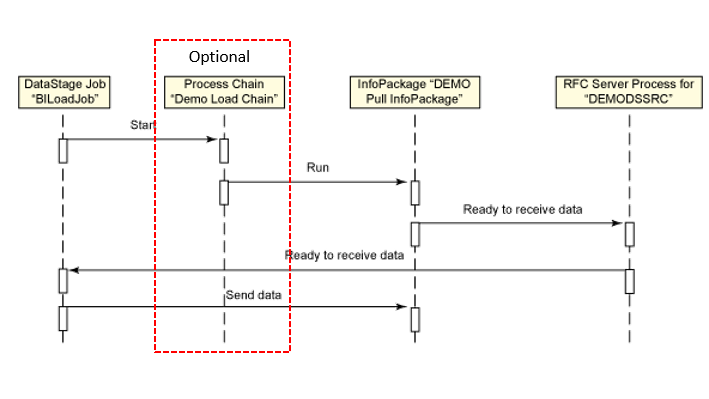
Figure 24. Start the Process Chain / InfoPackage using the DataStage job
3. File Type: In this mode, whole process become asynchronous. DataStage job will be started first and it will create the data file in the DataStage repository. Thereafter whenever Process Chain (optional) or InfoPackage us scheduled to run in SAP BW Server, loading process is started leading to successfully loading the data into BW.
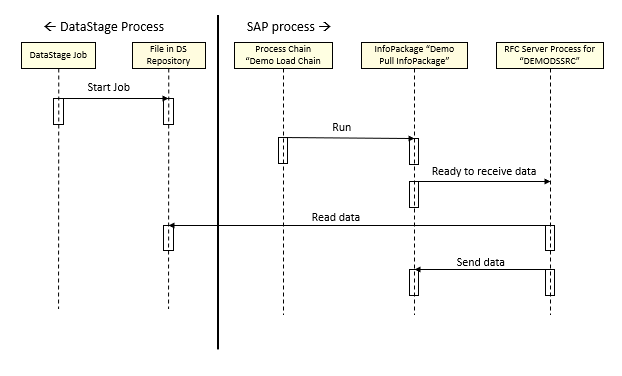
Figure 25. File Data Load Sequence Flow
Figure 25 shows that the DataStage job runs successfully. Figure 26 shows that the source data is loaded into the SAP BW.

Figure 25. Run DataStage job

Figure 26a. Data loaded into SAP BW

Figure 26B. Data loaded into SAP BW contd…
Loading data using BW 7.x Load Stage
Data flow associated with BW 7.x Load Stage

- A source system is defined to represent one or more DataStage jobs loading data into the SAP BW.
- DataSource defines the Persistent Staging area in the SAP BW system.
- Data will be loaded directly loaded from the BAPI Source System which represents DataStage in this case against the mutually agreed transfer structure associated between DataSource and Source System.
DataSources Setup in SAP BW
SAP BW 7.x DataStage uses DataSources as an underline object to load data into the SAP BW. Therefore, you must a valid DataSource in the SAP BW before using this stage.
DataSources are logical data interface definitions containing fields, that are used to transfer data to SAP BW systems. BW 7.x Load stage supports both custom as well as standard DataSources. In SAP BW system you first need to create and activate DataSources. Additionally, this DataSource needs to be attached to the source system. As per the current load case scenario, following section explains how to create 7.x DataSource for 0CUSTOMER Attribute and attach it to source system “DSDEMOSRC”
Step 1: Creating the DataSource

Figure 27: RSDS for new Datasource

Figure 28: Creating new Datasource

Figure 29: New Datasource
Step 2: Linking DataSource with InfoSource
Once DataSource has been created, it needs to be linked to InfoSource. For linking the DataSource with InfoSource

Figure 30: InfoSource selection

Figure 31: InfoSource transformation creation

Figure 32: Transformation in InfoSource
Once transformation has been created, the mappings will get visible. These mappings are between the InfoObjects of InfoSource and the fields of the DataSource

Figure 33: Mappings
The name of source system DEMODSSRC appears next to the DataSource in T-code RSA1. Also, if DataSource is viewed in source system, data flow is visible showing InfoSource successfully linked to DataSource (refer figure 34).

Figure 34: Data Flow
Designing BW 7.x Load Stage
Designing BW 7.x Load Stage is very similar to what you have seen for the case of the BW Legacy load stage with the following main differences:
- BW 7.x Load Stage uses BW 7.x DataSources as an underline SAP BW Object to load data into SAP BW Application. Therefore, instead of selecting InfoSources in BW Legacy Load Stage, you will select DataSource here.
- Unlike in BW Legacy load stage which allow you to create InfoSources and associated objects like characteristics, keys, figures etc., BW 7.x Load Stage does not allow the creation of DataSources in the SAP BW Application directly from DataStage. However, you can activate the existing DataSource for selected Source system.
- BW 7.x Load Stage does not allow the usage of Process chain to load data. Therefore, you will not find any Process chain tab in BW 7.x Load stage editor. This stage just uses the InfoPackages as BW agent to load data into SAP BW and it supports all different load mechanism as for the case of BW Legacy load stage.
Steps required to design and run the 7.x load stage is shown below

Figure 35. Setting up the BW 7.x Load Stage Load Data to SAP BW
BW 7.x Load Stage editor have several tabs which will help you to complete these steps. These tabs are explained below.

Figure 36. BW 7.x Load Stage Editor
General tab: In this tab you can select DataStage connection to the SAP BW. This connection is created in the DataStage Administrator for SAP BW.

Figure 37: Selecting BW Connection in General Tab
DataSource tab: In this tab, you will do the following operations:

Figure 38. Selecting Source System in Transfer Structure Tab

Figure 38. Selecting DataSource
Following points explain the functionality of this GUI:
- By default, the search scope will be selected as “Show DataSource for current Source Systems”. In this search scope, you will find list of the available DataSource which are already attached to selected Source system either manually in SAP BW (refer section: DataSources Setup in SAP BW) or through earlier BW 7.x Load Stage jobs created before.
- For cases where required DataSource is still not attached to current selected Source system, you can try selecting the Search Scope as “Show DataSource for all BAPI/External Source Systems”. This option allows you to search for the DataSources attached to all the BAPI Source systems available in selected SAP BW System. When you select such DataSource, the replica of that DataSource will be created and attached to your selected Source system.
- Second search scope is “DataSource Type”. You must select correct DataSource Type which could be either Transactional or Master Attribute/Text/Hierarchical ones. The above-mentioned searched scopes will bring the results only for selected DataSource type
- You can further filter down retrieved DataSources list as per the DataSource name/description or its associated Source system using the “Filter” functionality
- Once you select the DataSource and press OK, the selected DataSource will be attached to selected Source system and its metadata will be retrieved and shown in DataSource and columns tab page.
- For the hierarchical DataSource you need to additionally select hierarchy. This can be done using “Select Hierarchy” button.
Columns tab: When an InfoSource is selected on the Transfer Structure tab, a DataStage table definition is created based on the transfer structure of the DataSource. Figure 17 shows the table definition. Table 2 shows how the SAP data types are mapped to the DataStage data types. The table definition can be validated and synchronized with the InfoSource fields using the Validate Columns and Synchronize Columns buttons

Figure 38. Columns tab
| SAP data type | DataStage data type |
| DATS | SQL DATE |
| CURR | SQL CHAR |
| TIMS | SQL TIME |
| FLTP | SQL FLOAT |
| CHAR (no more than 256 characters) | SQL CHAR |
| CHAR (more than 256 characters) | SQL VARCHAR |
| NUMC | SQL CHAR |
Table 3. Data type mapping table
InfoPackage Tab: InfoPackage functionality is very similar to what has been explained legacy load stage. Therefore, for more details, you can refer to in the section: “InfoPackage Tab” in the Designing BW Legacy load Stage
Run data load operation
BW 7.x Load Stage follows the same data flow at the run time as explained for the BW Legacy load Stage. The only difference is that this stage loads data into the DataSource (PSA) layer in SAP BW. For more details, therefore, refer to section: Run data load operation
Figure 39 shows that the DataStage job runs successfully. Figure 40 shows that the source data is loaded into the SAP BW.

Figure 39. Run DataStage job

Figure 40A. Data loaded into SAP BW

Figure 40B. Data loaded into SAP BW contd…
Extract data from SAP BW
The BW Extract Stage extracts data from an SAP BW system. The extracted data can be fed into non-SAP applications. The BW Extract Stage is based on the SAP Open Hub Service, which defines a controlled and monitored data exporting process. BW Extract Stage extracts data using SAP Certified Open Hub Services which allows to extract data from the Open Hub Destination and/or InfoSpoke though InfoSpoke has been deprecated since SAP BW 7.0 systems. BW Extract Stage is therefore an SAP certified stage for extracting data from SAP BW 7.x Application servers.
From version 4.4.0.1 onwards, BW Extract Stage also supports extraction of data from m BW/4HANA Systems which also allows you to extract data using Open Hub Destination linked to database table. This will be explained in detail in the subsequent sections.
BW Extract Job User-case Scenario
The use case scenario for the BW Extract Stage is to extract the data from the SAP BW characteristic 0CUSTOMER and load into the sequential file. You can design a simple an ETL job to illustrate the steps necessary to extract data from an SAP BW system. Figure 41 shows the sample job. The job processes the extracted data using a DataStage Transformer Stage and then saves the processed results into a flat file.

Figure 41. BW Extract Stage job
The BW Extract Stage has a Stage Editor, shown in Figure 28. The Stage Editor contains four tabs for setting up various properties for the BW data extraction operation.
Prerequisites SAP BW Objects to be used for BW Extract Stage
Open Hub BW Extract Stage supports both BW InfoSpoke and BW Open Hub Destination (OHD) for data extraction.
InfoSpoke is a central piece of the Open Hub Service Pack in SAP BW. An InfoSpoke specifies three properties:
- An InfoProvider that provides the original data. An InfoProvider can be an InfoCube, a DataStore object, or an InfoObject.
- An Open Hub Destination that defines the targets to receive the extracted data. An Open Hub Destination can be a flat file, a database table, or a RFC destination.
- Transformation that converts the data from its original form to the destination form.
An InfoSpoke must be created first before it can be selected on the Open Hub Destination tab. BW Extract Stage supports creating an InfoSpoke and using the InfoSpoke for data extraction.
In the SAP BW 7.x systems, Open Hub Destination has been integrated into the new BW data transfer process and is no longer tightly coupled with InfoSpoke. As illustrated in Figure 30, a data transfer process transforms the data from an InfoProvider to an Open Hub Destination.

Figure 41. BW data extraction diagram
When the data is ready in the Open Hub Destination, SAP BW notifies the DataStage RFC Server process, which starts a DataStage job to extract the data from the Open Hub Destination. A process chain is created to control the whole data extraction process.
The use of a traditional BW InfoSpoke is not discussed in this article.
You must have the following BW Objects ready to be used in your SAP BW Server before using BW Extract Stage:
- Process Chain: BW process chain is workflow in the SAP BW System that extracts data from the SAP internal DataSources and populate data into the OHD/InfoSpoke
- InfoSpoke: In case you are running the BW Extract Stage in SAP BW Systems earlier than SAP BW 7.x systems
- Open Hub Destination from which the data will be extracted
- Data Transfer process which is an agent to transfer data from the OHD to DataStage
The following steps summarize how to create the above mentioned BW artefacts:
Step 1: Create and activate Open Hub Destination: You can create and activate a new Open Hub Destination using the SAP transaction RSBO or the Data Warehousing Workbench GUI. Figure 31 shows the dialog window for creating a new Open Hub Destination DEMODEST. The attributes of the 0CUSTOMER characteristic are selected to create the field definitions of the new Open Hub Destination.
Subsequently, as shown in Figure 32, Destination Type should be selected as “Third Party Tool” since data will be extracted to 3rd Party (DataStage from this OHD). RFC Destination should be set to the RFC Destination corresponding to the BAPI/External Source system which has been created for the DataStage in the section Source System Setup This RFC destination will act as data receiver for the Open Hub Destination.

Figure 42. Create new Open Hub Destination

Figure 43. Select RFC destination
Step 2: Create and activate a new data transfer process to transform the data from an InfoProvider to the Open Hub Destination. Figure 33 shows the dialog window for creating a new data transfer process. The data transfer process transfers the data from the Customer attributes to the Open Hub Destination DEMODEST

Figure 44. Create a new data transfer process
Step 3: Create and activate a new process chain to invoke the new data transfer process. Figure 34 shows that the data transfer process CUSTOMER > DEMODEST is added as a process to the process chain CUSTCHAIN.

Figure 45. Create and activate a process chain
Designing BW Extract Stage Job
BW Open Hub Extract Stage requires the following shown steps to extract data from the SAP BW System. These steps are illustrated in Figure 46 and described in detail in the following sections

Figure 46. Setting up the BW Extract Stage ExtractDataFromSAPBW
Since BW Extract Stage is a Source stage, all the tabs that are related to designing of the BW Extract Stage will appear in main Output tab page. Explanation of different tab pages and its explanation is given below
The General tab: In this tab page you can select the SAP BW Connection to DataStage as shown below

Figure 47. BW Extract Stage GUI
The Process Chain tab selects a source system and a process chain. The BW data extraction operation is run as a process within a process chain.

Figure 48. Process Chain tab
The Open Hub Destination tab selects an InfoSpoke or an Open Hub Destination.
An Open Hub Destination is set on the Open Hub Destination tab, as shown in Figure 37. Two user actions are required in this tab:
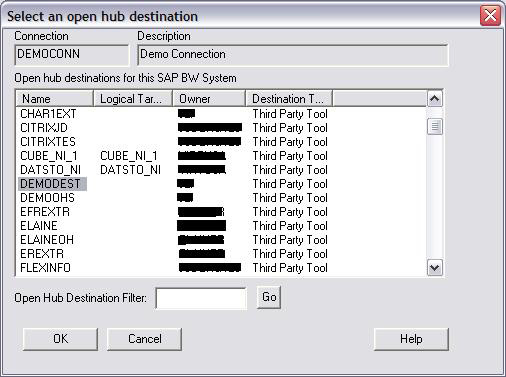
Figure 49. Select an Open Hub Destination

Figure 50. Open Hub Destination tab
An Open Hub Destination supports third-party parameters in the same way as InfoPackage. The button Update BW, in Figure 50, sets the third-party parameters of the selected Open Hub Destination. Figure 51 shows the result of when the button is clicked. Figure 52 shows that the job name Extract, the process chain CUSTCHAIN and the source system DEMODSSRC are set as the third-party parameters of the Open Hub Destination DEMODEST. The usage of the third-party parameters in the BW Extract Stage is similar to the usage of the parameters in the BW Load Stage.

Figure 51. Update the third-party parameters

Figure 52. DEMODEST third-party parameters
The Columns tab displays the column definitions for the extracted data from the SAP BW. This tab page will be having the same functionality as explained for the BW Load Stages
Run data extraction operation
Similar to the data load operation, the process chain CUSTCHAIN must be scheduled to run the data extraction operation. It can be started either by the DataStage job BIExtractJob or by the SAP Data Warehousing Workbench.
In this example, the DataStage job is started to invoke the process chain. Figure 53 shows that the DataStage job runs successfully and Figure 54 shows the data extracted from the SAP BW.

Figure 53. Run the DataStage job

Figure 54. Data extracted from SAP BW
Extract data from SAP BW/4HANA
From SAP BW Pack version 4.4.0.1 onwards, BW Open Hub Extract Stage also supports BW/4HANA on-premise system. However, there are some differences as listed below compared to traditional NW BW systems:
B. SAP BW/4HANA no longer supports BW External/BAPI Source systems. Implications of this, while using the stage are as follows:
- You are not required to use Source System for the SAP BW Connection as explained in the section: Source System Setup
- In the process chain tab page, option to select Source System is disabled
- There is no need to run BW RFC Server since it used to connect the DataStage with BW systems based on Source system. Therefore, for the BW/4HANA connections, you will find no instance of BW RFC Server gets started.
C. There is no concept of 3rd Party Destination while defining the Open Hub Destination in the BW/4HANA System. Implications of this, while using the stage are as follows:
- In the Open Hub Destination page, you must select the OHD which have Destination Type defined as “Database Table” in the BW/4HANA
- There is no concept of Updating Third Part Destination in BW/4HANA, therefore you will find “Update BW” disabled in GUI when you select SAP BW/4HANA connection
Open Hub Destination and Process Chain Setup for BW/4HANA
As explained above, BW Extract Stage extract data using Open Hub Destination. Data is filled from SAP underline DataStore to Open Hub Destination using Process chain and Data transfer process. So even for BW/4HANA you are required to have these BW/4HANA objects ready before you could make use of the stage. Only difference that few objects you are required to be created in HANA Studio rather than in traditional SAP GUI. This is explained below:

Figure 55. Create new Open Hub Destination

Figure 56. Select RFC destination

Figure 57. Creating Transformation


Figure 58. Create Data Transfer Process

Figure 59. Create and activate a process chain
Designing BW Extract Stage Job for BW/4HANA
Figure 60 shows the data flow for the BW Extract Stage for the BW/4HANA.
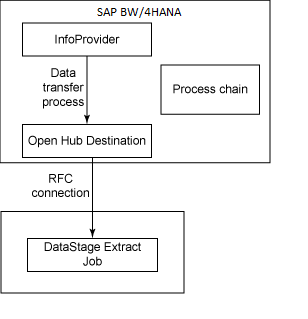
Figure 60. DATA FLOW FOR BW/4HANA EXTRACT
- When the job is triggered in DataStage, it starts the Process chain in BW/4HANA which in turns extract data from InfoProvider in BW/4HANA and load the data to Open Hub Destination. A data transfer process transforms the data from an InfoProvider to an Open Hub Destination
- When the data is ready in the Open Hub Destination, BW extract stage validates the OHD and check the DTP status. If the DTP status is ‘G’ i.e. Green (and not ‘R’ (Red), ‘A’ (Active)), DataStage job starts the extraction of data from the Open Hub Destination. A process chain is created to control the whole data extraction process.
As mentioned before, Open Hub Destination used with BW Extract Stage must has its destination type defined as database table only.
As far as the steps required to design the BW Extract Stage for BW/4HANA remains same as for the normal SAP BW Servers and explained above. The only differences are:
- In the Process chain tab, option to select Source system is greyed out since you are not required to select Source System for the BW/4HANA
- In the Open Hub Destination, “Update BW” button will be disabled since it not required.
Run data extraction operation
In this example, the DataStage job is started to invoke the process chain. Figure 53 shows that the DataStage job runs successfully and Figure 54 shows the data extracted from the SAP BW/4HANA.
Figure 53. Run the DataStage job

Figure 54. Data extracted from SAP BW/4HANA

Conclusion
This article demonstrated how to integrate SAP BW data with non-SAP BW data using IBM Information Server and the Infosphere DataStage SAP BW pack. It explained the SAP BW data loading and extraction processes. Two examples illustrated the step-by-step design processes.
IBM Information Server provides leading technology and integration solutions to two other critical issues in the SAP BW Data Warehouse environment:
- Data Quality: The data that builds a data warehouse often comes from various data sources. The structure of the legacy data is often not documented, and the data quality is poor. The Infosphere Information Analyzer product analyses your data and determines the data structure and quality. It helps you understand your data. The Infosphere QualityStage product standardizes and matches any type of information to create high quality data.
- Data Volume: There is often a huge amount of data that needs to be processed regularly for a data warehouse environment. Sometime the data volume grows beyond expectations. The issue needs to be addressed with a scalable ETL architecture. IBM Information Server leverages the pipeline and partition technologies to support high data throughput. IBM Information Server can be deployed on symmetric multiprocessing (SMP) and massively parallel processing (MPP) computer systems to achieve the maximum scalability.
Appendix: Terminology
| Terminology | Description |
| ETL | Extract, Transform, and Load |
| SAP BW | Business Intelligence |
| SAP BW | SAP Business Information Warehouse |
| GUI | Graphical User Interface |
| CRM | Customer Relationship Management |
| ODBC | Open Database Connectivity |
| DataStage job | A sequence of data operations performed by IBM Information Server. |
| RFC | SAP term, Remote Function Call |
| PSA | SAP BW term, Persistent Staging Area |
| Staging BAPI | SAP BW term, an open interface for third party ETL tools |
| Open Hub Service | SAP BW term, an SAP BW/BW data exporting mechanism |
| Source System | SAP BW term, a logical or physical system external to an SAP BW system. |
| InfoObject | SAP BW term, a lowest level information provider |
| DataStore Object | SAP BW term, a storage location for consolidated transaction and master data at document level. |
| InfoCube | SAP BW term, several relational tables arranged in a star schema |
| InfoSource | SAP BW term, a quantity of information that logically belongs together |
| InfoPackage | SAP BW term, an entry point for requesting data from a source system |
| InfoSpoke | SAP BW term, an extraction object that exports data within the Open Hub Service |
| Process Chain | SAP BW term, a sequence of processes linked together |
| Transfer Structure | SAP BW term, a selection of data fields from a source system |
Was this topic helpful?
Document Information
Modified date:
01 October 2019
UID
ibm11073570