IBM Support

Dashboard Maps display zip codes in multiple countries

Question & Answer


Question

Behavior: 

Inserting valid zip codes into a Dashboard Map visualization displays locations in different geographies than intended.  For example, zip codes being valid United States zip codes appear in Mexico, France, Israel, and so on).

image-20200309141628-1

Cause:

More context is required to verify zip codes are for the intended to display in a specific country.  Some zip codes are valid in other countries.

Resolution:

There are options to resolve the issue.

1. You can consider a custom polygon-based map in Cognos Analytics. More information on setting up Mapbox to work with Cognos Analytics can be found here.

2. Provide Cognos with more context to help in making a decision. Examples of which might be adding a column called Country to the data and putting United States in every row. Then add Country under points > locations. 
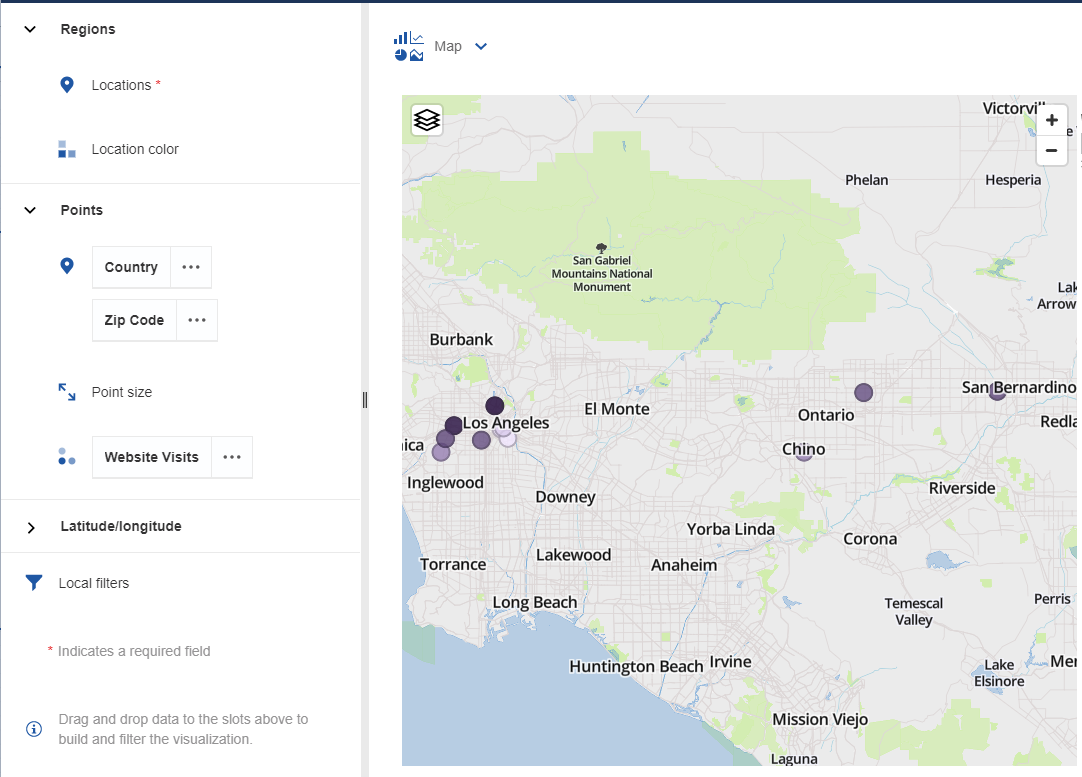
image-20200309141628-2

[{"Business Unit":{"code":"BU048","label":"IBM Software"},"Product":{"code":"SSTSF6","label":"IBM Cognos Analytics"},"Component":"11.1.X","Platform":[{"code":"PF016","label":"Linux"},{"code":"PF033","label":"Windows"}],"Version":"All Versions","Edition":"","Line of Business":{"code":"LOB76","label":"Data Platform"}},{"Product":{"code":"SS6G84","label":"IBM Cognos Analytics on Cloud"},"Business Unit":{"code":"BU048","label":"IBM Software"},"Component":" ","Platform":[{"code":"","label":""}],"Version":"","Edition":"","Line of Business":{"code":"LOB76","label":"Data Platform"}}]

Log InLog in to view more of this document

This document has the abstract of a technical article that is available to authorized users once you have logged on. Please use Log in button above to access the full document. After log in, if you do not have the right authorization for this document, there will be instructions on what to do next.

Document Information

Modified date:
01 May 2025

UID

ibm15694345