Troubleshooting
Problem
This document provides information on creating spooled files from PC files using File Transfer Protocol (FTP) and the Copy File (CPYF) command.
Resolving The Problem
To create a Spooled File from a PC File using FTP and the Copy File (CPYF) command, do the following:
| 1. | Creating the PC File Locate or create your PC file and save the file in a text only format. The following file was created in Microsoft Windows Notepad and saved as c:\testsplf.txt. |
 | |
| 2. | FTPing the File to the IBM i Use the FTP command to connect to your IBM i system. This can be done from a DOS prompt or from the Windows Run dialog box by typing FTP <SYSTEMNAME>. Sign on with your user ID and password. Type ASCII to set the file transfer mode to ASCII. Use the CD command to change to the library where you want to create your physical file/member, and then type put <filename>, and press the Enter key. Once the file has transferred, type BYE to exit the FTP program. |
 | |
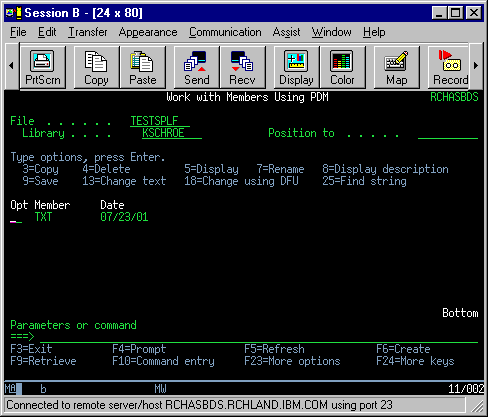
| 3. | Viewing the Member From your display session, use the Work with Members Using PDM (WRKMBRPDM) or Start Source Entry Utility (STRSEU) Command to view your newly created member and physical file. |
 | |
| 4. | Creating the Spooled File Now that the PC file is copied into a physical file member, use the Copy File (CPYF) command to copy the member to a Printer File. Doing this creates a spooled file. Keep in mind that your new spooled file will take its attributes from the printer file that it is copied to. Copying a member to the QSYSPRT printer file creates a spooled file with a length of 66, a width of 132, and a CPI value of 10. If these attributes do not match your requirements, use the Override with Printer File (OVRPRTF) command to override the printer file, or create a new printer file with the specific attributes that you require. For most people, OVRPRTF will be all that they need to make any adjustments. Use the CPYF command to copy the file to a printer file. In this example, the QSYSPRT printer file was used: |
 | |
| When the resulting spooled file is displayed, it will be 132 characters wide; however, only the first 90 will have data in them: | |
 | |
| If you want to create a spool file with a width equal to that of the original file, use the OVRPRTF command. To create a spooled file that is exactly 90 wide, use the OVRPRTF FILE(QSYSPRT) PAGESIZE(*N 90) command. If the CPYF command is used again, it will create a spooled file that is 90 characters wide and contains 90 characters of data: | |
 | |
| Your spooled file can now be printed. |
Use CPYFRMSTMF:
Alternatively, can transfer the file to IFS (or QDLS) and use CPYFRMSTMF command to copy to the physical file member.
If the physical file does not already exist in the library, create it with the CRTPF command first, specifying the correct record length.
Additional information on Copy From Stream File (CPYFRMSTMF)
Syntax example:
- CRTPF FILE(MyLib/NewFile) RCDLEN(90)
CPYFRMSTMF FROMSTMF('/QDLS/AnyFlr/NewDoc.TXT') TOMBR('/QSYS.LIB/AnyLib.LIB/NewFile.FILE/NewFile.MBR') MBROPT(*REPLACE)
[{"Type":"MASTER","Line of Business":{"code":"LOB68","label":"Power HW"},"Business Unit":{"code":"BU070","label":"IBM Infrastructure"},"Product":{"code":"SWG60","label":"IBM i"},"ARM Category":[{"code":"a8m0z0000000CPJAA2","label":"Print-\u003ESpooled Files QSPL Library"}],"ARM Case Number":"","Platform":[{"code":"PF012","label":"IBM i"}],"Version":"6.1.0;7.1.0;7.2.0;7.3.0;7.4.0;7.5.0;7.6.0"}]
Was this topic helpful?
Document Information
Modified date:
19 March 2026
UID
nas8N1017285