Troubleshooting
Problem
The Recovery state can occur when the save area in the service processor assembly is not synchronized with the HMC local copy of the save area.
Recovery State is caused by an error with reading partitions information locally on HMC or from NVRAM on the system. This can occur for multiple reasons including, NVRAM clear, planar replacement, and mis-match between HMC changes (sync).
Resolving The Problem
To Recover from the Recovery state, do the following starting at HMC V10R3M1060:
Step 1: Log on the HMC.
Log on the HMC with a user profile that has the proper task role (hmcsuperadmin, hmcservicerep, or hmcoperator) and resource role (the user must have access to the target system).
Step 2: Open the Recover partition window for the target system.
a) In the Navigation frame, click System resources -> Systems.
Step 1: Log on the HMC.
Log on the HMC with a user profile that has the proper task role (hmcsuperadmin, hmcservicerep, or hmcoperator) and resource role (the user must have access to the target system).
Step 2: Open the Recover partition window for the target system.
a) In the Navigation frame, click System resources -> Systems.

b) Select the server then scroll to the right on the dynamical blue menu to Config Backup .
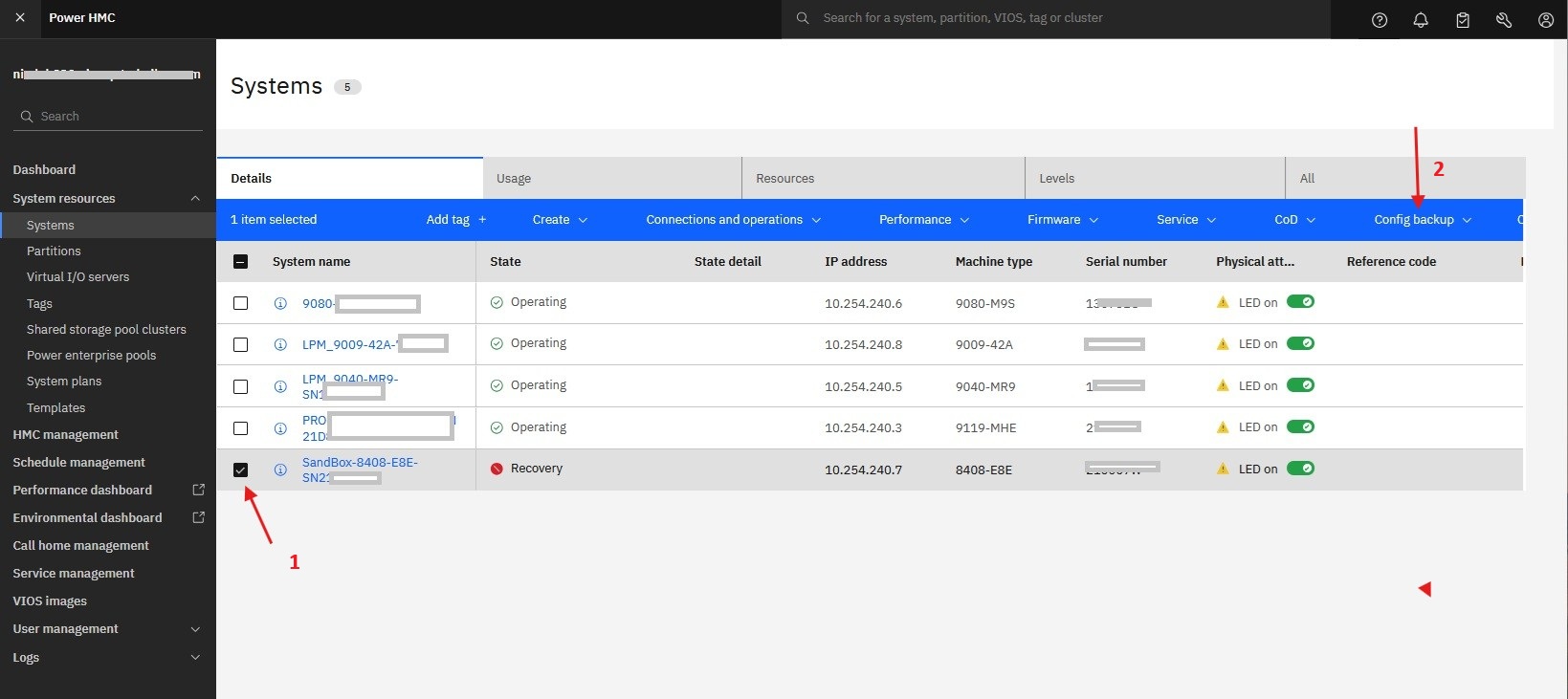
Step 3: Recover Partition Data
Select Config Backup -> Recover system

Step 4: Confirm the system to be recovered and then hit Recover:

Step 5: If the state remains in recovery , retry recovering partition data. If it fails a second time, contact your next level of support or your hardware service provider.
To Recover from the Recovery state, do the following:
Step 1: Log on the HMC.
Log on the HMC with a user profile that has the proper task role (hmcsuperadmin, hmcservicerep, or hmcoperator) and resource role (the user must have access to the target system).
Step 2: click the Resources icon , and then click All Systems.
a) In the Navigation frame, click System resources -> Systems.

b) Select the server then Recover Partition Data
Click on the server's name or alternately select the server, then click System Actions > Recover Partition Data

Step 1: Log on the HMC.
Log on the HMC with a user profile that has the proper task role (hmcsuperadmin, hmcservicerep, or hmcoperator) and resource role (the user must have access to the target system).
Step 2: click the Resources icon
, and then click All Systems.a) In the Navigation frame, click System resources -> Systems.
b) Select the server then Recover Partition Data
Click on the server's name or alternately select the server, then click System Actions > Recover Partition Data
Step 3: Select one of the following options and hit OK:
- Restore: This option restores the partition data by using the backup file that is saved automatically on the HMC.
- Initialize: This option clears all partition configuration data. This option can be used only if all partitions are in the Not Activated state.

Step 4: If the state remains in recovery , retry recovering partition data. If it fails a second time, contact your next level of support or your hardware service provider.
To Recover from the Recovery state, do the following:
Step 1: Log on the HMC.
Log on the HMC with a user profile that has the proper task role (hmcsuperadmin, hmcservicerep, or hmcoperator) and resource role (the user must have access to the target system).
Step 2: Open the Recover partition window for the target system.
a) In the Navigation frame, click System resources -> Servers.
Step 1: Log on the HMC.
Log on the HMC with a user profile that has the proper task role (hmcsuperadmin, hmcservicerep, or hmcoperator) and resource role (the user must have access to the target system).
Step 2: Open the Recover partition window for the target system.
a) In the Navigation frame, click System resources -> Servers.
b) Select the server then Recover Partition Data
Click on the server's name or alternately select the server, then click System Actions > Recover Partition Data
Click on the server's name or alternately select the server, then click System Actions > Recover Partition Data
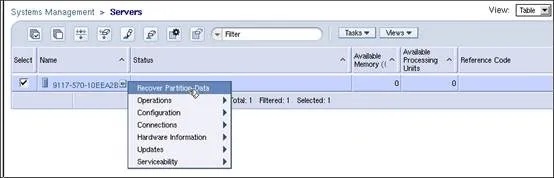
Step 3: Select one of the following options and hit OK:
- Restore: This option restores the partition data by using the backup file that is saved automatically on the HMC. The HMC will perform this action concurrently with no impact to running partitions.
- Initialize: This option clears all partition configuration data. This option can be used only if all partitions are in the Not Activated state. The HMC will check the partition states and will not proceed, instead a warning will be displayed that the LPARs must all be shutdown before this option can be executed.
Step 4: If the state remains in recovery , retry recovering partition data. If it fails a second time, contact your next level of support or your hardware service provider.
Document Location
Worldwide
[{"Type":"MASTER","Line of Business":{"code":"LOB68","label":"Power HW"},"Business Unit":{"code":"BU070","label":"IBM Infrastructure"},"Product":{"code":"SSSYO2","label":"Hardware Management Console (7042-CR9)"},"ARM Category":[{"code":"a8m3p000000F985AAC","label":"System States (No Connection, Incomplete, Recovery, Version Mismatch, etc.)"}],"ARM Case Number":"","Platform":[{"code":"PF025","label":"Platform Independent"}],"Version":"All Versions"},{"Type":"MASTER","Line of Business":{"code":"LOB68","label":"Power HW"},"Business Unit":{"code":"BU070","label":"IBM Infrastructure"},"Product":{"code":"7063CR1","label":"Hardware Management Console (7063-CR1)"},"ARM Category":[{"code":"a8m3p000000F985AAC","label":"System States (No Connection, Incomplete, Recovery, Version Mismatch, etc.)"}],"Platform":[{"code":"PF025","label":"Platform Independent"}]},{"Type":"MASTER","Line of Business":{"code":"LOB68","label":"Power HW"},"Business Unit":{"code":"BU070","label":"IBM Infrastructure"},"Product":{"code":"7063CR2","label":"Hardware Management Console (7063-CR2)"},"ARM Category":[{"code":"a8m3p000000F985AAC","label":"System States (No Connection, Incomplete, Recovery, Version Mismatch, etc.)"}],"Platform":[{"code":"PF025","label":"Platform Independent"}]},{"Type":"MASTER","Line of Business":{"code":"LOB08","label":"Cognitive Systems"},"Business Unit":{"code":"BU054","label":"Systems w\/TPS"},"Product":{"code":"SSOQ2E","label":"Hardware Management Console V10"},"ARM Category":[{"code":"a8m50000000L2vzAAC","label":"Howto"}],"Platform":[{"code":"PF025","label":"Platform Independent"}],"Version":"All Versions"},{"Type":"MASTER","Line of Business":{"code":"LOB57","label":"Power"},"Business Unit":{"code":"BU058","label":"IBM Infrastructure w\/TPS"},"Product":{"code":"SGGSNP","label":"Hardware Management Console V9"},"ARM Category":[{"code":"a8m50000000L2vzAAC","label":"Howto"}],"Platform":[{"code":"PF025","label":"Platform Independent"}],"Version":"All Versions"},{"Type":"MASTER","Line of Business":{"code":"LOB57","label":"Power"},"Business Unit":{"code":"BU058","label":"IBM Infrastructure w\/TPS"},"Product":{"code":"SGBR3L","label":"Hardware Management Console V8"},"ARM Category":[{"code":"a8m50000000L2vzAAC","label":"Howto"}],"Platform":[{"code":"PF025","label":"Platform Independent"}],"Version":"All Versions"},{"Type":"MASTER","Line of Business":{"code":"LOB57","label":"Power"},"Business Unit":{"code":"BU058","label":"IBM Infrastructure w\/TPS"},"Product":{"code":"HW1A1","label":"IBM Power Systems"},"ARM Category":[],"Platform":[{"code":"PF025","label":"Platform Independent"}],"Version":""}]
Was this topic helpful?
Document Information
Modified date:
13 October 2025
UID
ibm17166013