How To
Summary
This document describes the steps to enable SSL communication from Liberty Application Server for z/OS to Db2 with the type 4 JDBC driver. The program flow is illustrated as:
Liberty Application Server for z/OS -> SSL -> (AT-TLS) PolicyAgent -> DDF -> Db2
where the (AT-TLS) configuration is set up for inbound connections to Distributed Data Facility (DDF).
Objective
- Create the Db2 Library containing the Db2 JDBC Provider JAR files
- Configure the datasource with library reference and Db2 jcc properties
- Execute the RACF commands to install certificates on the Liberty Server keyring
- Run the sample application to connect to Db2 over SSL
- Configure mutual authentication (optional)
- SSL and Client Authentication configured with JDBC properties (alternate configuration)
Environment
This document assumes the Pagent address space is already set up, and that SSL and ClientAuthentication to DDF outside of Liberty for z/OS is complete.
In this example, Db2 is listening for SSL on port 448, and for SSL with Client Authentication on port 449.
Notice that the Keyring, HandShakeRole, and ClientAuthType are different between the SSL-only port 448 definition and the SSL with Client Authentication port 449 definition.
TTLSRule DB2BRule448
{
   LocalPortRange           448
   JobName                  DB2BDIST
   Direction                Inbound
   TTLSGroupActionRef       DB2AGroup
   TTLSEnvironmentActionRef DB2ServerSSLEnvironment
}
TTLSEnvironmentAction       DB2ServerSSLEnvironment
{
   TTLSKeyRingParms
   {
       Keyring              DB2DDFRING
   }
   HandShakeRole            Server
   TTLSCipherParms
   {
       V3CipherSuites       TLS_RSA_WITH_AES_256_CBC_SHA
       V3CipherSuites       TLS_RSA_WITH_AES_256_CBC_SHA
       V3CipherSuites       TLS_RSA_WITH_AES_256_CBC_SHA256
       V3CipherSuites       TLS_RSA_WITH_AES_128_CBC_SHA
       V3CipherSuites       TLS_RSA_WITH_AES_128_CBC_SHA256
   }
}
and
TTLSRule DB2BRule449
{
   LocalPortRange           449
   JobName                  DB2BDIST
   Direction                Inbound
   TTLSGroupActionRef       DB2AGroup
   TTLSEnvironmentActionRef DB2ClientCertSSLEnvironment
}

TTLSEnvironmentAction      DB2ClientCertSSLEnvironment
{
   TTLSKeyRingParms
   {
       Keyring              DB2DDFRING
   }
   HandShakeRole            ServerWithClientAuth
   TTLSCipherParms
   {
       V3CipherSuites       TLS_RSA_WITH_AES_256_CBC_SHA
       V3CipherSuites       TLS_RSA_WITH_AES_256_CBC_SHA
       V3CipherSuites       TLS_RSA_WITH_AES_256_CBC_SHA256
       V3CipherSuites       TLS_RSA_WITH_AES_128_CBC_SHA
       V3CipherSuites       TLS_RSA_WITH_AES_128_CBC_SHA256
   }
   TTLSEnvironmentAdvancedParms
   {
       ClientAuthType SAFCheck
   }
}
Steps
1. Create the Db2 Library containing the Db2 JDBC Provider JAR files
<library id="Db2Library">
<fileset dir="/jdbc/classes" includes="db2jcc4.jar db2jcc_license_cisuz.jar"/>
</library>
<fileset dir="/jdbc/classes" includes="db2jcc4.jar db2jcc_license_cisuz.jar"/>
</library>
For JDBC 3.0 driver use db2jcc.jar
For JDBC 4.0 driver use db2jcc4.jar
For JDBC 4.0 driver use db2jcc4.jar
Replace "/jdbc/classes" to be the absolute path to the Db2 JDBC driver JAR files
For reference:
2. Configure the datasource with library reference and Db2 jcc properties
driverType = 4
databaseName = Db2 database name (LOC1)
databaseName = Db2 database name (LOC1)
serverName = Db2 hostname
portNumber = Db2 SSL port (448)
sslConnection=true
securityMechanism=13
user=Db2 user
password=Db2 password <dataSource jndiName="jdbc/MyDB">
<jdbcDriver libraryRef="Db2Library"/>
<properties.db2.jcc databaseName="LOC1" driverType="4" user="DB2user" password="DB2password" serverName="db2.host.name" portNumber="448" sslConnection="true" securityMechanism="13"/>
</dataSource>
<jdbcDriver libraryRef="Db2Library"/>
<properties.db2.jcc databaseName="LOC1" driverType="4" user="DB2user" password="DB2password" serverName="db2.host.name" portNumber="448" sslConnection="true" securityMechanism="13"/>
</dataSource>
Numeric values can be found for property db2.jcc.securityMechanism
Select the Security mechanism referencing:
Security under the IBM Data Server Driver for JDBC and SQLJ
Security under the IBM Data Server Driver for JDBC and SQLJ
In this example, the following value was used for the securityMechanism.
13 ENCRYPTED_USER_PASSWORD_AND_DATA_SECURITY
Note: Any changes require a restart of the server.
3. Execute the RACF commands to install certificates on the Liberty Server keyring
a. Upload the Db2 Signer certificate to a dataset (SIGNER.DER) and add it to RACF database
RACDCERT CERTAUTH ADD('SIGNER.DER') TRUST withlabel ('DB2Signer')
b. Issue the RACF command to connect the DB2Signer certificate and any intermediate signer certificates to the Liberty server keyring.
RACDCERT ID(MSTONE1) CONNECT(RING(LibertyKeyring) LABEL('DB2Signer') CERTAUTH)
c. List the contents of the Liberty keyring to confirm the DB2Signer was connected with owner CERTAUTH and usage CERTAUTH
RACDCERT LISTRING(LibertyKeyring) ID(MSTONE1)

Digital ring information for user MSTONE1:
Ring:
     >LibertyKeyring<
Certificate Label Name             Cert Owner     USAGE      DEFAULT
--------------------------------   ------------   --------   -------
LibertySigner                      CERTAUTH       CERTAUTH     NO
LibertyPersonal                    ID(MSTONE1)    PERSONAL     NO
DB2Signer                          CERTAUTH       CERTAUTH     NO     <---- Certificate that signed the Db2 personal certificate
In this example, LibertySigner and LibertyPersonal are the certificates used for inbound SSL to the Liberty server.
DB2Signer is used for outbound SSL to the Db2.
4. Install the diagnostic DB2TestEAR.ear
<enterpriseApplication id="DB2RunAsRoleEAR" location="/Liberty/DB2TestEAR.ear" name="DB2TestEAR">
<web-bnd moduleName="DB2TestWAR">
<resource-ref name="java:comp/env/jdbc/MyDB" binding-name="jdbc/MyDB"></resource-ref>
</web-bnd>
</enterpriseApplication>
<web-bnd moduleName="DB2TestWAR">
<resource-ref name="java:comp/env/jdbc/MyDB" binding-name="jdbc/MyDB"></resource-ref>
</web-bnd>
</enterpriseApplication>
Replace "/Liberty/DB2TestEAR.ear" to be the absolute path to the EAR file.
The resource reference name is specified in the web.xml of the DB2TestWAR within the EAR.
The binding-name must match the name datasource jndi name.
4. Run the sample application to connect to Db2 over SSL
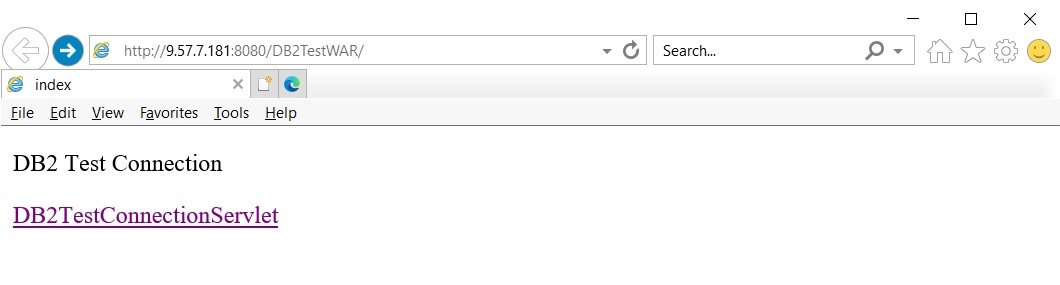
Invoke the application
http://host:port/DB2TestWAR
and click
DB2TestConnectionServlet
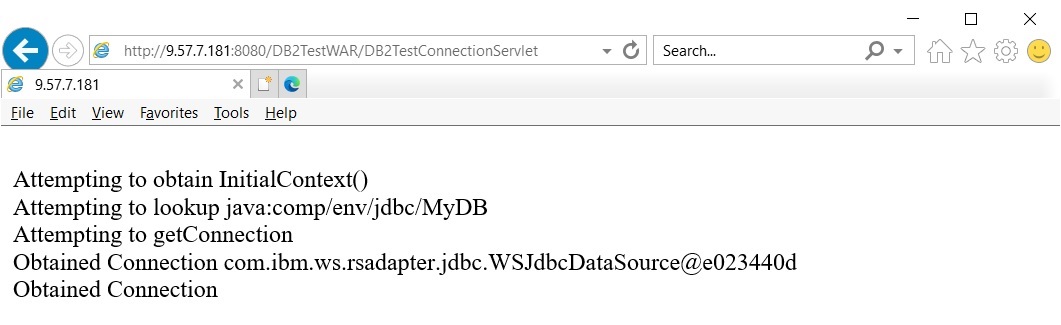
which attempts to get a connection with the datasource defined Liberty server that you mapped to the resource reference.
The main page appears as:
Successful sample output appears as:
If the Liberty keyring is missing the correct signer certificate, the messages.log shows an error similar to:
[8/1/22 15:50:01:090 EDT] 0000002e com.ibm.ws.ssl.core.WSX509TrustManager
CWPKI0823E: SSL HANDSHAKE FAILURE: A signer with SubjectDN [CN=www.ibm.com, O=IBM, ST=New York, C=US]
was sent from the host [db2.host.name:448].
The signer might need to be added to local truststore [safkeyring:///LibertyKeyring],
The signer might need to be added to local truststore [safkeyring:///LibertyKeyring],
located in SSL configuration alias [DefaultSSLSettings].
5. Configure mutual authentication (optional)
a. Update the Db2 jcc properties
driverType = 4
databaseName = Db2 database name (LOC1)
databaseName = Db2 database name (LOC1)
serverName = Db2 hostname
portNumber = Db2 SSL port (449)
sslConnection=true
securityMechanism=18
user=Db2 user
password=Db2 password<dataSource jndiName="jdbc/MyDB">
<jdbcDriver libraryRef="Db2Library"/>
<properties.db2.jcc databaseName="LOC1" driverType="4" serverName="db2.host.name" portNumber="449" sslConnection="true" securityMechanism="18"/>
</dataSource>
<jdbcDriver libraryRef="Db2Library"/>
<properties.db2.jcc databaseName="LOC1" driverType="4" serverName="db2.host.name" portNumber="449" sslConnection="true" securityMechanism="18"/>
</dataSource>
Numeric values can be found for property db2.jcc.securityMechanism
Select the Security mechanism referencing:
Security under the IBM Data Server Driver for JDBC and SQLJ
Security under the IBM Data Server Driver for JDBC and SQLJ
In this example, the following value was used for the securityMechanism.
18 TLS_CLIENT_CERTIFICATE_SECURITY
Note: Any changes require a restart of the server.
b. Upload the Db2 Personal certificate to a dataset (PERSONAL.DER) and add it to RACF database
RACDCERT ID(MSTONE1) ADD('Personal.DER') TRUST withlabel('DB2Personal') PASSWORD('XXXXXX')
The personal certificate should be a password protected pkcs12 file containing the private key.
c. Issue the RACF command to connect the DB2Personal certificate to the Liberty server keyring.
RACDCERT ID(MSTONE1) CONNECT(LABEL('DB2Personal') RING(LibertyKeyring))
d. List the contents of the Liberty server keyring to confirm the DB2Personal certificate was connected with cert owner userid and usage PERSONAL
RACDCERT LISTRING(WASKeyring2048) ID(MSTONE1)
Digital ring information for user MSTONE1
Ring:
     >WASKeyring2048<

Certificate Label Name             Cert Owner     USAGE      DEFAULT
--------------------------------   ------------   --------   -------
LibertySigner                      CERTAUTH       CERTAUTH     NO
LibertyPersonal                    ID(MSTONE1)    PERSONAL     NO
DB2Signer                          CERTAUTH       CERTAUTH     NO
DB2Personal                        ID(MSTONE1)    PERSONAL     NO  <--- Personal certificate used for client authentication
If the personal certificate is owned by the same userid as the Liberty server keyring,
Liberty should have no issues accessing the personal certificate and its private key with the default setup of:
READ access to FACILITY classes
IRR.DIGTCERT.LIST
and
IRR.DIGTCERT.LISTRING
This setup is sufficient for when Liberty for z/OS is using a different RACF database than Pagent, DDF, and Db2 as the personal certificate will be installed or mapped under a different userid on the remote RACF database.
e. RACF commands for personal certificate owned by a different userid then Liberty server userid.
If Liberty for z/OS, Pagent, DDF and Db2 share the same RACF database, and the Db2 personal certificate is owned by a userid (DB2USER) that is different from the Liberty userid (MSTONE1), it is necessary to issue the following RACF commands to allow the Liberty userid access to its own keyring and to the private key of the ID that personal certificate belongs to (DB2USER).
RACDCERT LISTRING(LibertyKeyring) ID(MSTONE1)
Digital ring information for user MSTONE1
Ring:
     >LibertyKeyring<

Certificate Label Name             Cert Owner            USAGE           DEFAULT
--------------------------------   ------------          --------        -------
LibertySigner                      CERTAUTH              CERTAUTH        NO
LibertyPersonal                    ID(MSTONE1)           PERSONAL        NO
DB2Signer                          CERTAUTH              CERTAUTH        NO
DB2Personal                        ID(DB2USER)           PERSONAL        NO   <-- Personal certificate used for client authentication
------------
//Create the RDATALIB class for keyring LibertyKeyring owned by user MSTONE1
RDEFINE RDATALIB MSTONE1.LibertyKeyring.LST UACC(NONE)
RDEFINE RDATALIB MSTONE1.LibertyKeyring.LST UACC(NONE)
//Allow MSTONE1to access the keyring owned by MSTONE1
PERMIT MSTONE1.LibertyKeyring.LST CLASS(RDATALIB) ID(MSTONE1) ACC(CONTROL)
PERMIT MSTONE1.LibertyKeyring.LST CLASS(RDATALIB) ID(MSTONE1) ACC(CONTROL)
//Allow MSTONE1 to access the private key of DB2USER
PERMIT MSTONE1.LibertyKeyring.LST CLASS(RDATALIB) ID(DB2USER) ACC(CONTROL)
PERMIT MSTONE1.LibertyKeyring.LST CLASS(RDATALIB) ID(DB2USER) ACC(CONTROL)
//Refresh the RDATALIB class
SETR RACLIST(RDATALIB) REFRESH
---------
SETR RACLIST(RDATALIB) REFRESH
---------
f. Set the default personal certificate (DB2Personal) to be used for outbound mutual authentication.
The clientKeyAlias is set to DB2Personal to ensure Liberty uses the correct personal certificate for outbound client authentication to Db2.
<sslDefault sslRef="DefaultSSLSettings"/>
<ssl id="DefaultSSLSettings"
securityLevel="HIGH"
keyStoreRef="CellDefaultKeyStore"
trustStoreRef="CellDefaultTrustStore"
serverKeyAlias="LibertyPersonal"
clientKeyAlias="DB2Personal"/>
securityLevel="HIGH"
keyStoreRef="CellDefaultKeyStore"
trustStoreRef="CellDefaultTrustStore"
serverKeyAlias="LibertyPersonal"
clientKeyAlias="DB2Personal"/>
<keyStore id="CellDefaultKeyStore"
location="safkeyring:///LibertyKeyring"
filebased="false"
password="password"
type="JCERACFKS"/>
location="safkeyring:///LibertyKeyring"
filebased="false"
password="password"
type="JCERACFKS"/>
<keyStore id="CellDefaultTrustStore"
location="safkeyring:///LibertyKeyring"
filebased="false"
password="password"
type="JCERACFKS"/>
location="safkeyring:///LibertyKeyring"
filebased="false"
password="password"
type="JCERACFKS"/>
Note: When there are 2 or more personal certificates on a keyring, the serverKeyAlias should be set to guarantee the correct personal certificate is used for inbound SSL, and the clientKeyAlias should be set to guarantee the correct personal certificate is used for outbound client authentication.
Retry the DB2TestEAR application to confirm that Db2 is accessible using mutual authentication.
6. SSL and Client Authentication configured with JDBC properties (alternate configuration)
In steps 1 - 5, the Liberty server is managing the setup of the SSL using the sslDefault, ssl, and keystore tags.
The signer certificate and personal certificate used for outbound SSL and client authentication are set at the server level using the clientKeyAlias or based on outbound host, protocol and port using an outboundConnection tag.
The JDBC driver provides properties that allow you set up a truststore at the datasource level which might be needed in scenarios where there are many applications running in a Liberty server and each application needs its own personal certificate for outbound client authentication.
If each application has a resource reference, unique datasource, unique keyring, and a unique personal certificate on the keyring, then mapping the application to a the unique datasource allows each application to have a unique personal certificate to connect to Db2.
When setting up the truststore using JDBC properties, the SSL connections are not managed by the application server, but by the JDBC driver.
a. Remove the DB2 certificates from the LibertyKeyring
RACDCERT REMOVE(CERTAUTH LABEL('DB2Signer') RING(LibertyKeyring)) ID(MSTONE1)
RACDCERT REMOVE(LABEL('DB2Personal') RING(LibertyKeyring)) ID(MSTONE1)
RACDCERT REMOVE(LABEL('DB2Personal') RING(LibertyKeyring)) ID(MSTONE1)
b. Create a new datasource keyring (DSKeyring) and connect the DB2 certificates to the keyring.
RACDCERT ADDRING(DSKeyring) ID(MSTONE1)
RACDCERT ID(MSTONE1) CONNECT (RING(DSKeyring) LABEL('DB2Signer') CERTAUTH)
RACDCERT ID(MSTONE1) CONNECT (LABEL('DB2Personal') RING(DSKeyring))
RACDCERT LISTRING(DSKeyring) ID(MSTONE1)
RACDCERT ID(MSTONE1) CONNECT (RING(DSKeyring) LABEL('DB2Signer') CERTAUTH)
RACDCERT ID(MSTONE1) CONNECT (LABEL('DB2Personal') RING(DSKeyring))
RACDCERT LISTRING(DSKeyring) ID(MSTONE1)
c. List the contents of the Liberty server keyring and datasource keyring
RACDCERT LISTRING(LibertyKeyring) ID(MSTONE1)
Digital ring information for user MSTONE1:

Ring:
     >LibertyKeyring<
Certificate Label Name             Cert Owner     USAGE      DEFAULT
--------------------------------   ------------   --------   -------
LibertySigner                      CERTAUTH       CERTAUTH     NO
LibertyPersonal                    ID(MSTONE1)    PERSONAL     NO
RACDCERT LISTRING(DSKeyring) ID(MSTONE1)
Digital ring information for user MSTONE1:

Ring:
     >DSKeyring<
Certificate Label Name             Cert Owner     USAGE      DEFAULT
--------------------------------   ------------   --------   -------
DB2Signer                          CERTAUTH       CERTAUTH     NO
DB2Personal                        ID(MSTONE1)    PERSONAL     NO
d. Update the Db2 jcc properties for SSL
<properties.db2.jcc
databaseName="LOC1"
driverType="4"
user="DB2 User"
password="DB2 password"
serverName="db2.host.name"
portNumber="448"
sslConnection="true"
securityMechanism="13"
sslTrustStoreLocation="safkeyring:///DSKeyring"
sslTrustStoreType="JCERACFKS"
sslTrustStorePassword="password"/>
databaseName="LOC1"
driverType="4"
user="DB2 User"
password="DB2 password"
serverName="db2.host.name"
portNumber="448"
sslConnection="true"
securityMechanism="13"
sslTrustStoreLocation="safkeyring:///DSKeyring"
sslTrustStoreType="JCERACFKS"
sslTrustStorePassword="password"/>
Retry the DB2TestEAR application to confirm that Db2 is accessible using SSL.
e. Update the Db2 jcc properties for SSL with client authentication.
<properties.db2.jcc
databaseName="LOC1"
driverType="4"
serverName="db2.host.name"
portNumber="449"
sslConnection="true"
securityMechanism="18"
sslTrustStoreLocation="safkeyring:///DSKeyring"
sslTrustStoreType="JCERACFKS"
sslTrustStorePassword="password"/>
databaseName="LOC1"
driverType="4"
serverName="db2.host.name"
portNumber="449"
sslConnection="true"
securityMechanism="18"
sslTrustStoreLocation="safkeyring:///DSKeyring"
sslTrustStoreType="JCERACFKS"
sslTrustStorePassword="password"/>
Note that when specifying safkeyring:///DSKeyring the keyring owner is the address space owner which is the equivalent of specifying safkeyring://MSTONE1/DSKeyring. If the keyring is owned by another user, update the user in safkeyring://NEWUSER/DSKeyring and follow the prior steps to setup RDATALIB access. The password for sslTrustStorePassword must be literal string "password".
Retry the DB2TestEAR application to confirm that Db2 is accessible using mutual authentication.
Additional Information
References:
Document Location
Worldwide
[{"Type":"MASTER","Line of Business":{"code":"LOB36","label":"IBM Automation"},"Business Unit":{"code":"BU053","label":"Cloud \u0026 Data Platform"},"Product":{"code":"SS8L5V","label":"IBM z\/OS Liberty Embedded base element"},"ARM Category":[{"code":"a8m3p000000F7yIAAS","label":"IBM WebSphere Liberty-All Platforms-\u003EJCA-J2C-Connection Pooling-DB Connections"},{"code":"a8m3p000000F7yQAAS","label":"IBM WebSphere Liberty-All Platforms-\u003ELiberty SSL"}],"ARM Case Number":"","Platform":[{"code":"PF035","label":"z\/OS"}],"Version":"All Versions"}]
Was this topic helpful?
Document Information
Modified date:
02 August 2022
UID
ibm16609068