Question & Answer
Question
How do I connect to the Netezza system from WinSQL?
Answer
You can connect to Netezza from WinSQL using ODBC, as follows:
1. Confirm that you have the Netezza ODBC driver for Windows installed. This driver must be installed to begin the configuration.
2. Launch WinSQL. The ODBC Data Source dialog box opens.
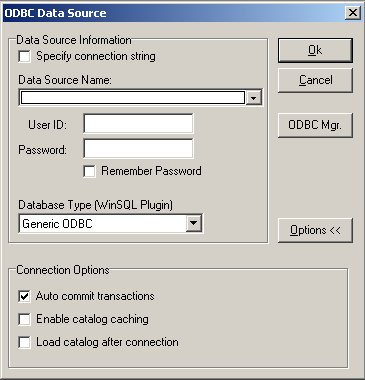
3. If it is not already selected, select MS Access Database from the pull-down as the Data Source Name.
4. Click the Specify connection string radio button. A new text field displays.

5. In the area that lists the data source information, change DSN=MS Access Database to DSN=NZSQL. NZSQL is the configured name for Netezza data source. Note that NZSQL is now available from the Data Source Name pull-down. (Uncheck the Specify connection string radio button to verify the addition.)
6. Click Ok to open the ODBC Driver Setup window, which configures the Netezza ODBC driver. Enter the server's IP address, the database name, and the login credentials (user name and password) for the database.

You can now connect to the Netezza database from WinSQL.
For more information, refer to the IBM Netezza ODBC, JDBC, and OLE DB Installation and Configuration Guide.
Historical Number
NZ161463
Was this topic helpful?
Document Information
Modified date:
17 October 2019
UID
swg21570292