Technical Blog Post
Abstract
Connect:Direct for Windows and UNIX Auditing Ideas.
Body
Steps for checking for the presence of Connect:Direct on a system, checking if the service is running, and checking if Secure+ is enabled.
You can incorporate these steps into a custom program of your own design.
For Windows:
You can check for the presence of the file 'CDNT.EXE' in the directory structure to indicate that Connect:Direct for Windows is installed. The default path is C:\Program Files (x86)\Sterling Commerce\Connect Direct v4.x.x\Server.

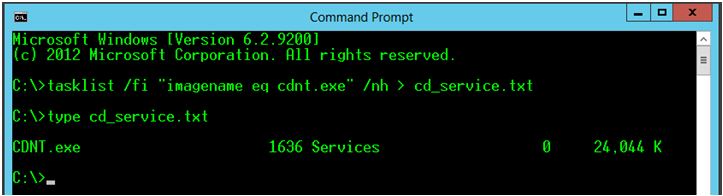
To verify if the Connect:Direct for Windows service is actually running, you would have to do something like execute the 'tasklist' command and capture the output to a text file.
Example: tasklist /fi "imagename eq cdnt.exe" /nh >cd_service.txt
Using your own methods, you would then have to parse out the text file 'cd_service.txt' to verify the presence of 'cdnt.exe' in the output.
Connect:Direct for Windows Secure+ can be enabled or disabled for each individual node with a Secure+ record. You would have to check each node record in Secure+ to verify if it is enabled.
You can create a command to execute a query to the Secure+ CLI and capture the configuration output to a text file.
Example:
@echo off
echo display all; >splusconfig.txt
call "C:\Program Files (x86)\Sterling Commerce\Connect Direct v4.x.x\Server\Secure+\spcli.cmd" <splusconfig.txt >splusconfig.cfg
erase splusconfig.txt
Using your own methods, you would then have to parse out the text file 'splusconfig.cfg'. You would need to check the value of the 'PROTOCOL=' parameter for each node record entry in the file. Examples:

For UNIX:
You can check for the presence of the file 'CDPMGR' in the directory structure to indicate that Connect:Direct for UNIX is installed.
The default path is /home/Installer ID/cdunix/ndm/bin

To verify if Connect:Direct for UNIX is actually running, you would have to do something like execute the 'ps' command and capture the output to a text file.
Example: ps -C cdpmgr >cd_service.txt
Using your own methods, you would then have to parse out the text file 'cd_service.txt' to verify the presence of 'cdpmgr' in the output.

Connect:Direct for UNIX Secure+ can be enabled or disabled for each individual node with a Secure+ record. You would have to check each node record in Secure+ to verify if it is enabled.
You can create a shell command to execute a query to the Secure+ CLI and capture the output to a text file.
Example:
echo "display all;" >splusconfig.txt
/home/Installer ID/cdunix/ndm/bin/spcli.sh <splusconfig.txt >splusconfig.cfg
Using your own methods, you would then have to parse out the text file 'splusconfig.cfg'. You would need to check the value of the 'PROTOCOL=' parameter for each record entry in the file. The output will be in the same format as shown above in the Windows example.
UID
ibm11123767